Control structures and functions
UAT 104 Computer Programming
Lesson
By the end of this module you will be able to
- Write if/elif/else decisions and loops with for and while
- Use lists, tuples and dicts to hold mission data
- Write functions with docstrings, default values and return values
- Handle errors appropriately with exceptions
- Test functions with assert and pytest
- Read a traceback to locate an error, and use print and breakpoint (pdb or the VS Code debugger) to inspect variables
Why this matters
Useful programs must decide, for example warning when the battery is low, and repeat, for example computing every leg of a route. As code grows, it must be split into functions with clear jobs that can be tested separately and reused. The autopilots that fly real aircraft are built from the same elements, only on a much larger scale.
Deciding with if
This example grades a battery against PX4’s default thresholds in v1.17, the latest release when checked (low 15%, critical 7%); batteries are covered in depth in UAT 203.
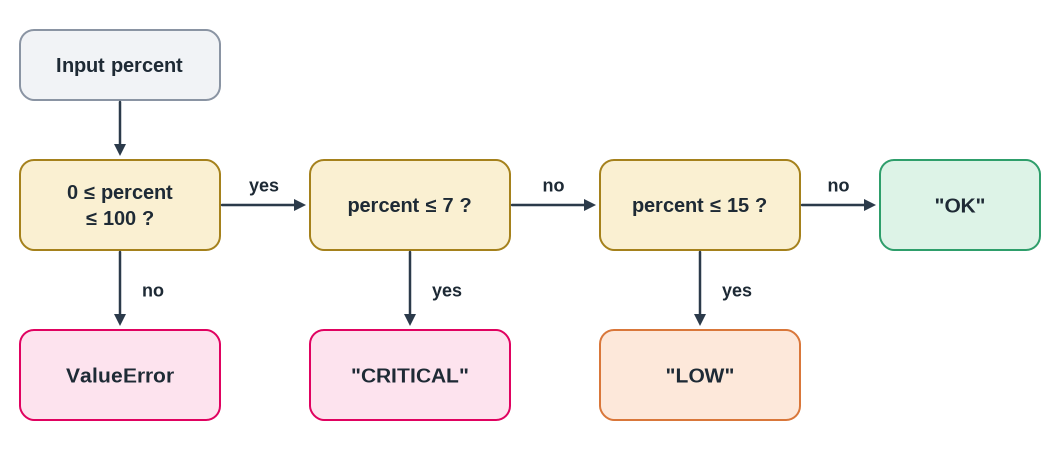
def battery_status(percent):
    """Return "OK", "LOW" or "CRITICAL" for a battery percentage (0-100)."""
    if not 0 <= percent <= 100:
        raise ValueError("percent must be between 0 and 100")
    if percent <= 7:
        return "CRITICAL"
    if percent <= 15:
        return "LOW"
    return "OK"


for level in [100, 16, 15, 8, 7, 0]:
    print(level, battery_status(level))
100 OK
16 OK
15 LOW
8 LOW
7 CRITICAL
0 CRITICALOrder matters. <= 7 must be checked before <= 15; swap them and 5% returns “LOW” instead of “CRITICAL”. Values exactly on a boundary, such as 15 and 7, must always be tested.
Handling errors
Given an impossible value such as 120%, a function should not guess. It should raise an exception so the caller knows, and the caller chooses how to handle it with try/except.
readings = [45, 120, 12]
for reading in readings:
    try:
        print(reading, battery_status(reading))
    except ValueError as err:
        print(reading, "rejected:", err)
45 OK
120 rejected: percent must be between 0 and 100
12 LOWCatching everything with a bare except: and doing nothing is a dangerous habit, because it hides the real problem. Always name the error type you expect.
Loops and data structures
A list holds an ordered, changeable sequence; a tuple holds data that should not change, such as one coordinate; a dict holds name–value pairs.
Example 1 Route length and flight time
A 200 × 100 m rectangular route in local coordinates (metres east, north), flown at 8 m/s.
import math

waypoints = [(0, 0), (200, 0), (200, 100), (0, 100), (0, 0)]
drone = {"id": "RSU-QUAD-01", "cruise_ms": 8.0}

total_m = 0.0
for start, end in zip(waypoints, waypoints[1:]):
    leg = math.dist(start, end)
    total_m += leg
    print(f"{start} -> {end}: {leg:.0f} m")

minutes, seconds = divmod(total_m / drone["cruise_ms"], 60)
print(f"total {total_m:.0f} m, {minutes:.0f} min {seconds:.0f} s")
(0, 0) -> (200, 0): 200 m
(200, 0) -> (200, 100): 100 m
(200, 100) -> (0, 100): 200 m
(0, 100) -> (0, 0): 100 m
total 600 m, 1 min 15 szip(waypoints, waypoints[1:]) pairs neighbouring points, a pattern used constantly with routes and time series.
Reusable functions
A good function does one job, has a name that says what it does, has a docstring describing what it takes and returns (PEP 257), and does not quietly change outside values.
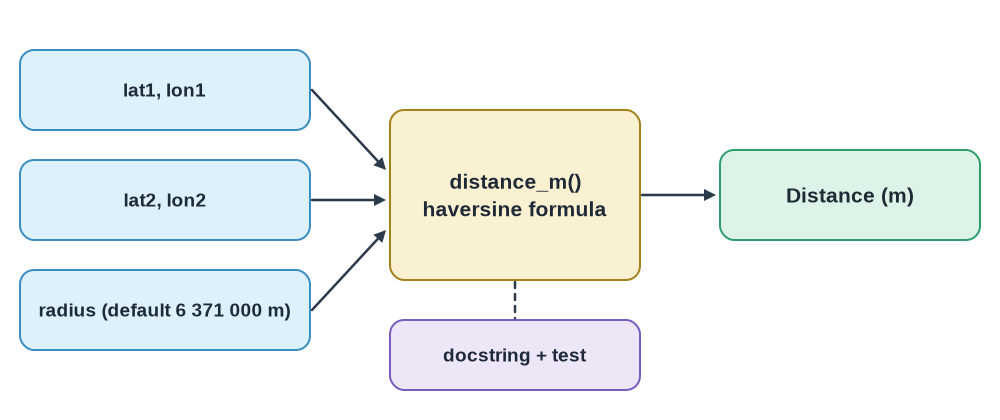
Example 2 Is the site inside VTR1?
Using the VTR1 (Bangkok City) restricted area from Thailand’s AIP ENR 5.1, amendment 10/26 (always check the currently effective issue): a circle of 10 NM radius around 13°45′54″N 100°32′18″E, from the ground to 3,000 ft. The site is at 13°50′00″N 100°40′00″E.
EARTH_RADIUS_M = 6_371_000.0
NM_TO_M = 1852


def distance_m(lat1, lon1, lat2, lon2, radius=EARTH_RADIUS_M):
    """Great-circle distance in metres between two points given in degrees."""
    phi1, phi2 = math.radians(lat1), math.radians(lat2)
    d_phi = phi2 - phi1
    d_lambda = math.radians(lon2 - lon1)
    a = math.sin(d_phi / 2) ** 2 + math.cos(phi1) * math.cos(phi2) * math.sin(d_lambda / 2) ** 2
    return 2 * radius * math.asin(math.sqrt(a))


def dms_to_deg(degrees, minutes, seconds):
    """Convert degrees, minutes and seconds to decimal degrees."""
    return degrees + minutes / 60 + seconds / 3600


vtr1_centre = (dms_to_deg(13, 45, 54), dms_to_deg(100, 32, 18))
site = (dms_to_deg(13, 50, 0), dms_to_deg(100, 40, 0))

d = distance_m(*vtr1_centre, *site)
print(f"{d / 1000:.1f} km, inside VTR1: {d <= 10 * NM_TO_M}")
15.8 km, inside VTR1: TrueThis matches a hand calculation. The * before a tuple unpacks it into separate arguments, and underscores in 6_371_000.0 make the digits easier to read.
Testing functions
assert checks that a condition is true; if not, the program stops and reports it immediately. Use it with known answers, including boundary values and impossible inputs.
assert battery_status(16) == "OK"
assert battery_status(15) == "LOW"
assert battery_status(7) == "CRITICAL"
assert math.isclose(distance_m(0, 0, 0, 1), 111_194.9, abs_tol=0.1)

try:
    battery_status(-1)
except ValueError:
    print("all tests passed")
all tests passedAs a project grows, move tests into test_*.py files and run them with pytest, which requirements.txt already installs.
# test_battery.py
import pytest
from mission_tools import battery_status

def test_boundaries():
    assert battery_status(15) == "LOW"
    assert battery_status(7) == "CRITICAL"

def test_rejects_impossible_values():
    with pytest.raises(ValueError):
        battery_status(120)
Run python -m pytest in the work folder.
Debugging: finding out why a program goes wrong
Debugging means finding the cause of a program’s wrong behaviour and fixing it. The name comes from “bug”, an old word for a fault in a machine. Program errors come in three kinds:
- Syntax errors: code that breaks the rules of the language, such as a missing
:afterif. Python reports them before the program starts. - Runtime errors (exceptions): the code is valid, but it meets a situation it cannot continue from, such as dividing by zero or opening a file that does not exist. Python stops and prints a traceback.
- Logic errors: the program runs to the end but gives the wrong answer, such as the wrongly ordered conditions in the first section of this module. These are the hardest to find, because there is no message; they are caught by testing with values whose answers you know.
Reading a traceback from the bottom up
A traceback reports which function called which until the error happened. Its heading says most recent call last, meaning the latest call is at the bottom. Start reading at the last line, which gives the error type and message, then work upward to the first line that belongs to your own file; that line is usually where the fix is needed. When ~ and ^ marks appear under the code, Python is pointing at the part of the expression that caused the error.
Inspecting variables with print and breakpoint
Once you know where, you need to know the values of the variables at that point. There are two ways:
- Print them. The quickest way is an f-string with
=, such asprint(f"{t1 - t0=}"), which prints both the expression and its value. Good for a quick look, but remove it once the fix is done. - Stop the program with a debugger. The built-in function
breakpoint()pauses the program at that line and opens pdb, Python’s standard debugger, where you can type commands. The most used arep expression(print a value),n(run the next line),s(step into a called function),c(continue to the next breakpoint),l(list the code around the stop),w(show the chain of function calls) andq(quit).
VS Code does the same without changing the code: click the left margin of a line or press F9 to set a breakpoint, press F5 to start debugging, then read values in the VARIABLES panel and the call chain in the CALL STACK panel. Press F10 to run the next line and F11 to step into a function.
An effective debugging routine is: make the error happen again, read the message, form a hypothesis about the cause, check the real values to confirm it, fix it, and write a test so it cannot come back. Do not change several things at once by guessing, or you will not know which change actually fixed it.
Example 3 Tracking down a ZeroDivisionError
This program calculates the speed between neighbouring pairs of telemetry samples; each sample is (time s, distance m).
log = [(0.0, 0.0), (1.0, 7.8), (2.0, 15.9), (2.0, 15.9), (3.0, 24.1)]


def speeds(samples):
    """Speed in m/s between consecutive (time_s, distance_m) samples."""
    result = []
    for (t0, d0), (t1, d1) in zip(samples, samples[1:]):
        result.append((d1 - d0) / (t1 - t0))
    return result


print(speeds(log))
Running it with Python 3.14 gives this traceback (file path shortened):
Traceback (most recent call last):
  File "C:\drone\speed_log.py", line 12, in <module>
    print(speeds(log))
          ~~~~~~^^^^^
  File "C:\drone\speed_log.py", line 8, in speeds
    result.append((d1 - d0) / (t1 - t0))
                  ~~~~~~~~~~^~~~~~~~~~~
ZeroDivisionError: division by zero- The last line says a
ZeroDivisionErrorhappened: division by zero. - Working upward, it happened in
speeds, line 8, and^points at the division sign, so the divisort1 - t0was zero. - Form a hypothesis: two samples have the same time. Confirm it by adding
if t1 == t0: breakpoint()before the division and running again. The program stops exactly at the problem pair.
-> breakpoint()
(Pdb) p t0, t1, d0, d1
(2.0, 2.0, 15.9, 15.9)
(Pdb) p result
[7.8, 8.100000000000001]
(Pdb) q
Quitting pdb will kill the process. Quit anyway? [y/n] y
Samples 3 and 4 are identical in every value, which really happens when a telemetry packet is received twice or a time is logged twice (Module 4 analyses link quality and lost packets in real data). The problem is in the data, not the formula.
- Fix and test: skip pairs whose time does not increase, then add an
assertso the old problem cannot return.
log = [(0.0, 0.0), (1.0, 7.8), (2.0, 15.9), (2.0, 15.9), (3.0, 24.1)]


def speeds(samples):
    """Speed in m/s between consecutive (time_s, distance_m) samples."""
    result = []
    for (t0, d0), (t1, d1) in zip(samples, samples[1:]):
        dt = t1 - t0
        if dt <= 0:                  # duplicate or out-of-order packet
            continue
        result.append(round((d1 - d0) / dt, 2))
    return result


print(speeds(log))
assert speeds([(0.0, 0.0), (0.0, 0.0)]) == []
print(f"{log[3][0] - log[2][0]=}")
[7.8, 8.1, 8.2]
log[3][0] - log[2][0]=0.0The last line shows = printing, which gives both the expression and its value. The 8.100000000000001 seen in pdb is the inexact decimal from Module 1, not a bug.
Module lab
Lab: a mission tools library
- Create
mission_tools.pywithbattery_status(),distance_m()androute_length_m(), which takes a list of latitude–longitude points, each with a docstring. - Write
test_mission_tools.pycovering boundary values, impossible values and known answers (1 degree of longitude on the equator is 111 194.9 m), and make pytest pass. - Write a function that checks every waypoint is within a given geofence radius of the take-off point, and reports those that are not.
- Swap test files with another group and run them against their code. Record the cases that break the other group’s code.
Common mistakes
Watch out
- Ordering conditions wrongly, so a narrower condition is never reached
- Not testing boundary values, such as exactly 15
- Using a bare
except:, hiding real errors - Using a list as a default parameter, such as
def f(points=[]), which carries values across calls; useNoneand create a new list inside - Passing degrees to trigonometric functions that expect radians
- Reading a traceback from the top and getting lost in library code. Start at the last line, then find the first line that is in your own file
Summary
if/elif/elsemakes decisions; the order of conditions changes the answerforloops over data;zip(a, a[1:])pairs neighbouring items- Lists, tuples and dicts hold different kinds of mission data
- Good functions do one job, have docstrings, and raise errors on impossible input
- Test with
assertand pytest, focusing on boundaries and known answers - Debug by reading the traceback from the bottom up, checking real values with
print(f"{x=}")orbreakpoint(), fixing, then adding a test so it cannot happen again
Check your understanding
- What does
battery_status(15)return, and why? - If
percent <= 15were checked beforepercent <= 7, what would 5 return? - A traceback ends with
KeyError: 'cruise_ms', and the lowest line from your own file isspeed = drone["cruise_ms"]. What should you check first? - How long is the route (0, 0) → (30, 40) → (30, 100) in metres?
- Why should you not write
def add_point(points=[])?
Answers
"LOW", because 15 is not above 15 but is above 7"LOW", which is wrong, because the first condition catches it before the critical check- Whether the dict
dronereally has the key"cruise_ms", for example withp drone.keys()in pdb orprint(f"{drone=}"); the key may be spelled differently, or the data read in may lack it - m
- The default list is created once and shared by every call, so values from earlier calls remain
Key formulas
| Great-circle distance (haversine) | |
| Length of a multi-waypoint route |
Key references
- Python Software Foundation. The Python tutorial (Python 3.14 documentation). link
- van Rossum, G., Warsaw, B., & Coghlan, A. (2001). PEP 8 – Style guide for Python code. link
- Goodger, D., & van Rossum, G. (2001). PEP 257 – Docstring conventions. link
- Downey, A. B. (2024). Think Python: How to think like a computer scientist (3rd ed.). O’Reilly. link
- Matthes, E. (2023). Python crash course (3rd ed.). No Starch Press.
- PX4 Autopilot. PX4 user and developer guide. link
- สำนักงานการบินพลเรือนแห่งประเทศไทย. (2026). Aeronautical information publication Thailand (eAIP), ENR 5.1 Prohibited, restricted and danger areas (the AIRAC AIP amendment changes monthly: AMDT 10/26 was the effective issue on 2 October 2026; use the currently effective issue). link
- Python Software Foundation. pdb: The Python debugger (Python 3.14 documentation). link
- Microsoft. Debug code with Visual Studio Code. Visual Studio Code documentation. link
Further reading
Study the assigned knowledge units in advance, review media and take the module quiz
In class / field
Lab or field practice from worksheets with a safety checklist
Learning evidence: Checked worksheets and quiz results