Gateways and communication protocols
UAT 459 UAS, Internet of Things and Smart Warehouse Systems
Lesson
By the end of this module you will be able to
- Explain the functions of an IoT gateway, including multiple radio interfaces, protocol conversion, store-and-forward, edge data reduction and time synchronisation
- Calculate a gateway's buffer size and the time to send its backlog when the connection returns
- Select radios for a warehouse with a link budget based on the ITU-R P.1238 indoor propagation model
- Compare MQTT 5, CoAP and HTTP and calculate data load by QoS level and topic alias use
Why this matters
The 92 sensors in the distribution centre do not talk to the server directly. BLE sensors reach a few tens of metres, LoRaWAN sensors need a dedicated receiver, the refrigeration controllers speak an industrial control language, and the platform takes data over MQTT on an IP network. The intermediary that lets everything talk is the gateway, and the language is the communication protocol.
Wrong choices at this layer create problems that are hard to trace, such as cold-room data missing in stretches because the cold-room wall blocks the radio, or a gateway dumping its whole backlog at once and overwhelming the platform after the network returns. This module covers the gateway and communication protocol topics of the course description. UAT 105 and UAT 457 module 10 already taught MQTT basics such as QoS, retained messages, will messages and shared subscriptions, so this module focuses on what a gateway really needs.
What a gateway does
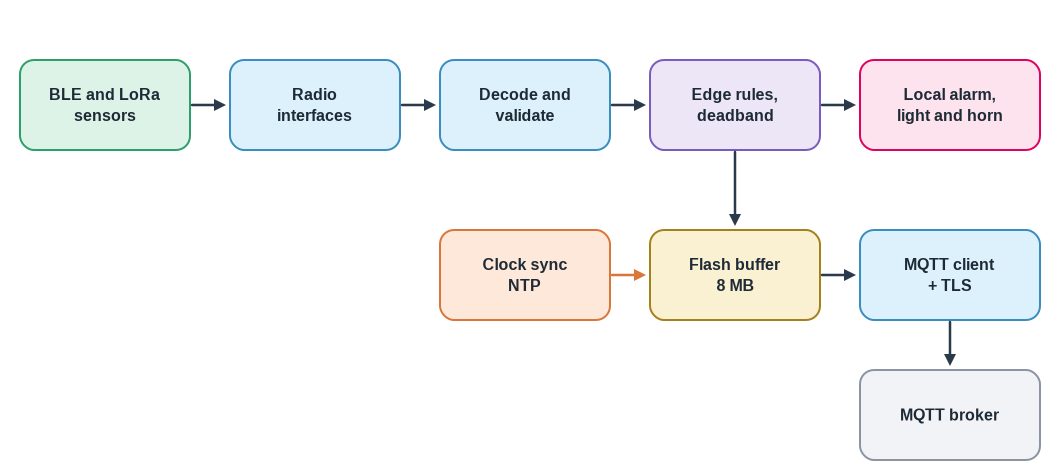
ITU-T Y.2060 defines two gateway capabilities: support for multiple interfaces, both towards devices (such as Zigbee, Bluetooth, Wi-Fi, CAN bus) and towards the network (such as Ethernet, LTE), and protocol conversion when the two sides use different protocols (International Telecommunication Union, 2012). In a pharmaceutical store a gateway must do several more things.
- Decode and validate: check that a message comes from a registered sensor, that the value is physically possible, and that it is not a duplicate
- Edge rules: reduce unchanged data, and switch on the cold room’s light and horn by itself without waiting for the server
- Store-and-forward: keep data in flash memory while the connection to the broker is down and send it when the link returns, as WHO Supplement 6 requires wireless systems to buffer data during network outages (World Health Organization, 2015a)
- Time synchronisation with NTP, so every value carries a correct time; cheap sensors often lack an accurate clock, so the gateway stamps the time
- Encryption endpoint: connect to the broker over TLS and authenticate with the gateway’s own certificate
Buffer size is simple to calculate. The backlog is , where is the number of devices, the recording rate per device and the outage time. When the link returns, the gateway sends the backlog while new data keeps arriving, so the catch-up time is , where is the rate the platform accepts from one gateway.
Example 1 The buffer of gateway G2 in the cold room
G2 receives data from 40 devices, each recording one value a minute of 48 bytes. The team wants to survive a 12-hour outage (for example a failed network switch over a holiday night). The flash reserved for buffering is 8 MB, and the platform limits intake to 200 values per second per gateway (assumed values).
# store-and-forward at gateway G2 during a loss of its uplink (assumed values)
devices, per_min, rec_bytes = 40, 1, 48     # devices behind G2, records per device per minute, bytes per record
outage_h, flash_mb = 12, 8                  # longest outage to survive, flash set aside for the buffer
drain_rate = 200                            # records per second the platform accepts from one gateway
backlog = devices * per_min * 60 * outage_h
print(f"backlog after {outage_h} h: {backlog:,} records = {backlog * rec_bytes / 1e6:.2f} MB")
print(f"buffer lasts {flash_mb * 1e6 / (devices * per_min * 60 * rec_bytes):.1f} h before data is lost")
new_rate = devices * per_min / 60
print(f"catch-up time: {backlog / (drain_rate - new_rate):.0f} s while new data keeps arriving")
backlog after 12 h: 28,800 records = 1.38 MB
buffer lasts 69.4 h before data is lost
catch-up time: 144 s while new data keeps arriving8 MB of flash lasts 69 hours, enough for a three-day holiday, and a 12-hour backlog is sent in about two and a half minutes. What still needs design is that backfilled data must carry the measurement time, not the sending time, and the platform must not raise alarms again from old values so that staff receive hundreds of SMS messages at once.
Reducing data at the edge
When a cold room runs normally its temperature hardly changes, so sending every value wastes battery and storage. A common approach is report by exception: send a new value only when it differs from the last value sent by more than a set band, the deadband. WHO, however, requires at least six records per hour, so the gateway must also force a heartbeat at least every 10 minutes, and values not sent must still be kept in the original record in the sensor or gateway, not discarded.
Example 2 A 0.3 °C deadband with a 10-minute heartbeat
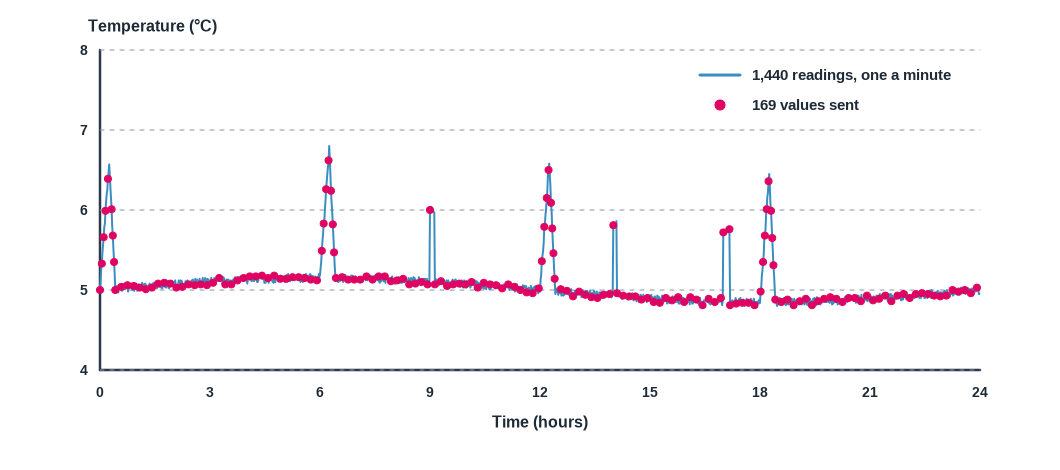
Simulate one day of cold-room temperature measured every minute, with a coil defrost every six hours, three loading door openings and a little noise (simulated data with a fixed seed).
import math, random
# one day of cold-room readings every minute: defrost every 6 h, door openings, sensor noise (simulated)
rng = random.Random(476)
temp = []
for m in range(1440):
    t = 5.0 + 0.15 * math.sin(2 * math.pi * m / 1440)
    k = m % 360
    if k < 25:                                   # defrost: rises for 15 min, recovers over 10 min
        t += 1.6 * min(k, 15) / 15 - (1.6 * (k - 15) / 10 if k > 15 else 0)
    if m in range(540, 548) or m in range(840, 846) or m in range(1020, 1031):
        t += 0.9                                 # loading doors open
    temp.append(round(t + rng.uniform(-0.05, 0.05), 2))
DEADBAND, HEARTBEAT = 0.3, 10                    # °C change to report, minutes between forced reports
sent, last_v, last_t = [], None, -HEARTBEAT
for m, v in enumerate(temp):
    if last_v is None or abs(v - last_v) >= DEADBAND or m - last_t >= HEARTBEAT:
        sent.append(m); last_v, last_t = v, m
gaps = [b - a for a, b in zip(sent, sent[1:])]
held = [temp[max(s for s in sent if s <= m)] for m in range(1440)]
print(f"sent {len(sent)} of 1440 readings ({len(sent) / 1440:.0%}), longest gap {max(gaps)} min")
print(f"largest error if the dashboard holds the last value: {max(abs(a - b) for a, b in zip(temp, held)):.2f} °C")
print(f"day min {min(temp):.2f} °C, max {max(temp):.2f} °C")
sent 169 of 1440 readings (12%), longest gap 10 min
largest error if the dashboard holds the last value: 0.29 °C
day min 4.80 °C, max 6.80 °CThe gateway sends only 12% of the values. The longest gap is exactly 10 minutes, so six records per hour are still met, and the dashboard is never more than 0.29 °C from the true value, always less than the deadband. A caution: the deadband must be much smaller than the gap between normal values and the pre-alarm limit (7.6 °C), or a slow rise could cross the limit unseen by the platform. Alarms should therefore be decided at the gateway from every value, not only from values already sent.
Choosing radios in a warehouse
A warehouse is a harsh place for radio. Steel racks, pallets of liquids and cold-room walls made of insulated panels faced with metal on both sides all reflect and absorb waves. The table summarises common radios.
| Radio | Band | Strengths | Limits in a warehouse |
|---|---|---|---|
| Bluetooth Low Energy | 2.4 GHz | Low power, cheap devices | Short range, heavily blocked by metal walls |
| Wi-Fi | 2.4, 5, 6 GHz | Uses existing network, high data rate | High power use, poor fit for battery sensors |
| IEEE 802.15.4 (such as Zigbee) | 2.4 GHz | Can form mesh networks | Needs relay nodes placed for coverage |
| LoRaWAN | Below 1 GHz | Long range, passes obstacles better | Low data rate, long transmit time |
| UHF RFID | 860 to 930 MHz in EPC Gen2 Release 3.0.1 (ISO/IEC 18000-63 and earlier Gen2 releases say 860 to 960 MHz); each country sets the band used | Tags need no battery | Read only where a reader is installed |
Spectrum use in Thailand must follow NBTC notifications. IoT and RFID devices in 920 to 925 MHz have power conditions set by notification (Telecommunications Association of Thailand, n.d.), and a LoRaWAN channel plan must be chosen from the LoRa Alliance Regional Parameters to match the permitted band (LoRa Alliance, 2025). Check the latest notification before any real installation.
Whether a signal will arrive is predicted with a link budget. Recommendation ITU-R P.1238-13 (International Telecommunication Union, 2025) gives a site-general model for transmitter and receiver on the same floor.
where is distance (m) and frequency (GHz). For an industrial environment without line of sight (NLoS), the coefficients are , , , valid for 0.625 to 255 GHz and 3 to 110 m. Real loss varies around this value as a normal variable with standard deviation dB. The link margin must exceed ; for the link to work at 95% of locations, use .
Example 3 Can a sensor in the cold room reach the gateway?
A site measurement found the cold-room wall adds about 20 dB of loss. Three options are compared (transmit power, receiver sensitivity and antenna gains assumed from datasheets).
import math
# link budget from a sensor in the cold room to a gateway outside it, ITU-R P.1238-13 industrial NLoS
ALPHA, BETA, GAMMA, SIGMA = 2.80, 23.55, 2.16, 5.70
def loss(d_m, f_ghz):
    return 10 * ALPHA * math.log10(d_m) + BETA + 10 * GAMMA * math.log10(f_ghz)
PANEL_DB = 20                                  # insulated metal-faced panel, measured on site (assumed)
Z95 = 1.645                                    # one-sided 95 % margin for shadow fading
links = {  # name: (frequency GHz, Tx dBm, antenna gains dBi, receiver sensitivity dBm, distance m, panel?)
    "BLE 2.44 GHz, gateway outside": (2.44, 0, 2, -94, 45, True),
    "BLE 2.44 GHz, gateway inside":  (2.44, 0, 2, -94, 18, False),
    "LoRa 0.923 GHz, gateway outside": (0.923, 14, 2, -126, 45, True),
}
for name, (f, tx, g, sens, d, panel) in links.items():
    rx = tx + g - loss(d, f) - (PANEL_DB if panel else 0)
    margin = rx - sens
    ok = "ok" if margin >= Z95 * SIGMA else "too small"
    print(f"{name:<32} L = {loss(d, f):5.1f} dB, Rx {rx:6.1f} dBm, margin {margin:5.1f} dB ({ok})")
print(f"margin needed for 95 %: {Z95 * SIGMA:.1f} dB")
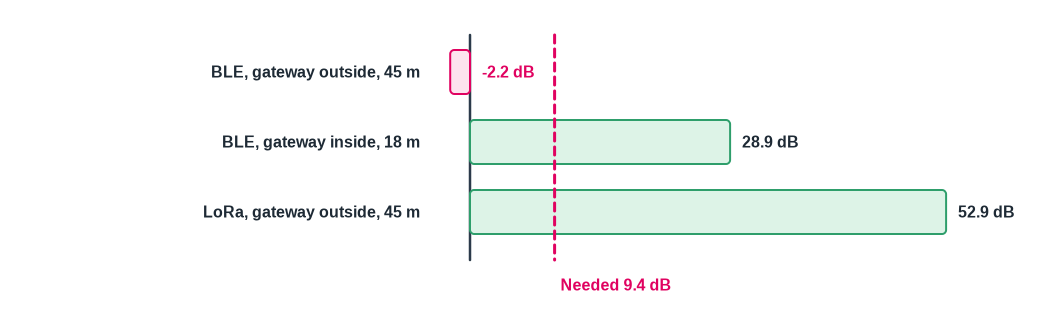
BLE 2.44 GHz, gateway outside L = 78.2 dB, Rx -96.2 dBm, margin -2.2 dB (too small)
BLE 2.44 GHz, gateway inside L = 67.1 dB, Rx -65.1 dBm, margin 28.9 dB (ok)
LoRa 0.923 GHz, gateway outside L = 69.1 dB, Rx -73.1 dBm, margin 52.9 dB (ok)
margin needed for 95 %: 9.4 dBBLE through the cold-room wall to an outside gateway has a negative margin and will not work. There are two fixes: mount the gateway inside the cold room (choosing a model rated for low temperature and running PoE through the wall), or use LoRa, which has plenty of margin, but module 6 showed that LoRa sending every minute drains batteries quickly. The team mounts two BLE gateways inside the cold room. Following WHO guidance to test wireless coverage for dead zones before use, the team also walks the site and measures real signals after installation, because the model is an average over many buildings, not this room.
Application protocols: MQTT 5, CoAP and HTTP
Once data reaches the gateway, it travels to the platform over an IP network. Kurose and Ross (2025) explain that networked applications must agree on a communication pattern. For IoT there are three main options.
| Protocol | Pattern | Transport | Best for |
|---|---|---|---|
| MQTT 5 | Publish/subscribe through a broker | TCP (TLS) | Gateways sending continuous values and receiving commands |
| CoAP | Light request/response, 4-byte fixed header | UDP (DTLS) | Constrained devices that need request and reply |
| HTTP | Request/response | TCP (TLS) | Information systems such as the WMS and non-urgent tasks |
CoAP, RFC 7252 (Shelby et al., 2014), is designed to resemble HTTP but be small enough for microcontrollers. Confirmable messages must be acknowledged and are retransmitted if not, with default values of a 2-second timeout and at most 4 retransmissions. MQTT 5 (OASIS, 2019) is the main choice between gateway and platform in this case. A gateway needs four of its features.
- Persistent sessions (Session Expiry Interval): when greater than zero, the broker keeps the client’s subscriptions and stores pending QoS 1 and 2 messages for it while disconnected; useful for gateways that receive commands, such as changes to alarm limits
- Acknowledgement flows by QoS: QoS 0 sends only PUBLISH; QoS 1 adds one PUBACK; QoS 2 adds PUBREC, PUBREL and PUBCOMP, three packets in all. Each successful acknowledgement with no properties is 4 bytes
- Keep Alive: the client must send some packet (or a PINGREQ) within this interval. If the broker receives nothing for 1.5 times the Keep Alive, it must close the connection, so this value sets how fast the platform learns a gateway has gone silent
- Topic Alias: send the full topic name once with a number, then only the 2-byte number (a 3-byte property in total); valid only within that connection
Example 4 MQTT packet size per reading
A PUBLISH packet has a fixed header (1 byte plus the remaining length as a Variable Byte Integer), a variable header (topic name with a 2-byte length prefix, a 2-byte packet identifier when QoS is above zero, and the property length) and the payload. 92 sensors each send one value a minute (topic and payload as designed by the team).
# size of MQTT 5 packets for one temperature reading (fixed header + variable header + payload)
def vbi_len(n):                       # bytes needed for a Variable Byte Integer
    return 1 if n < 128 else 2 if n < 16384 else 3
def publish(topic_len, payload, qos, alias=False):
    var = 2 + topic_len + (2 if qos else 0)       # topic name (length prefix + text) and packet identifier
    props = 3 if alias else 0                     # Topic Alias property: identifier byte + 2-byte value
    var += vbi_len(props) + props
    rem = var + payload
    return 1 + vbi_len(rem) + rem
ACK = 4                                           # PUBACK, PUBREC, PUBREL or PUBCOMP with success, no properties
topic = "bp1/z2/temp/T2-07"
json_payload = '{"t":"2026-10-01T02:15:00Z","v":5.12,"q":0}'
cases = {"QoS 0, JSON": (len(topic), len(json_payload), 0, False, 0),
         "QoS 1, JSON": (len(topic), len(json_payload), 1, False, 1),
         "QoS 2, JSON": (len(topic), len(json_payload), 2, False, 3),
         "QoS 1, JSON, topic alias": (0, len(json_payload), 1, True, 1),
         "QoS 1, 10-byte binary, alias": (0, 10, 1, True, 1)}
sensors, per_day = 92, 1440
for name, (tl, pl, q, al, acks) in cases.items():
    total = publish(tl, pl, q, al) + acks * ACK
    print(f"{name:<29} {total:3d} bytes per reading, {total * sensors * per_day / 1e6:5.2f} MB/day")
KEEP_ALIVE = 60
print(f"broker declares a silent gateway dead within {1.5 * KEEP_ALIVE:.0f} s")
QoS 0, JSON 65 bytes per reading, 8.61 MB/day
QoS 1, JSON 71 bytes per reading, 9.41 MB/day
QoS 2, JSON 79 bytes per reading, 10.47 MB/day
QoS 1, JSON, topic alias 57 bytes per reading, 7.55 MB/day
QoS 1, 10-byte binary, alias 24 bytes per reading, 3.18 MB/day
broker declares a silent gateway dead within 90 sMoving from QoS 0 to QoS 1 adds only 9% but guarantees delivery at least once, which is worth it for data that serve as GDP evidence. QoS 2 costs more and is unnecessary when the receiver drops duplicates by message ID. These figures exclude TCP, IP and TLS headers, which in practice often exceed the message itself, so the gateway should batch several values per message when sending a backlog. A binary payload saves a lot, but every reader must know the same format, so the team uses JSON between gateway and platform, and a 60-second Keep Alive reveals a silent gateway within 90 seconds.
Module lab
Lab: a mock gateway and a signal survey
- Install Mosquitto on the group’s computer, write a mock gateway in Python (paho-mqtt) that reads real sensors or a simulated data file, applies the deadband and heartbeat rules of Example 2, and sends with QoS 1 and a message ID
- Disconnect the mock gateway from the broker for 15 minutes; check that the buffer keeps all data, that stored times are measurement times, and that the platform does not raise alarms again from old values; compare the catch-up time with the formula of Example 1
- Walk-survey the RSSI of a BLE sensor around a mock cold room or a room with metal walls at 15 or more points, compare with the ITU-R P.1238 prediction of Example 3, and propose gateway positions
- Capture packets with Wireshark, count bytes per reading at QoS 0, 1 and 2, compare with Example 4 and explain the differences
Common mistakes
Watch out
- Time-stamping at sending instead of measurement, so a whole backlog appears to happen in one second
- Using a deadband without a heartbeat, falling below six records per hour, or discarding unsent values altogether
- Deciding alarms only from values already sent, when the deadband can hide a value that crossed the limit
- Trusting a propagation model without a site survey, especially around cold rooms with metal walls
- Using QoS 2 for every message because it feels safest, instead of removing duplicates at the receiver
Summary
- A gateway supports several radios, converts protocols, validates, reduces data, stores and forwards, synchronises time and terminates TLS
- Backlog and catch-up time
- A deadband cuts data sharply but needs a heartbeat to meet requirements, and alarms must be decided from every value
- An ITU-R P.1238 link budget with a margin guides radio choice and gateway placement; a cold-room wall can change the answer
- MQTT 5 offers persistent sessions, QoS 1, Keep Alive and topic aliases; CoAP suits constrained devices and HTTP suits information systems
Check your understanding
- A gateway serves 30 devices, each recording two values a minute, and the link is down for 6 hours. How many values are backlogged, and how many seconds does catch-up take if the platform accepts 100 values per second?
- Why must a gateway using a deadband send a heartbeat at least every 10 minutes in a pharmaceutical store?
- Using the ITU-R P.1238 industrial NLoS model, what is the loss at 2.44 GHz over 30 m?
- A gateway’s Keep Alive is 45 seconds. Within how many seconds will the broker drop a silent gateway?
- One reading at QoS 1 uses 71 bytes including a 4-byte PUBACK. How many bytes does it use at QoS 2, including acknowledgements?
Answers
- values; new data arrive at value per second, so catch-up takes seconds
- WHO requires at least six records per hour. If the temperature is steady, a deadband sends nothing; a heartbeat every 10 minutes keeps the record complete and shows the sensor is still alive
- dB
- seconds
- At QoS 1 the PUBLISH is 67 bytes plus a 4-byte PUBACK. At QoS 2 the PUBLISH is unchanged (it still has a packet identifier) but there are three acknowledgements, so bytes
Key formulas
| Backlog and catch-up time | |
| Indoor basic transmission loss (ITU-R P.1238) | |
| Link margin | |
| Time for the broker to drop a silent client |
Key references
- International Telecommunication Union. (2012). Overview of the Internet of things (Recommendation ITU-T Y.2060). link
- World Health Organization. (2015). Temperature and humidity monitoring systems for fixed storage areas: Technical supplement to WHO Technical Report Series, No. 961, 2011, Annex 9 (Supplement 6). WHO. link
- International Telecommunication Union. (2025). Propagation data and prediction methods for the planning of indoor radiocommunication systems and radio local area networks in the frequency range from 300 MHz to 450 GHz (Recommendation ITU-R P.1238-13). link
- OASIS. (2019). MQTT version 5.0 (OASIS Standard, 7 March 2019). link
- Shelby, Z., Hartke, K., & Bormann, C. (2014). The Constrained Application Protocol (CoAP) (RFC 7252). RFC Editor. link
- LoRa Alliance. (2025). RP002-1.0.5 LoRaWAN regional parameters. link
- สมาคมโทรคมนาคมแห่งประเทศไทย. การใช้งาน IoT และ RFID ย่าน 920–925 MHz (สรุปประกาศ กสทช.). link
- Kurose, J. F., & Ross, K. W. (2025). Computer networking: A top-down approach (9th ed.). Pearson. link
Further reading
Study the assigned knowledge units in advance, review media and take the module quiz
Deep dive: MQTT and Eclipse Mosquitto for drone and IoT systems
เครือข่าย TCP/IP สำหรับงานภาคสนาม
Deep dive: Internet of Military Things, LoRa/mesh networks and field applications
In class / field
Lab or field practice from worksheets with a safety checklist
Learning evidence: Checked worksheets and quiz results