Checking datasets before AI training
Practise checking for leakage from the same flight, duplicate images and incomplete data using CSV and Python before training an object-detection model
Prototype lesson · 90 minutes · computer-based practice

Practise checking for leakage from the same flight, duplicate images and incomplete data using CSV and Python before training an object-detection model
Preparing before you start
This lesson is designed for 90 minutes as part of a 7-hour data preparation module. It does not yet train a model or test a real drone. The goal is to read the manifest, a table showing the origin and split of the data, and to explain what could make evaluation results look better than they really are
Use Python 3.10 or later and a program that opens CSV files. No GPU, web account or additional packages are needed. If you are not yet ready to run Python, you can check the table manually first and then compare it with the program's results
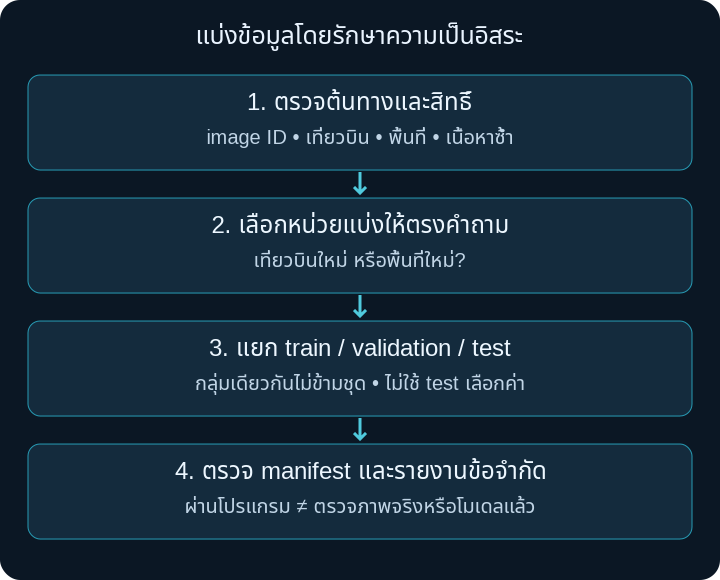
Why random image sampling alone is not enough
Many frames from the same flight may be very similar. If near-identical images are in both the training and test sets, the model may score well because it has already seen similar conditions, but this does not show that it will work on a new flight or area
train is used for learning, validation is used to choose the model and decision settings, and test is held back for evaluation after choices are locked. Repeatedly using test to choose the confidence threshold means test is no longer an independent evaluation set as originally intended
This exercise uses flight_id as the group that must not cross splits. If the question is about use in new areas , site_id must also be considered as a split unit. The example program does not yet check cross-area conditions automatically
Read the manifest and find the errors
Extract the ZIP, open dataset-split/manifest-review.csv and read the columns:
image_id: image record IDflight_id: source flight, used for grouping in this tasksite_id: source areacontent_id: a hypothetical content ID to practise cases where content is the same but image names differ; it is not a hash computed from real imagessplit:train,validationortestlicense: source of rights for the sample data; the program only checks that a value is present and does not certify legal rights
Note the line numbers and reasons before running the program. Look for five types: one flight crossing splits, duplicate image IDs, duplicate content, missing required values, and split names outside the agreed set in the task
Run the checker on a computer
Open a terminal in the folder dataset-split after extracting the files. First test the file that has no problems within the program's scope
Windows:
py -3 check_split.py manifest-valid.csv
py -3 check_split.py manifest-review.csv
Linux:
python3 check_split.py manifest-valid.csv
python3 check_split.py manifest-review.csv
The output is JSON. For the first file, expect valid: true and errors: [] . For the task file, expect valid: false with five error types GROUP_LEAKAGE, DUPLICATE_IMAGE_ID, DUPLICATE_CONTENT, MISSING_VALUE, INVALID_SPLIT
The program exits with code 0 when no problems are found within the checking scope, 1 when data problems are found, and 2 when the file cannot be opened or its format cannot be read. The English messages are status names to match against the list above, not instructions to install additional programs
The actually tested OS status is in verification.json in the ZIP. The commands for each OS are starting guidance, not evidence that results exist for every machine
Fix with evidence; do not guess to make the program pass
- In this task a single flight should be in one set. Choose the split before training and record the reason
- Duplicate images must be traced back to the originals before choosing which to keep; different file names may be the same content
- If
flight_idis missing, check the original source or quarantine the record, recording the reason. Do not enter a made-up ID to make the program pass - Check the meaning of
holdoutbefore renaming it to match the agreement; do not automatically change every incorrect value to test - Submit the corrected table, the list of quarantined records and
data-card.md, then run the check again
manifest-valid.csv is an example of a structure that passes, not real data corrected from the task file. Every record and ID in this set is synthetic data, with no images of people or real missions
How do you know you did it right?
Open answers.md after completing the task. The draft criteria are: finding errors 30 points, reasons for fixes/quarantine 30, data card and reproducibility evidence 25, explaining limitations 15. The target is at least 75, and leakage must not be concealed
Passing the program does not yet confirm the correctness of labels, image rights, class balance, or similar images with different content_id , and it does not yet show model accuracy. Instructors should ask “What can this CSV still not tell us?”
Common problems
- Cannot find
pyorpython3: check that a working Python is available; if installation is needed, use Python.org and then open a new terminal - File not found: extract the ZIP first and open the terminal in the folder containing
check_split.py; do not run from the ZIP viewer window - Missing columns: keep the header names as in the README. Some spreadsheets may change the CSV delimiter; save as comma-separated and UTF-8
- Check results differ from expectations: distinguish file line numbers from data order. The header is line 1; check the spelling and letter case of split
Further reading and bibliography
- Computer Vision and AI training websites for the training, evaluation, export and on-board checking stages
- Datasets for experiments to choose data while checking provenance and rights before use
- scikit-learn developers. (n.d.). Cross-validation: evaluating estimator performance. Supports separating test from setting selection and splitting samples that belong to related groups
- NIST. (2023). AI Risk Management Framework 1.0. A reference framework for risk management and reporting AI limitations; not a model certification
- CDC. (2025). Quality Training Standards. Used as guidance for giving learners practice and feedback
Retrieved 8 September B.E. 2569 (2026). Using flights/areas as split units and this task set are applications by PK-Research; choose split units that match the real mission before applying them to your own dataset
Back to the curriculum plan AI and drones: from images to models →