Exercise: preparing a mission on the computer
Organise a worksheet of hypothetical data and identify items still missing before using official services.

Prepare your tools
Use a browser and a program that opens CSV files on Windows or Linux. No drone or real registration account is needed. Download mission-readiness.csv and use hypothetical data only.
Steps
- Name a hypothetical mission and the person responsible, and open the table selecting UTF-8
- Put the status of the aircraft/remote pilot, radio, area, date/time and weather on separate rows
- Open the official agency links to record which services or documents must be checked; do not submit any applications
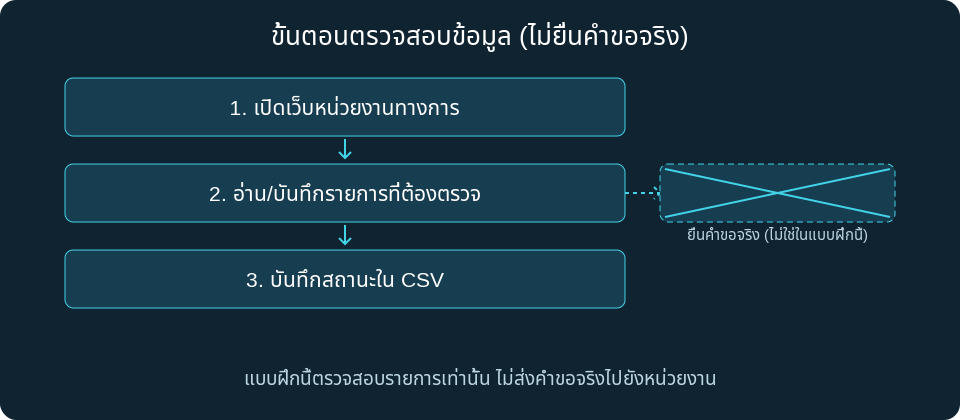
- Enter the check date, the effective date if known, and the status “data ready/still missing/must enquire” with reasons
- Have a peer check whether the evidence covers this hypothetical mission
Output to submit
Submit a CSV identifying at least two outstanding items with responsible persons, and a paragraph on how registration differs from mission authorisation. The pass criterion is that no blank is interpreted as an approval and every conclusion can be traced to a source and a check date.
Conceptual answer key
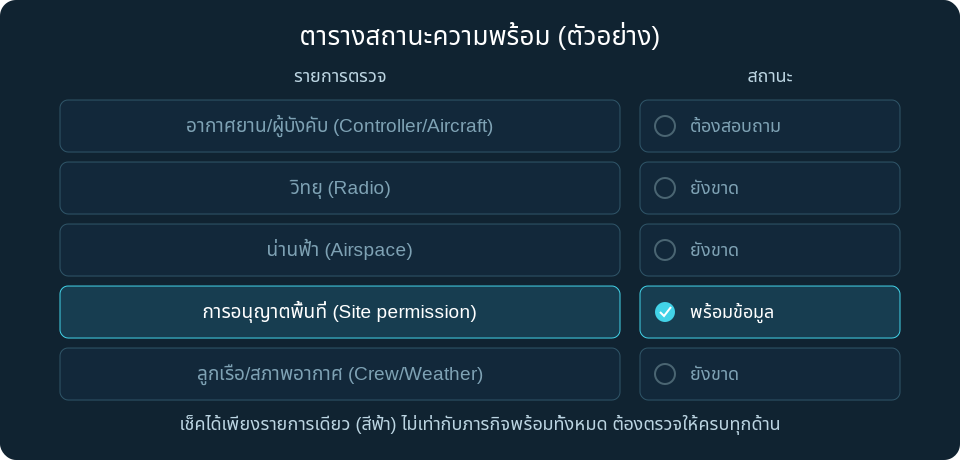
If there is only a letter of consent for the area, readiness with respect to airspace, people and equipment still cannot be concluded. The appropriate status is to list the items that need further checking. Passing the exercise means being able to organise the data, not obtaining the right to fly.
Usage rights for exercise files
Download the LICENSE.txt licence, Python code is MIT; forms are CC BY 4.0 with credit to PK-Research
References and scope
Sources checked 7 September 2026 (B.E. 2569); compiled alongside knowledge generously shared by DTI