Exercise: reading synthetic navigation data
Start with self-generated timestamps and trajectories before installing external VIO tools.
Prepare and run
Download trajectory-lab.py It uses Python 3 on Windows/Linux with no extra dependencies. Run python trajectory-lab.py or python3 trajectory-lab.py in the working folder. Results are placed in a new folder whose name begins with trajectory-output- so that earlier results are not overwritten.
Understand the data
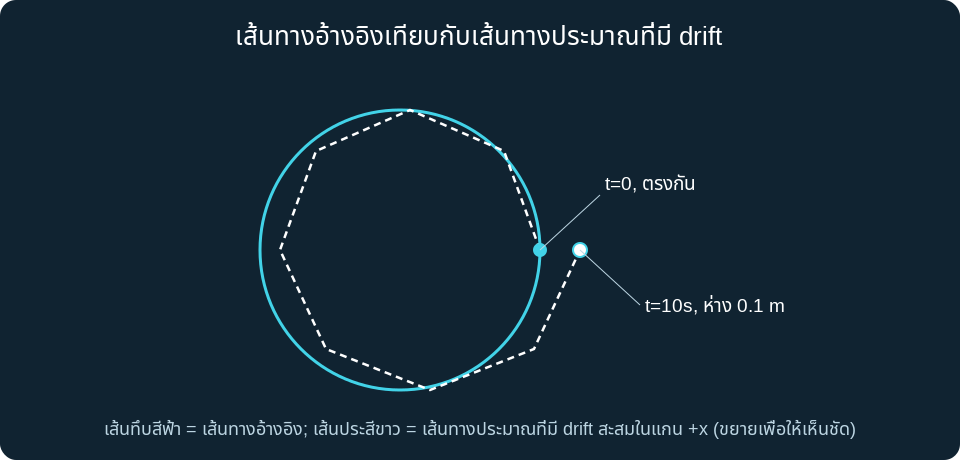
The program generates 101 reference positions on a circle and an estimate with an x-direction drift added deliberately. Both sets use the same time and frame, in seconds and metres. This data is not VIO output and contains no real camera/IMU data so it is used only for practising reading tables.
- Open
trajectory.csvand check that time increases and the number of rows. - Compare the reference and the estimate at the start and end times.
- Read
summary.jsonthen explain how the added drift affects the results. - Record the OS/Python version and the command in your lab notebook.
Expected results
The start positions match; at 10 seconds the x-direction error equals 0.1 m, as set, and there are 101 samples. No aircraft parameters or network communications are changed.
Once you understand the table, use the replay dataset guide according to the project owner's environment. Running external VIO software is currently an item awaiting checking; it is not claimed to pass just because this exercise runs successfully.
Rights to use the exercise files
Download the LICENSE.txt licence, the Python code is under MIT; the forms are under CC BY 4.0, crediting PK-Research
References and scope
Sources checked 7 September B.E. 2569 (2026), compiled with knowledge kindly provided by DTI