Number systems and digital logic
UAT 105 Digital Technology and Networks
Lesson
By the end of this module you will be able to
- Convert between decimal, binary and hexadecimal, and read the bytes of a MAVLink message
- Explain how negative integers are stored in two's complement and how floats follow IEEE 754
- Write truth tables for AND, OR, XOR and NOT gates and combine them into an adder
- Explain error detection with parity and CRC, and compute the CRC of a MAVLink frame
Why this matters
Everything a drone senses and commands, from IMU acceleration to GNSS position to a return-to-launch order, is stored and sent as bits: nothing but 0s and 1s. If you can read bits, you can decode telemetry yourself, understand why a negative speed turns into 65286 when read as the wrong type, and see how a receiver catches data damaged on the way.
This module follows UAT 104 module 4, where we read a .tlog file with pymavlink. This time we look down at the bits to see what the library does for us.
Binary and hexadecimal
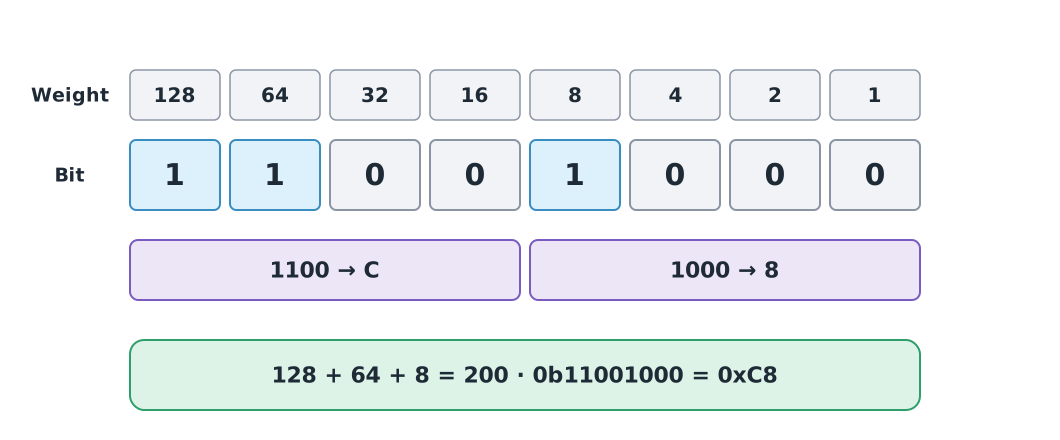
Binary uses only 0 and 1. Each digit is a bit, and each place is worth twice the one to its right, just as decimal places grow by ten. Eight bits make a byte, which holds 0 to 255.
Hexadecimal uses 0–9 and A–F. One hex digit stands for exactly four bits, so a byte is two hex digits. Programmers like it because it is much shorter and easier to read than binary. In Python, binary literals start with 0b and hex literals with 0x.
for n in [5, 13, 200, 255]:
    print(f"{n:>3}  bin {n:08b}  hex 0x{n:02X}")
print(int("11001000", 2), int("C8", 16), int("0xFD", 16))
5 bin 00000101 hex 0x05
13 bin 00001101 hex 0x0D
200 bin 11001000 hex 0xC8
255 bin 11111111 hex 0xFF
200 200 253The first byte of a MAVLink 2 frame is 0xFD, which is 253, as the last line shows.
Watch the units of data
Link speed is counted in bits per second: 20 Mbit/s is 20,000,000 bit/s. File size is usually counted in bytes, and 1 byte is always 8 bits. Also, kB (kilobyte) is 1000 bytes in SI, while KiB (kibibyte) is 1024 bytes. Some operating systems show one unit but label it as the other, so check before you calculate.
Negative integers in two’s complement
Computers store negative integers in two’s complement: the value in bits is stored as . The advantage is that one adder circuit handles both positive and negative numbers. The leftmost bit is 1 when the number is negative, so a signed 16-bit integer holds −32768 to 32767.
In MAVLink, the GLOBAL_POSITION_INT message stores the vertical speed vz as a signed 16-bit integer in cm/s. A drone climbing at 2.5 m/s reports vz = −250, because the z axis of the NED frame points down.
import struct

raw = struct.pack("<h", -250)
print(raw.hex(" "), f"{int.from_bytes(raw, 'little'):016b}")
print(struct.unpack("<h", raw)[0], struct.unpack("<H", raw)[0])
print((1 << 16) - 250)
06 ff 1111111100000110
-250 65286
65286The code <h tells struct to read a signed 16-bit integer in little-endian order (least significant byte first), which MAVLink uses. Reading the same bytes as <H (unsigned) gives 65286, exactly . Strange speed values like this in a plot usually come from reading the wrong data type.
Example 1 The float 0.1 in memory
Floating-point numbers follow IEEE 754-2019, which splits the bits into a sign, an exponent and a fraction. MAVLink’s ATTITUDE message stores angles as 32-bit floats, which cannot represent 0.1 exactly, as we saw in UAT 104 module 1.
print(struct.pack(">f", 0.1).hex(), f"{struct.unpack('>f', struct.pack('>f', 0.1))[0]:.20f}")3dcccccd 0.10000000149011611938The stored value is 0.100000001490…, not exactly 0.1, so never compare floats with ==.
Logic gates and truth tables
A logic gate is a circuit that takes bits in and puts a bit out according to a rule. The basic gates are AND (1 when every input is 1), OR (1 when any input is 1), NOT (inverts) and XOR (1 when the two inputs differ). A truth table lists the output for every possible input; two inputs give cases.
from itertools import product

print("A B | AND OR XOR NAND")
for a, b in product([0, 1], repeat=2):
    print(a, b, "|", a & b, " ", a | b, " ", a ^ b, "  ", 1 - (a & b))
A B | AND OR XOR NAND
0 0 | 0 0 0 1
0 1 | 0 1 1 1
1 0 | 0 1 1 1
1 1 | 1 1 0 0In Python the operators &, | and ^ work directly on bits. We use them with a bitmask to read several states from one number. For example, bit 7 of base_mode in HEARTBEAT says whether the motors are armed.
MAV_MODE_FLAG_SAFETY_ARMED = 0b1000_0000
MAV_MODE_FLAG_CUSTOM_MODE_ENABLED = 0b0000_0001
base_mode = 0x51
print(f"{base_mode:08b}", bool(base_mode & MAV_MODE_FLAG_SAFETY_ARMED), bool(base_mode & MAV_MODE_FLAG_CUSTOM_MODE_ENABLED))
armed = base_mode | MAV_MODE_FLAG_SAFETY_ARMED
print(f"{armed:08b}", hex(armed))
01010001 False True
11010001 0xd1From gates to an adder
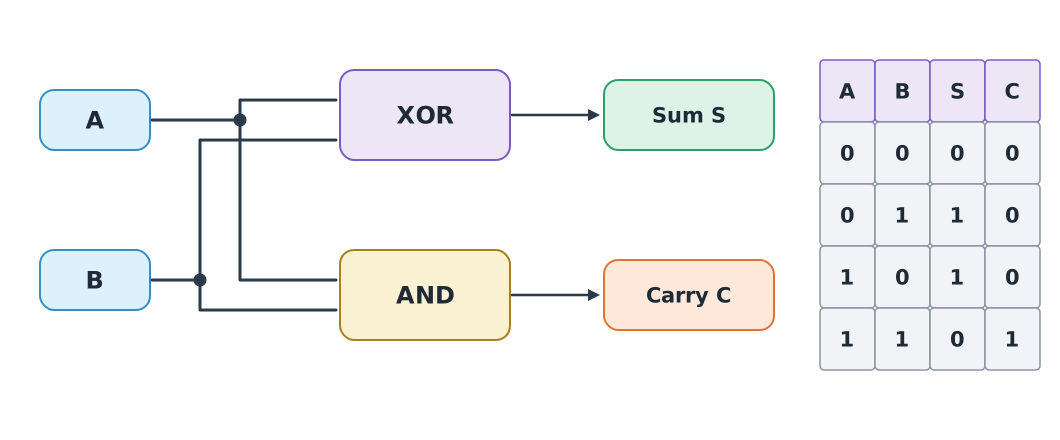
Connecting an XOR and an AND gives a half adder, which adds two one-bit numbers: the sum and the carry . Two half adders make a full adder that also accepts the carry from the previous digit, and a row of full adders adds multi-bit numbers. The arithmetic logic unit (ALU) inside a CPU is built on this idea.
def half_adder(a, b):
    return a ^ b, a & b


def full_adder(a, b, cin):
    s1, c1 = half_adder(a, b)
    s, c2 = half_adder(s1, cin)
    return s, c1 | c2


def add_4bit(x, y):
    carry, bits = 0, []
    for i in range(4):
        s, carry = full_adder((x >> i) & 1, (y >> i) & 1, carry)
        bits.append(s)
    return sum(b << i for i, b in enumerate(bits)), carry


for x, y in [(5, 6), (9, 7), (15, 1)]:
    total, carry = add_4bit(x, y)
    print(f"{x} + {y} -> sum {total:04b} ({total}), carry {carry}")
5 + 6 -> sum 1011 (11), carry 0
9 + 7 -> sum 0000 (0), carry 1
15 + 1 -> sum 0000 (0), carry 1is too large for 4 bits (maximum 15), so the sum wraps to 0 and the carry is 1. This is overflow. MAVLink’s 8-bit sequence counter wraps from 255 back to 0 for the same reason.
Error detection with parity and CRC
Radio noise can flip bits on the way, so the receiver needs a way to know the data is damaged. The simplest method is a parity bit, which records whether the number of 1s is even or odd. It only catches an odd number of flipped bits.
A stronger method is the CRC (cyclic redundancy check), which uses XOR and bit shifts to compute a check value over the whole frame. MAVLink ends every frame with a 2-byte CRC-16/MCRF4XX, and also feeds a per-message value called CRC_EXTRA into the calculation. If sender and receiver disagree about a message’s format, the CRC does not match and the message is dropped.
def crc16_mcrf4xx(data, crc=0xFFFF):
    for byte in data:
        tmp = byte ^ (crc & 0xFF)
        tmp = (tmp ^ (tmp << 4)) & 0xFF
        crc = ((crc >> 8) ^ (tmp << 8) ^ (tmp << 3) ^ (tmp >> 4)) & 0xFFFF
    return crc


print(hex(crc16_mcrf4xx(b"123456789")))0x6f91The value 0x6F91 for the test string “123456789” matches the standard check value of CRC-16/MCRF4XX, so the function is correct. Next, try it on a real HEARTBEAT frame built with pymavlink.
Example 2 Checking the CRC of a HEARTBEAT frame
This frame is 21 bytes: a 10-byte header, 9 bytes of payload and a 2-byte CRC. The CRC_EXTRA of HEARTBEAT is 50.
frame = bytes.fromhex("fd 09 00 00 00 01 01 00 00 00 04 00 00 00 02 03 51 03 03 7e 22")
header, payload, crc_bytes = frame[:10], frame[10:19], frame[19:]
msg_id = int.from_bytes(header[7:10], "little")
custom_mode = int.from_bytes(payload[0:4], "little")
print(len(frame), msg_id, custom_mode, payload[4], payload[5], hex(payload[6]))

HEARTBEAT_CRC_EXTRA = 50
crc = crc16_mcrf4xx(frame[1:19] + bytes([HEARTBEAT_CRC_EXTRA]))
print(hex(crc), crc == int.from_bytes(crc_bytes, "little"))

damaged = bytearray(frame)
damaged[16] ^= 0b1000_0000
crc_bad = crc16_mcrf4xx(bytes(damaged[1:19]) + bytes([HEARTBEAT_CRC_EXTRA]))
print(hex(crc_bad), crc_bad == int.from_bytes(crc_bytes, "little"))
21 0 4 2 3 0x51
0x227e True
0xf10 FalseThe CRC starts from the second byte (it excludes 0xFD). The result 0x227E matches the last two bytes 7e 22, stored little-endian. When we flip the leftmost bit of base_mode (making it look armed), the CRC changes at once, so the receiver drops the frame instead of trusting wrong data.
A CRC is not security
A CRC catches accidental errors but not an attacker, because anyone can compute a fresh CRC for a forged message. Proving that a message came from the real sender needs a secret key, such as MAVLink signing, covered in module 5.
Module lab
Lab: reading a drone’s bits
- Open
telemetry_sample.tlogfrom UAT 104, read the first 40 bytes withopen(..., "rb"), and pick apart the header of the first frame by hand: length, sequence, system ID and message ID. - Write a function that turns
base_modeinto a list of all 8 flags that are set, using the names from the MAVLink common.xml documentation. - Build an 8-bit adder from
full_adderand test it against(x + y) % 256for every pair from 0–255. - Use
crc16_mcrf4xxto check the CRC of every frame in the.tlogfile and count frames whose CRC does not match (get each message’s CRC_EXTRA from pymavlink).
Common mistakes
Watch out
- Mixing up bits and bytes: a 20 Mbit/s link carries 2.5 MB/s, not 20 MB/s
- Reading the wrong data type: reading a signed integer as unsigned turns small negative values into huge numbers
- Forgetting byte order: MAVLink is little-endian; reading it backwards makes every number wrong
- Ignoring overflow: a fixed-size counter wraps to zero, so gaps must be computed modulo its size
- Thinking a CRC stops forged messages: it only catches accidental errors
Summary
- Eight bits make a byte, and one hex digit stands for four bits, which is why bytes are written in hex
- Negative numbers use two’s complement; floats follow IEEE 754, which cannot represent some values exactly
- AND, OR, XOR and NOT gates combine into adders, and bitmasks read status flags from a single number
- MAVLink detects errors with a CRC-16/MCRF4XX that includes CRC_EXTRA, but a CRC does not prevent forged messages
Check your understanding
- What is
0b10110in decimal? - What is
0x3Fin decimal, and how is it written as 8-bit binary? - Which byte, in hex, stores the signed 8-bit integer −1?
- With A = 1 and B = 1, what sum and carry does a half adder give?
- Why does MAVLink feed CRC_EXTRA into the CRC calculation?
Answers
- , written
00111111 - , which is
0xFF - Sum and carry (because 1 + 1 = 10 in binary)
- To check that sender and receiver agree on the format of that message type; if not, the CRC fails and the message is dropped
Key formulas
| Value of an n-bit binary number | |
| Negative number in two's complement | |
| Range of an n-bit signed integer | |
| Half adder |
Key references
- Harris, S. L., & Harris, D. (2021). Digital design and computer architecture: RISC-V edition. Morgan Kaufmann.
- IEEE. (2019). IEEE standard for floating-point arithmetic (IEEE Std 754-2019). link
- MAVLink Development Team. Packet serialization. MAVLink developer guide. link
- MAVLink Development Team. MAVLink common message set (common.xml). link
- Python Software Foundation. ipaddress, socket, hashlib and hmac modules. The Python standard library (3.14). link
Further reading
Study the assigned knowledge units in advance, review media and take the module quiz
In class / field
Lab or field practice from worksheets with a safety checklist
Learning evidence: Checked worksheets and quiz results