UAV vs UAS and systems thinking
UAT 201 Fundamentals of Unmanned Aircraft Systems
Lesson
By the end of this module you will be able to
- Distinguish UA, UAV, UAS and RPAS using ICAO definitions
- Identify the elements of a UAS and the role of each
- Use systems thinking to trace which subsystem a problem comes from
- Convert units common in drone work, and calculate how far a drone moves between data updates
Why this matters
People call everything a “drone”, but when the video freezes in flight you must ask whether the problem is in the aircraft, the radio link, the camera or the app on the tablet. Treat a drone as just “a small aircraft” and you fix the wrong thing. This course therefore starts by seeing a drone as a system of parts working together.
The whole course uses one hypothetical case: a student team preparing a photo survey of a campus building with a quadcopter, from understanding the system, through simulator practice and mission planning, to checking readiness before a real flight. The Python code of every module can be downloaded from /downloads/uat-201/.
UA, UAV, UAS and RPAS
The International Civil Aviation Organization (ICAO) defines these terms as follows:
| Term | Meaning |
|---|---|
| UA (unmanned aircraft) | An aircraft intended to be flown without a pilot on board |
| UAV (unmanned aerial vehicle) | An older term for the aircraft itself, close in meaning to UA |
| UAS (unmanned aircraft system) | The aircraft together with all the associated elements that let it fly |
| RPAS (remotely piloted aircraft system) | A UAS flown by a remote pilot, comprising the aircraft, the remote pilot station and the C2 link |
UAS is therefore wider than the aircraft, just as a “rail system” means not only the trains but also the track, stations, signalling and staff.
Elements of a UAS
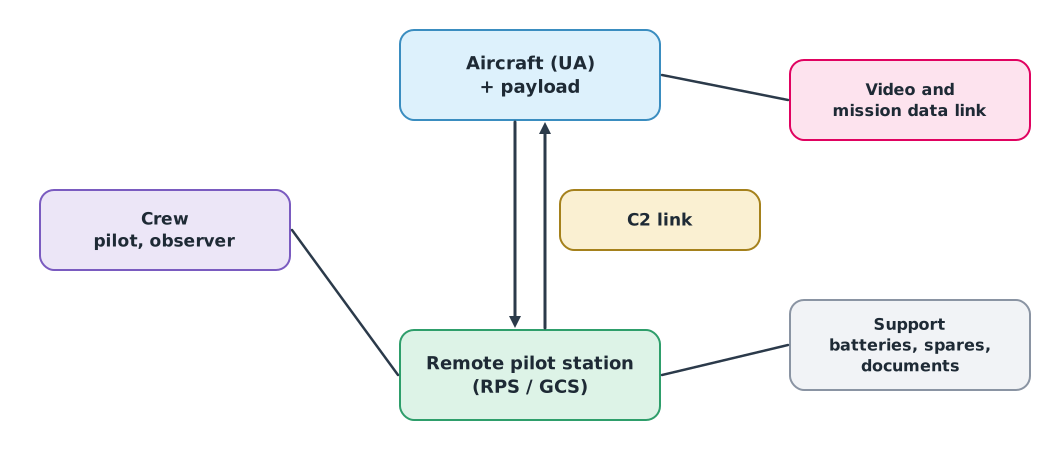
- Aircraft (UA): frame, propulsion, flight controller and sensors such as the IMU, GNSS and barometer
- Payload: the equipment that does the job, such as a camera, thermal camera or spray tank
- Remote pilot station (or ground control station, GCS): the transmitter and software such as QGroundControl or Mission Planner
- C2 link (command and control link): the data link between aircraft and station for commanding and monitoring the flight
- Crew: pilot, observer and camera operator
- Support: batteries, chargers, spares, manuals and records
The two widely used open flight-control software projects are ArduPilot and PX4. Ready-made drones from manufacturers (COTS, commercial off-the-shelf) are easy to use but usually offer less freedom to modify or replace parts than self-built systems.
Systems thinking when something goes wrong
When a symptom appears, first ask whether it comes from the aircraft, the link, the payload or the mission software. If the video freezes but the drone still holds its position, the aircraft is working normally; the problem is probably the video link or the app, not the motors. Separating subsystems like this avoids replacing the wrong part.
The three rotation axes
An aircraft rotates about three axes; pilots and flight-controller logs use these terms constantly.
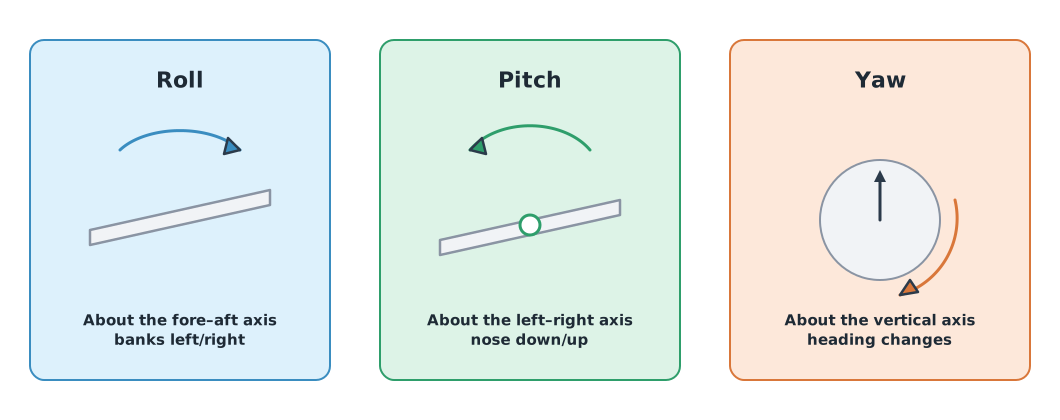
- Roll: rotation about the fore–aft axis; the aircraft banks left or right
- Pitch: rotation about the left–right axis; the nose goes down or up
- Yaw: rotation about the vertical axis; the heading changes
The direction the nose points (heading) can differ from the direction actually travelled (track) in wind or sideways flight.
Units before calculations
Numbers from battery labels, sensors and logs often come in different units; convert them before using a formula.
Example 1 Converting units from a battery label and a log
import math

capacity_mah, v_nominal = 5000, 22.2
capacity_ah = capacity_mah / 1000
energy_wh = v_nominal * capacity_ah
print(f"{capacity_mah} mAh = {capacity_ah} Ah; energy {energy_wh:.0f} Wh = {energy_wh * 3600:,.0f} J")

heading_deg = 90
print(f"{heading_deg} deg = {math.radians(heading_deg):.6f} rad")
5000 mAh = 5.0 Ah; energy 111 Wh = 399,600 J
90 deg = 1.570796 radCapacity in mAh is not energy; multiply by voltage to get Wh. Most maths functions in programs take angles in radians, not degrees.
Data rate matters too. If the station receives a position five times a second, a fast drone moves a long way between updates.
speed = 10.0                     # m/s
for rate_hz in (10, 5, 1):
    print(f"telemetry {rate_hz:>2} Hz: drone moves {speed / rate_hz:.1f} m between updates")
link_loss_s = 2.0
print(f"a {link_loss_s:.0f} s link loss at {speed:.0f} m/s = {speed * link_loss_s:.0f} m without new data")
telemetry 10 Hz: drone moves 1.0 m between updates
telemetry 5 Hz: drone moves 2.0 m between updates
telemetry 1 Hz: drone moves 10.0 m between updates
a 2 s link loss at 10 m/s = 20 m without new dataThe screen always shows the past. The slower or patchier the data, the more the pilot sees a position that does not match reality. This is why the law requires keeping the aircraft in sight, and why you must know what the system does when the link is lost (module 4).
Module lab
Lab: identifying the elements of a real drone and a simulated system
- Examine the lab’s training drone (battery disconnected). Identify which parts are aircraft, payload, remote pilot station and support, photographing and labelling them.
- Read the training drone’s manufacturer manual. Note maximum flight time, transmission range and the conditions the manufacturer used for testing, separating manufacturer test data from legal limits.
- Open QGroundControl or Mission Planner connected to SITL (demonstrated by the instructor) and point out roll, pitch, yaw and heading on screen.
- Write three hypothetical problems and state which subsystem each probably comes from, with reasons.
- Run the code in this lesson with the numbers from the training drone’s battery label.
Common mistakes
Watch out
- Thinking a UAS is just the drone, forgetting the link, station and crew
- Converting mAh straight to flight time without going through energy and power
- Passing degrees to functions that expect radians
- Believing the advertised transmission range is the legal flying range
- Replacing parts before identifying which subsystem is at fault
Summary
- The UA is the aircraft; the UAS adds the station, C2 link, payload, crew and support
- Systems thinking traces problems to the right subsystem
- Roll, pitch and yaw are rotations about three axes, and heading can differ from track
- Convert units before calculating; the distance between updates is speed divided by data rate
Check your understanding
- How does a UAS differ from a UA?
- How many Wh does a 14.8 V 2200 mAh battery hold?
- What is 45° in radians (4 decimal places)?
- A drone flies at 8 m/s with position data at 4 Hz. How far does it move between updates?
- The video freezes, but the drone still hovers in place. Which subsystem is the likely cause?
Answers
- The UA is the aircraft; the UAS is the aircraft plus all the elements that let it fly, such as the station and C2 link
- Wh
- rad
- m
- The video link or the app on the station, not the propulsion
Key formulas
| Capacity and energy conversion | |
| Angle conversion | |
| Distance travelled |
Key references
- International Civil Aviation Organization. Frequently used terms (unmanned aircraft, UAS). link
- International Civil Aviation Organization. (2015). Manual on remotely piloted aircraft systems (RPAS) (Doc 10019). ICAO. link
- Barnhart, R. K., Marshall, D. M., & Shappee, E. (Eds.). (2021). Introduction to unmanned aircraft systems (3rd ed.). CRC Press. link
- Fahlstrom, P. G., Gleason, T. J., & Sadraey, M. H. (2022). Introduction to UAV systems (5th ed.). Wiley. link
- ArduPilot Dev Team. ArduPilot documentation. link
- PX4 Autopilot. PX4 user and developer guide. link
Further reading
Study the assigned knowledge units in advance, review media and take the module quiz
UAV/UAS fundamentals and flight simulation
Topic 1: Safety and flight fundamentals
In class / field
Lab or field practice from worksheets with a safety checklist
Learning evidence: Checked worksheets and quiz results