Overview of automation
UAT 202 Fundamentals of Automation Technology
Lesson
By the end of this module you will be able to
- Explain the components of an automated system: sensors, controllers, actuators and the process
- Distinguish open-loop from closed-loop control, and say which copes with disturbances
- Place equipment in the levels of the ISA-95 model
- Explain levels of automation and the role of people in automated systems
Why this matters
A drone hovering steady in the wind, a factory conveyor that stops when a box falls across it, and an air conditioner holding room temperature all work on one principle: measure, decide, act, over and over. Anyone who understands this principle can read any automated system, from factory machines to a drone’s flight controller.
The whole course uses one hypothetical case: an automatic drone battery-swap station, with a conveyor carrying batteries, sensors that detect a landed drone and a battery, a pneumatic gripper arm, a charging cabinet whose temperature must be controlled, and an emergency stop button. Stations like this are used for drones that must fly continuously, such as area surveillance. The Python code of every module can be downloaded from /downloads/uat-202/.
Components of an automated system
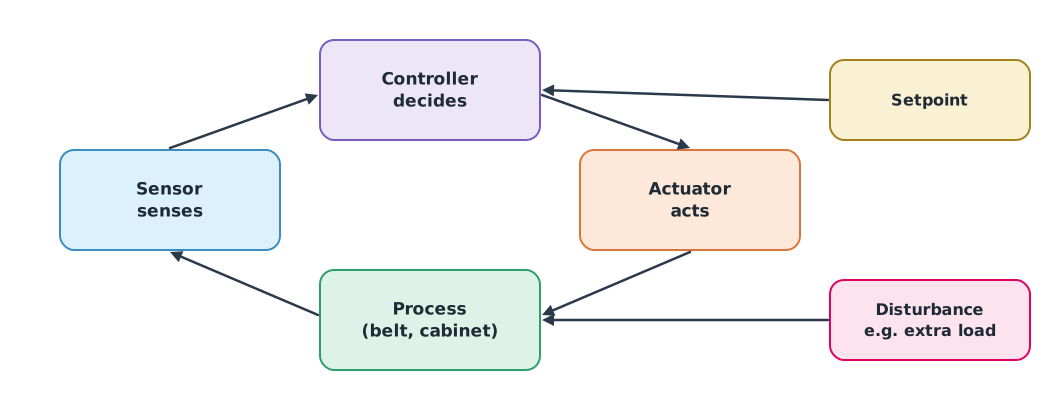
- Sensor: turns what is measured into an electrical signal, such as a sensor detecting a battery on the belt or a temperature sensor in the charging cabinet
- Controller: compares the measurement with the desired value (setpoint) and decides, such as a PLC or microcontroller
- Actuator: turns commands into action, such as a motor, pneumatic valve or fan
- Process: what is being controlled, such as belt speed or cabinet temperature
- Disturbance: something that changes the process without our command, such as heavier batteries on the belt
Open loop and closed loop
An open-loop system acts on a plan without measuring the result, like a toaster set on a timer whether or not the bread is done. A closed-loop (feedback) system measures the result and corrects the command by the error , the setpoint minus the measurement.
Example 1 A conveyor under extra load
The battery conveyor must run at 0.5 m/s. At 10 s extra batteries are loaded and the belt slows. Compare a fixed voltage command (open loop) with correcting the command by the error with gain .
def conveyor(kp, t_end=20.0, dt=0.01):
    v, tau, k, target, u0 = 0.0, 0.5, 0.25, 0.5, 2.0   # m/s, s, (m/s)/V, m/s, V
    speeds, t = {}, 0.0
    while t <= t_end + 1e-9:
        load = 0.1 if t >= 10 else 0.0                    # extra load at 10 s
        u = u0 + kp * (target - v)                         # kp = 0 is open loop
        v += dt * (k * u - load - v) / tau
        for mark in (9.99, 20.0):
            if abs(t - mark) < dt / 2:
                speeds[mark] = v
        t += dt
    return speeds


for kp in (0, 8, 40):
    s = conveyor(kp)
    label = "open loop" if kp == 0 else f"feedback Kp={kp}"
    print(f"{label:<17} before load {s[9.99]:.3f} m/s, after load {s[20.0]:.3f} m/s")
open loop before load 0.500 m/s, after load 0.400 m/s
feedback Kp=8 before load 0.500 m/s, after load 0.467 m/s
feedback Kp=40 before load 0.500 m/s, after load 0.491 m/sBefore the load all three run at 0.5 m/s. After the load, the open loop slows to 0.4 m/s because it does not know it has slowed, while feedback compensates; the higher the gain, the closer to target, but a small error remains, which a PI controller removes in module 4.
Factory levels in ISA-95
The ISA-95 standard (IEC 62264) divides an organisation’s systems into levels, showing what each device does and whom it talks to.
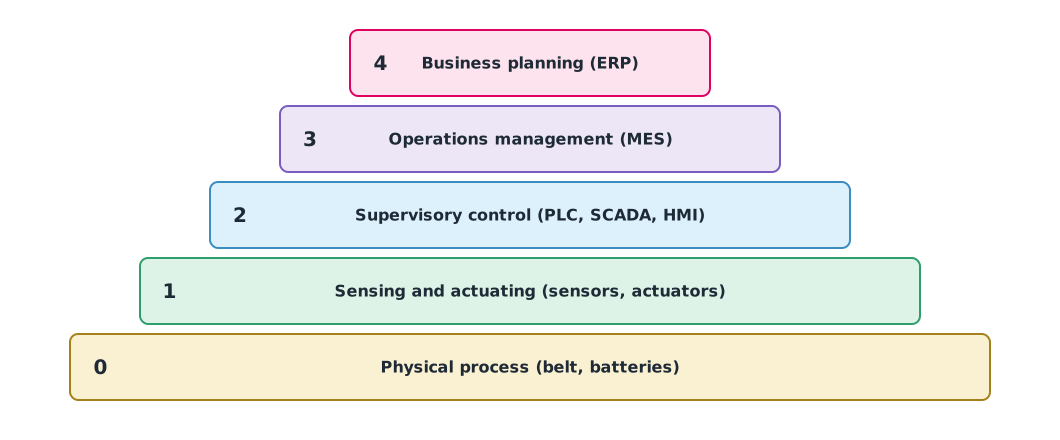
Our battery-swap station has sensors and actuators (level 1), a PLC and control screen (level 2), while the system scheduling missions for the whole drone fleet is comparable to level 3.
Where people fit
Automation is not just “human does it” or “machine does it”. Sheridan and Verplank (1978) proposed a ten-level scale, from the human doing everything to the computer deciding without informing the human. Parasuraman, Sheridan and Wickens (2000) split work into four stages, information acquisition, analysis, decision and action, each of which can be automated to a different degree.
In a drone, for example, the flight controller holds attitude fully automatically, but the decision to start a mission still belongs to the pilot. Choosing the right level means thinking about the consequences when the system fails, and people must understand enough to take over.
Module lab
Lab: identifying automation components around you
- Choose three automated systems (such as an automatic door, a washing machine and a drone in Loiter mode) and list the sensor, controller, actuator, process and disturbance of each.
- State whether each is open or closed loop, with reasons.
- Run the code in Example 1, varying the load and gain, and record the speed after loading.
- Draw the group’s battery-swap station, placing each device in an ISA-95 level.
- State the level of automation of each step in the station and where people must decide.
Common mistakes
Watch out
- Assuming any computer-controlled system is closed loop, when it may not measure anything
- Forgetting disturbances in the design
- Raising the gain indefinitely without considering that the system may oscillate
- Letting automation make critical decisions when people cannot take over
Summary
- Automated systems have sensors, controllers, actuators and a process, working as a sense–decide–act loop
- Open loop does not measure, so it cannot handle disturbances; closed loop corrects commands by the error
- ISA-95 divides systems into levels 0 to 4, from the physical process to business systems
- Levels of automation can differ between steps, and people must be able to take over
Check your understanding
- Is a toaster on a timer open loop or closed loop?
- The setpoint is 0.5 m/s and the measurement 0.42 m/s. What is the error?
- In Example 1, with and an error of 0.03 m/s, how much is the voltage command raised above ?
- At which ISA-95 level is the PLC controlling the conveyor?
- Why can open loop not cope with disturbances?
Answers
- Open loop, because it does not measure whether the bread is done
- m/s
- V
- Level 2 (supervisory control)
- It does not measure the result, so it does not know the process has changed
Key formulas
| Error | |
| A simple feedback command |
Key references
- Groover, M. P. (2018). Automation, production systems, and computer-integrated manufacturing (5th ed.). Pearson. link
- Åström, K. J., & Murray, R. M. (2021). Feedback systems: An introduction for scientists and engineers (2nd ed.). Princeton University Press. link
- International Society of Automation. ISA-95 standard: Enterprise-control system integration (ANSI/ISA-95, IEC 62264). link
- Sheridan, T. B., & Verplank, W. L. (1978). Human and computer control of undersea teleoperators (DTIC ADA057655). MIT Man-Machine Systems Laboratory. link
- Parasuraman, R., Sheridan, T. B., & Wickens, C. D. (2000). A model for types and levels of human interaction with automation. IEEE Transactions on Systems, Man, and Cybernetics – Part A: Systems and Humans, 30(3), 286–297. link
Further reading
Study the assigned knowledge units in advance, review media and take the module quiz
In class / field
Lab or field practice from worksheets with a safety checklist
Learning evidence: Checked worksheets and quiz results