Automated flight in SITL and the field
UAT 304 UAS Mission Planning and Autonomous Flight
Lesson
By the end of this module you will be able to
- Progress automated missions from simulation to the field in stages
- Compare each leg's flight time with the plan and find the cause of large differences
- Explain each type of ArduPilot failsafe and configure it for the mission
- Test the response to abnormal events in SITL before real flight
Why this matters
An automated mission that passes in SITL is not guaranteed to pass in the field, where wind, GNSS signals and real links differ from the simulator. The drone knowledge base’s unit on a training plan from remote control to simulated missions practises step by step with observation criteria and log files, and its unit on the flight-skills path links simulator to field with pre- and post-flight checklists. This module focuses on two things: checking that the mission went to plan and testing that the system responds to abnormal events as intended.
Training progression
- SITL with the same mission as the real flight, testing every failsafe
- Real flight in open ground at lower height and range than the plan, with the pilot ready to take control
- The full real mission, with an observer
- Review the log of every sortie before flying the next
Comparing flight time with the plan
Example 1 Which leg took unusually long?
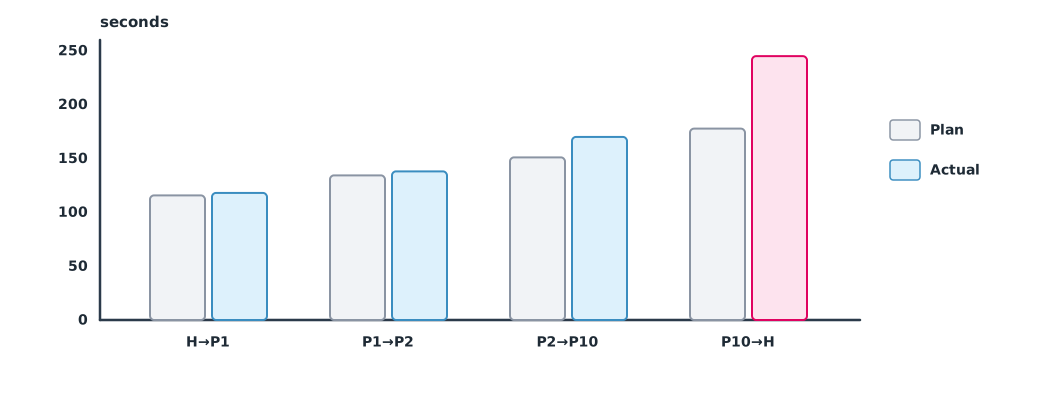
Sortie 1 from Module 3 flies at 8 m/s and hovers 60 seconds at each point to take images. Actual times are read from the log as the time to reach each waypoint (simulated values). The team investigates any leg more than 20% slower than planned.
import math

pts = {"H": (0, 0), "P1": (420, 150), "P2": (900, -200), "P10": (1100, -900)}
legs = [("H", "P1"), ("P1", "P2"), ("P2", "P10"), ("P10", "H")]
actual_s = [118, 138, 170, 245]                  # seconds per leg from the log, including the hold at the end point
SPEED, HOLD = 8.0, 60
for (a, b), act in zip(legs, actual_s):
    d = math.dist(pts[a], pts[b])
    plan = d / SPEED + (HOLD if b != "H" else 0)
    diff = (act - plan) / plan
    flag = "  <- investigate" if diff > 0.20 else ""
    print(f"{a:>3}->{b:<3} {d:5.0f} m  plan {plan:5.1f} s  actual {act:3d} s  {diff:+.0%}{flag}")
H->P1 446 m plan 115.7 s actual 118 s +2%
P1->P2 594 m plan 134.3 s actual 138 s +3%
P2->P10 728 m plan 151.0 s actual 170 s +13%
P10->H 1421 m plan 177.7 s actual 245 s +38% <- investigateThe last leg, from P10 back to take-off, is much slower than planned while the others are close to plan. Possible causes are a headwind, or RTL using a different speed from the mission speed. Check wind direction and speed in the log before concluding. This information makes the energy plan for the next sortie more accurate.
ArduPilot failsafes
The ArduPilot documentation describes each failsafe separately:
- RC loss
FS_THR_ENABLE, for example 1 = RTL (land if there is no GPS) and 3 = land. To let an automated mission continue, use bit 0 ofFS_OPTIONS(the old value 2 was removed from Copter 4.0) - GCS link loss
FS_GCS_ENABLEacts when no signal is received for longer thanFS_GCS_TIMEOUT(5 seconds by default), and bit 1 ofFS_OPTIONSlets the mission continue - Battery
BATT_FS_LOW_ACTandBATT_FS_CRT_ACT, for example 2 = RTL and 1 = land. They take no action if the vehicle is already in RTL or Land, and cannot be reset until reboot - EKF acts when two of the compass, position and velocity variances exceed
FS_EKF_THRESH(0.8 by default) for 1 second; the defaultFS_EKF_ACTIONis land
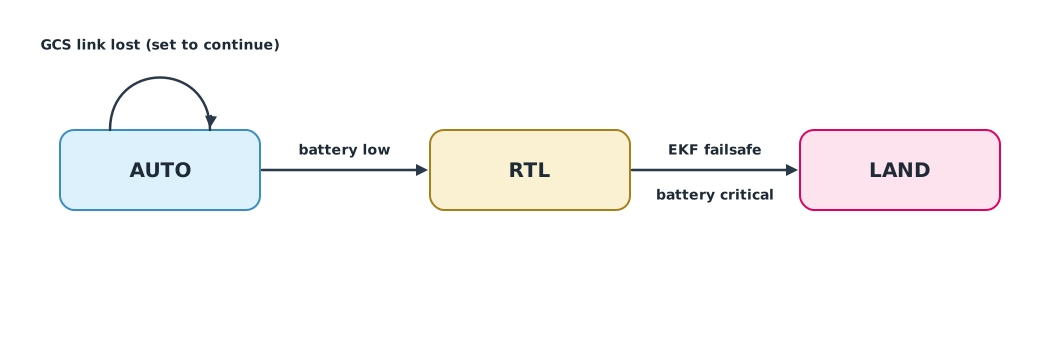
The documentation does not state a priority when several failsafes occur at once, so the team must test in SITL with the firmware version actually used. The following example is a teaching model using the rule “the safer action wins” to practise thinking ahead; it is not ArduPilot’s internal logic.
Example 2 Stepping through events with the configured values (teaching model)
params = {"FS_GCS_CONTINUE_AUTO": True, "BATT_FS_LOW_ACT": "RTL", "BATT_FS_CRT_ACT": "LAND", "FS_EKF_ACTION": "LAND"}
events = [(300, "GCS link lost"), (420, "GCS link restored"), (540, "battery low"), (600, "EKF variance high")]
RANK = {"AUTO": 0, "RTL": 1, "LAND": 2}         # higher is more conservative (model assumption)

mode = "AUTO"
for t, ev in events:
    want = mode
    if ev == "GCS link lost":
        want = "AUTO" if params["FS_GCS_CONTINUE_AUTO"] else "RTL"
    elif ev == "battery low":
        want = params["BATT_FS_LOW_ACT"]
    elif ev == "EKF variance high":
        want = params["FS_EKF_ACTION"]
    new = want if RANK[want] >= RANK[mode] else mode
    print(f"t={t:>3}s {ev:<20} requested {want:<4} -> mode {new}")
    mode = new
t=300s GCS link lost requested AUTO -> mode AUTO
t=420s GCS link restored requested AUTO -> mode AUTO
t=540s battery low requested RTL -> mode RTL
t=600s EKF variance high requested LAND -> mode LANDA short GCS link drop does not stop the mission, because it is set to continue. But when the battery is low the aircraft returns to launch, and when the EKF goes wrong on the way back it lands where it is, which could be in the middle of the flooded area. The team must know in advance that this outcome is possible and prepare a recovery team. Before the real job, test the same sequence of events in SITL to see whether the result matches expectations.
Module lab
Lab: from SITL to the field
- Upload the mission from Module 3 in SITL, record the log and compare times with Example 1
- Test in SITL: cut the GCS link, turn off the RC transmitter, lower the simulated battery voltage and simulate GPS loss, recording each result
- Compare the results with the model in Example 2; if they differ, trust SITL and correct the team’s model
- Fly stage 2 of the progression for real under the instructor’s supervision
- Review the log before moving on to the full mission
Common mistakes
Watch out
- Jumping straight from SITL to the full mission
- Not testing failsafes in SITL with the values to be used for real
- Guessing the failsafe order instead of testing it
- Using parameter meanings from old firmware versions
- Not reviewing the log before the next sortie
Summary
- Progress from SITL to limited field flight and only then to the full mission
- Compare each leg’s time with the plan to find anomalies and refine the energy plan
- ArduPilot failsafes are separate by type, each with a configurable action, and the documentation does not state an order when they occur together
- Always test the sequence of events in SITL before the real job
Check your understanding
- A leg of 800 m at 8 m/s with a 60-second hover has what planned time?
- Plan 100 s, actual 130 s. What is the relative difference?
- In current Copter versions, what must be set for the mission to continue when RC is lost?
- Does the battery failsafe act if the aircraft is already in RTL?
- Why test the failsafe sequence in SITL?
Answers
- s
- Bit 0 of
FS_OPTIONS - No
- The documentation does not state the order when several events occur together, and the result depends on the firmware version and settings
Key formulas
| Planned leg time | |
| Relative difference |
Key references
- ArduPilot Dev Team. SITL simulator (software in the loop). link
- ArduPilot Dev Team. Radio failsafe. ArduPilot Copter documentation. link
- ArduPilot Dev Team. Battery failsafe. ArduPilot Copter documentation. link
- ArduPilot Dev Team. GCS failsafe. ArduPilot Copter documentation. link
- ArduPilot Dev Team. EKF failsafe. ArduPilot Copter documentation. link
- ArduPilot Dev Team. Parameter list (Copter stable V4.6.3). ArduPilot Copter documentation. link
- ArduPilot Dev Team. Onboard message log messages. ArduPilot Copter documentation. link
Further reading
Study the assigned knowledge units in advance, review media and take the module quiz
Training plan from transmitter to simulated missions
Simulated missions and Return to Launch
Flight-skills pathway: from simulator to field
In class / field
Lab or field practice from worksheets with a safety checklist
Learning evidence: Checked worksheets and quiz results