IoT and WMS
UAT 363 Unmanned Aircraft Systems Technology for Transportation and Smart Warehousing
Lesson
By the end of this module you will be able to
- Design data flow from drones over MQTT with suitable topics and QoS levels
- Design JSON scan messages that a warehouse management system (WMS) can use
- Reconcile scan results with WMS records and compute record accuracy
- Validate product codes with the GS1 check digit
Why this matters
Scan results that stay on the drone are useless. The data must flow into the warehouse management system (WMS), be compared with records, and alert staff when discrepancies are found. The ETH report names integration with existing systems as a main challenge for warehouse drones. If messages are lost, duplicated or a product code is misread, the system wrongly concludes that stock is missing or in excess.
MQTT in the warehouse
The knowledge unit on MQTT and Eclipse Mosquitto explains the publish–subscribe architecture. The publisher (the drone) sends messages to a topic on a broker, and subscribers (the WMS, a dashboard) subscribe to that topic. Publishers and subscribers do not need to know each other directly.
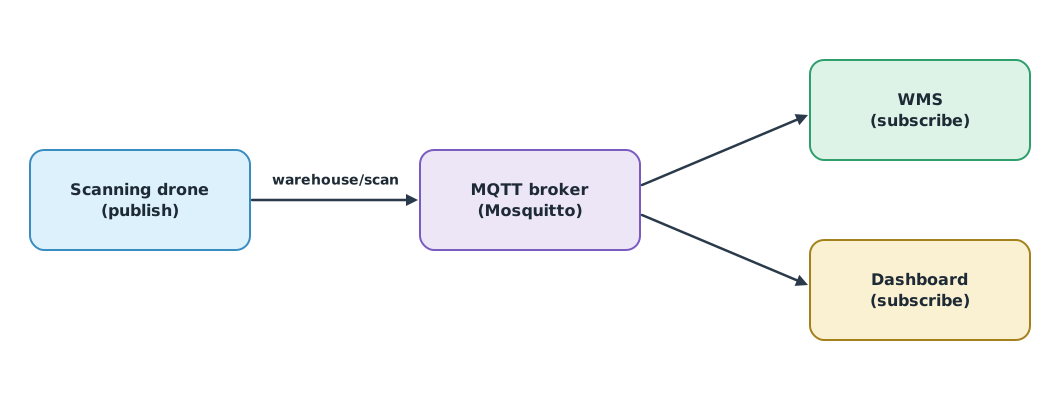
The OASIS MQTT 5.0 standard defines three quality of service (QoS) levels:
| QoS | Meaning | Effect on scan results |
|---|---|---|
| 0 | At most once; messages may be lost | A correct location may appear “not found” |
| 1 | At least once; duplicates may occur | Receivers must handle duplicates, e.g. by message ID |
| 2 | Exactly once | Slower because of multi-step acknowledgement |
Stock scans usually use QoS 1 with a unique message ID so receivers can drop duplicates. Frequent drone position updates may use QoS 0, since a new message soon replaces a lost one.
Example 1. Scan messages and reconciliation
One JSON message per location, then compared with the WMS records (8 synthetic locations).
import json

scan_msg = {"msg_id": "D1-20260927-0001", "location": "A1-03-2", "item": "4012345000016",
            "qty": 12, "ts": "2026-09-27T09:15:02+07:00", "drone": "D1"}
print("topic warehouse/scan/A1 payload", json.dumps(scan_msg))

wms = {"A1-01-1": ("4012345000016", 10), "A1-02-1": ("4012345000023", 5), "A1-03-2": ("4012345000016", 12),
       "A1-04-3": ("4012345000030", 8), "A1-05-1": ("4012345000047", 20), "A1-06-2": ("4012345000054", 6),
       "A1-07-4": ("4012345000061", 4), "A1-08-5": ("4012345000078", 9)}
scan = {"A1-01-1": ("4012345000016", 10), "A1-02-1": ("4012345000023", 3), "A1-03-2": ("4012345000016", 12),
        "A1-05-1": ("4012345000047", 20), "A1-06-2": ("4012345000054", 6), "A1-07-4": ("4012345000061", 4),
        "A1-08-5": ("4012345000078", 9), "A1-09-1": ("4012345000085", 2)}

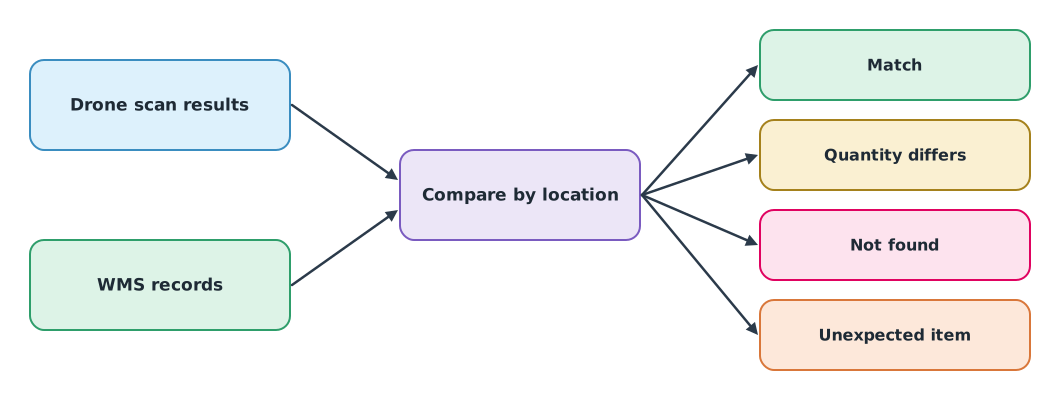
result = {"match": [], "qty differs": [], "not found": [], "unexpected": []}
for loc, (item, qty) in wms.items():
    if loc not in scan:
        result["not found"].append(loc)
    elif scan[loc] == (item, qty):
        result["match"].append(loc)
    else:
        result["qty differs"].append(loc)
result["unexpected"] = [loc for loc in scan if loc not in wms]
for k, v in result.items():
    print(f"{k:<12} {len(v)} {v}")
print(f"record accuracy {len(result['match']) / len(wms):.1%} of {len(wms)} WMS locations")
topic warehouse/scan/A1 payload {"msg_id": "D1-20260927-0001", "location": "A1-03-2", "item": "4012345000016", "qty": 12, "ts": "2026-09-27T09:15:02+07:00", "drone": "D1"}
match 6 ['A1-01-1', 'A1-03-2', 'A1-05-1', 'A1-06-2', 'A1-07-4', 'A1-08-5']
qty differs 1 ['A1-02-1']
not found 1 ['A1-04-3']
unexpected 1 ['A1-09-1']
record accuracy 75.0% of 8 WMS locations“Not found” may mean the stock really is missing, that the drone could not read the label, or that a QoS 0 message was lost. Before adjusting the WMS, staff must confirm the finding and record the cause.
Product codes and check digits
Product codes under the GS1 standard (GS1 General Specifications) end with a check digit computed from the other digits. If a camera misreads one digit, the check digit usually no longer matches, so the system rejects the code instead of recording the wrong item.
Example 2. Validating the check digit of a 13-digit code
def gs1_check_digit(digits):                 # without the check digit
    total = sum(int(d) * (3 if i % 2 == 0 else 1) for i, d in enumerate(reversed(digits)))
    return (10 - total % 10) % 10

def is_valid(code):
    return code.isdigit() and gs1_check_digit(code[:-1]) == int(code[-1])

for code in ("4012345000016", "4012348000016", "4012345000023"):
    print(f"{code}: check digit {gs1_check_digit(code[:-1])}, valid {is_valid(code)}")
4012345000016: check digit 6, valid True
4012348000016: check digit 3, valid False
4012345000023: check digit 3, valid TrueThe second code has one digit misread (5 as 8), so the check digit does not match and the system should ask for a rescan instead of recording it.
Module lab
Lab: sending scan results into a system
- Install Mosquitto in the lab and use paho-mqtt to send scan results from the module 3 lab in the message format of Example 1
- Write a subscriber that records to a table (standing in for the WMS), drops duplicates by msg_id, and test QoS 0 and 1 while briefly cutting the network
- Reconcile scan results with the records and compute record accuracy
- Validate the check digit of every code read and count the rejects
- Write a staff confirmation procedure before records are adjusted
Common mistakes
Watch out
- Using QoS 0 for scan results and concluding stock is missing
- No message ID, so QoS 1 duplicates are counted twice
- Adjusting WMS records automatically without confirmation
- Not validating check digits, recording the wrong item
- Leaving the broker unprotected without authentication and encryption (see the MQTT knowledge unit)
Summary
- MQTT publish–subscribe carries scan results from drones to the WMS and dashboards
- QoS 0 may lose, QoS 1 may duplicate, QoS 2 delivers exactly once; choose by the effect on data
- Reconciliation by location gives four outcomes, and findings are confirmed before records change
- The GS1 check digit catches misread codes
Check your understanding
- Which QoS level may duplicate messages?
- 50 locations checked and 46 match. What is the record accuracy?
- Why should scan results carry a unique message ID?
- The first 12 digits are 401234500001. What is the check digit?
- What are possible causes of a “not found” result?
Answers
- QoS 1
- So receivers can drop duplicates when QoS 1 is used
- 6
- The stock is really missing, the label could not be read, or the message was lost in transit
Key formulas
| Record accuracy | |
| GS1 check digit (mod 10) |
Key references
- OASIS. (2019). MQTT version 5.0 (OASIS Standard, 7 March 2019). link
- Eclipse Foundation. Eclipse Mosquitto: An open source MQTT broker. link
- Eclipse Foundation. paho-mqtt: MQTT version 5.0/3.1.1 client class (Python package). link
- GS1. (2026). GS1 general specifications (Release 26.0). link
- Wawrla, L., Maghazei, O., & Netland, T. (2019). Applications of drones in warehouse operations (White paper). ETH Zurich, D-MTEC, Chair of Production and Operations Management. link
- Ma, Y., Selby, N., & Adib, F. (2017). Drone relays for battery-free networks. In Proceedings of ACM SIGCOMM 2017 (pp. 335–347). ACM. link
- Kurose, J. F., & Ross, K. W. (2025). Computer networking: A top-down approach (9th ed.). Pearson. link
Further reading
Study the assigned knowledge units in advance, review media and take the module quiz
IoT and smart warehouse systems
Deep dive: MQTT and Eclipse Mosquitto for drone and IoT systems
In class / field
Intensive lab and field practice recorded in a lab notebook
Learning evidence: Lab notebook signed by the instructor