Barcode and RFID tag reading
UAT 459 UAS, Internet of Things and Smart Warehouse Systems
Lesson
By the end of this module you will be able to
- Explain the GS1 codes on pallet labels (SSCC, GS1-128 barcodes and 2D codes) and use the check digit to reject misreads
- Choose the lens, distance, camera orientation and flight speed that let a drone read barcodes from the middle of the aisle
- Explain passive UHF RFID, the frequency rules in Thailand, and compute read range with the Friis equation
- Evaluate read rates and design how unread locations are handled
Why this matters
A counting drone has one core job: to read which pallet is where. If it cannot read, or reads wrongly, everything downstream, from localization and reconciliation to the business case, loses its meaning. Reading from a drone is much harder than pointing a handheld scanner. The drone is more than a metre from the label, it is always moving, the warehouse is dim at night, and some labels are creased or face the wrong way.
This module covers the “barcode or tag reading” topic of the course description. It looks at two technologies: barcodes read by a camera and RFID read by radio. The parts warehouse in the case study uses both. Ordinary pallets carry GS1-128 labels, and the steel returnable containers of some customers carry RFID tags.
GS1 codes on pallet labels
GS1 is the organisation that sets the product-identification standards used worldwide. Two of its keys matter in a warehouse. The GTIN (global trade item number) identifies a kind of item, such as one model of brake pad, while the SSCC (serial shipping container code) identifies this particular shipping unit, such as this pallet. Think of the GTIN as a car model and the SSCC as one car’s licence plate. An SSCC has 18 digits: an extension digit, the company prefix issued by GS1, a serial reference chosen by the company, and a final check digit.
The logistic label prints the SSCC as a GS1-128 barcode, a one-dimensional symbol. The GS1 General Specifications, Release 26.0 (GS1, 2026a), set the key values for logistic units scanned in general distribution:
- X-dimension, the width of the narrowest bar: 0.495 to 0.940 mm for GS1-128
- Bar height: at least 31.75 mm
- Quiet zones left and right: at least 10 times X
- 2D codes: GS1 DataMatrix and GS1 QR Code use X from 0.743 mm; 2D codes store more data in less space and have built-in error correction
- Position on the pallet: barcodes must sit 400 to 800 mm above the pallet base, and two identical labels on adjacent sides are recommended
The last point matters a great deal for drones. It tells us at what height the camera must look, and two labels on adjacent sides make it more likely that at least one faces the aisle.
The check digit
The last digit of an SSCC or GTIN is a check digit computed from the others. Multiply the digits by 3 and 1 alternately, starting with 3 on the rightmost data digit, add them, and find the digit that brings the total up to a multiple of 10: . If the software misreads one digit, the check digit no longer matches and the system can reject the read at once instead of recording a pallet that does not exist.
Example 1 Building and checking an SSCC check digit
The company has prefix 8850123 (assumed). It builds the SSCC of one pallet and checks three reads: one correct, one with the seventh digit misread from 2 as 8, and one with two adjacent digits swapped.
def gs1_check(data):
    """GS1 check digit: weights 3,1,3,1... from the rightmost data digit."""
    s = sum(int(d) * (3 if i % 2 == 0 else 1) for i, d in enumerate(reversed(data)))
    return (10 - s % 10) % 10

body = "0" + "8850123" + "456789012"       # extension + company prefix + serial (assumed)
sscc = body + str(gs1_check(body))
print("SSCC", sscc)
reads = [sscc, sscc[:6] + "8" + sscc[7:], sscc[:9] + sscc[10] + sscc[9] + sscc[11:]]
for r in reads:
    ok = len(r) == 18 and gs1_check(r[:17]) == int(r[17])
    print(r, "accept" if ok else "reject, re-read")
SSCC 088501234567890121
088501234567890121 accept
088501834567890121 reject, re-read
088501234657890121 reject, re-readBoth the single misread digit and the swapped neighbours are rejected, but the check digit does not catch everything. Swapping two adjacent digits that differ by 5 (such as 0 and 5) leaves the weighted sum unchanged modulo 10, so it slips through. A good system therefore also checks that the SSCC read actually exists in the WMS.
Choosing a camera that reads from the aisle
A barcode decoder needs the narrowest bar to cover at least a certain number of pixels, the pixels per module (). One pixel projected onto the label measures , where is the pixel size on the sensor, the distance from camera to label and the focal length, the same relation used for ground sample distance in aerial imaging. The condition gives the maximum reading distance:
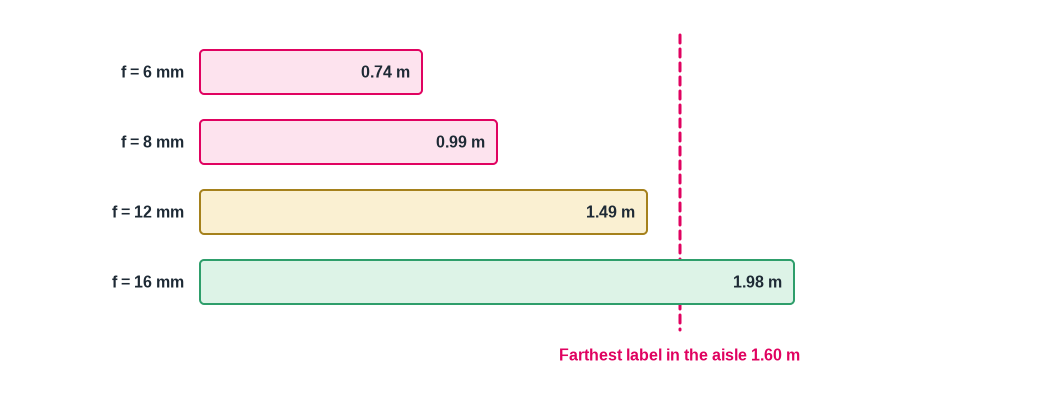
In a 3.0 m aisle the drone flies along the centre line, and the camera is about 1.35 m from the pallet faces. That distance can vary by m because of drone position error and pallets not stored flush, so the design must read out to 1.60 m and still cover the label band when as close as 1.10 m.
Example 2 Choosing the lens and camera orientation
The camera has a 6.4 × 4.8 mm sensor, 4,000 × 3,000 pixels and 1.6 µm pixels. The team requires 2.5 pixels per module and uses the minimum GS1-128 X of 0.495 mm (camera values and the 2.5-pixel rule are assumed).
# which lens lets the camera read a GS1-128 label from the aisle? (camera values assumed)
X = 0.495                  # mm, smallest X-dimension for GS1-128 on logistic units (GS1)
PPM = 2.5                  # pixels per module the decoder needs (team rule, assumed)
PITCH = 0.0016             # mm per pixel (6.4 mm sensor / 4000 px)
SENSOR = (6.4, 4.8)        # mm, long and short side
D_NOM, D_VAR = 1.35, 0.25  # m, camera-to-label distance and its variation in the aisle

gsd_max = X / PPM                                  # mm per pixel on the label
print(f"GSD needed <= {gsd_max:.3f} mm/px")
for f in (6, 8, 12, 16):
    d_max = gsd_max * f / PITCH / 1000              # m
    ok = "ok" if d_max >= D_NOM + D_VAR else "too short"
    print(f"f = {f:2d} mm: reads up to {d_max:.2f} m ({ok} for {D_NOM + D_VAR:.2f} m)")

f = 16
near, far = D_NOM - D_VAR, D_NOM + D_VAR
band = 800 - 400 + 31.75                            # mm, label zone 400-800 mm plus bar height
for name, side in (("landscape", SENSOR[1]), ("portrait", SENSOR[0])):
    h = side * near * 1000 / f
    print(f"{name}: vertical footprint at {near:.2f} m = {h:.0f} mm (need {band:.0f} mm)")
gsd = PITCH * D_NOM * 1000 / f
v_max = gsd / 1000 * 4000                           # m/s for 1 px of blur at 1/4000 s
print(f"GSD at {D_NOM} m = {gsd:.3f} mm/px, blur at 0.5 m/s and 1/4000 s = "
      f"{0.5 * 1000 / 4000 / gsd:.2f} px, max speed {v_max:.2f} m/s")
GSD needed <= 0.198 mm/px
f = 6 mm: reads up to 0.74 m (too short for 1.60 m)
f = 8 mm: reads up to 0.99 m (too short for 1.60 m)
f = 12 mm: reads up to 1.49 m (too short for 1.60 m)
f = 16 mm: reads up to 1.98 m (ok for 1.60 m)
landscape: vertical footprint at 1.10 m = 330 mm (need 432 mm)
portrait: vertical footprint at 1.10 m = 440 mm (need 432 mm)
GSD at 1.35 m = 0.135 mm/px, blur at 0.5 m/s and 1/4000 s = 0.93 px, max speed 0.54 m/sThe output says three things. First, a 12 mm lens reads only to 1.49 m, not enough when the drone drifts away, so a 16 mm lens is needed. Second, with the camera in the usual landscape orientation the image is only 330 mm tall and misses part of the 400 to 800 mm label band; turned to portrait it covers 440 mm, which fits with almost no margin. Third, at 1/4000 s and 0.5 m/s the blur is 0.93 pixels; faster than 0.54 m/s the blur exceeds one pixel.
A fast shutter lets in little light, and at night a warehouse often keeps only some lights on, so counting drones usually carry their own lighting. The WareVision study by Kalinov et al. (2020) was tested in a real warehouse under low light and used a convolutional neural network to find barcodes in the image before decoding, which locates labels against cluttered backgrounds better than trying to decode the whole frame directly.
Passive UHF RFID
RFID (radio-frequency identification) reads codes by radio without needing to see the tag. Warehouses mostly use passive UHF tags, which have no battery. The reader (interrogator) transmits, the tag harvests energy from that field to power its chip, and it replies by modulating the reflection of the reader’s signal (backscatter). It is like shining a torch at a small mirror that blinks a code. The worldwide standard is GS1’s EPC Gen2, Release 3.0.1, which defines a passive-backscatter air interface for 860 to 930 MHz (GS1, 2026b).
Each country sets its own band and power. GS1’s overview of September 2025 lists Thailand at 920 to 925 MHz, at most 4 W EIRP, with a licence required above 0.5 W (GS1, 2025). The Thai Telecommunications Association’s summary of the NBTC notifications of B.E. 2560 (2017) gives the same picture: RFID in 920 to 925 MHz up to 4 W EIRP, and use without a radio licence only up to 500 mW EIRP (Telecommunications Association of Thailand, 2017). Both are secondary summaries, not the notifications themselves, so always check the latest NBTC notification before fitting a reader to a drone.
The distance at which the reader can power a tag follows from the Friis transmission equation (Friis, 1946), which Rao et al. (2005) write as a read-range formula for RFID tags:
where is the wavelength, the equivalent isotropically radiated power, the tag antenna gain, the fraction of power delivered to the chip, the polarisation loss factor and the minimum power the chip needs. This is a free-space range; among metal racks and reflections, real ranges are usually shorter.
Example 3 Tag read range from the drone
The tag chip needs −20 dBm, 0.8 of the power reaches the chip, and half is lost to polarisation because the reader antenna is circularly polarised while the tag is linear. Three cases are compared (tag values assumed).
import math
# forward-link read range of a passive UHF tag: r = lambda/(4 pi) * sqrt(EIRP * G * tau * p / P_th)
lam = 3e8 / 922.5e6                         # m, centre of the 920-925 MHz band
P_TH = 10 ** (-20 / 10) / 1000              # W, tag chip sensitivity -20 dBm (assumed)
TAU, POL = 0.8, 0.5                         # power transfer to the chip, polarisation loss (assumed)
cases = [("0.5 W EIRP, dipole tag", 0.5, 2.15), ("4 W EIRP, dipole tag", 4.0, 2.15),
         ("0.5 W EIRP, tag on metal", 0.5, -3.0)]
print(f"wavelength {lam:.3f} m")
for name, eirp, g_dbi in cases:
    r = lam / (4 * math.pi) * math.sqrt(eirp * 10 ** (g_dbi / 10) * TAU * POL / P_TH)
    print(f"{name:<26} {r:.1f} m")
wavelength 0.325 m
0.5 W EIRP, dipole tag 4.7 m
4 W EIRP, dipole tag 13.3 m
0.5 W EIRP, tag on metal 2.6 mAt 0.5 W EIRP, which needs no licence, an ordinary dipole tag reads at 4.7 m, more than the 3.0 m aisle width. The drone will therefore hear tags on the opposite rack face and in neighbouring bays too. Long range is not always an advantage, because it hides which slot a tag is in; module 3 deals with that. A tag stuck straight onto a steel container has low gain and reads at only 2.6 m, so a tag designed for metal surfaces (an on-metal tag) is needed.
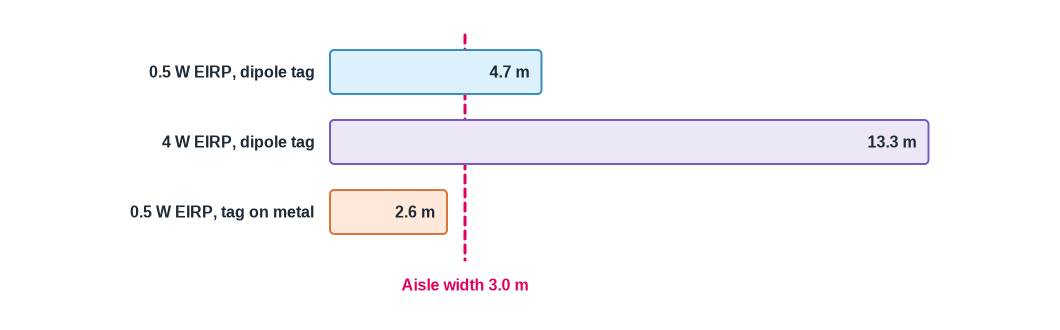
Raising power eightfold from 0.5 to 4 W increases range only times, because range grows with the square root of power. Another option is to use the drone as a relay between a reader on the floor and the tags, the idea behind RFly, where Ma et al. (2017) showed that tags could be read and located farther away than with a reader on the floor alone.
In short: barcodes are already on every pallet, cost almost nothing and localize well because they must be seen to be read, but they need a clear view of the label. RFID reads without line of sight and reads many tags at once, but tags must be added, metal and liquids interfere, and the wide read zone makes localization hard. The case warehouse therefore relies on barcodes and uses RFID for the returnable steel containers that customers already tag.
Read rate and unread locations
The first-pass read rate is the share of locations read on the first flight. Locations fail for many reasons: creased labels, labels facing inwards, stretch film glare or motion blur. The key rule is that an unread location must be recorded as “unread”, never as “empty”, because the two states lead to completely different actions.
Example 4 How much does a re-flight recover?
The first pass reads 96% of the 3,360 upper locations. The team re-flies only the unread locations and expects to recover 70% of them (assumed values).
# first-pass read rate, re-flight, and what is left for staff (assumed rates)
upper, p1, recover = 3360, 0.96, 0.70
miss1 = upper * (1 - p1)
miss2 = miss1 * (1 - recover)
print(f"unread after pass 1: {miss1:.0f}, after re-flight: {miss2:.0f} "
      f"({miss2 / upper * 100:.1f} % for staff)")
unread after pass 1: 134, after re-flight: 40 (1.2 % for staff)The re-flight recovers only 70%, not 96% as on the first pass, because failures are not independent: a creased or wrongly placed label fails every time, however often the drone tries. The remaining 40 locations go to staff as tasks, and the images should be kept to find causes, for example which supplier often places labels wrongly.
Module lab
Lab: barcode and tag reading on a test bench
- Print at least 10 GS1-128 labels with assumed SSCCs at X = 0.5 mm and fix them to boxes 400 to 800 mm above the base, with some creased or tilted. Verify the check digits with the code in Example 1
- Mount the camera on a cart or slide rail (no flying), in portrait orientation. Record images at 1.1, 1.35 and 1.6 m and at 0.3, 0.5 and 0.8 m/s, decode them with a barcode-decoding library and record the read rate
- Compare the results with Example 2. Explain at which distance or speed reading starts to fail and whether the cause matches GSD or blur
- With a handheld RFID reader at no more than 0.5 W EIRP, measure the read range of tags on a cardboard box and on a steel plate, and compare with Example 3
Common mistakes
Watch out
- Flying closer to the racks to make labels readable instead of changing the lens or camera, which adds collision risk for nothing
- Mounting the camera in landscape out of habit, so the image misses part of the 400 to 800 mm label band
- Recording unread locations as empty, so the WMS creates wrong tasks and reorders stock
- Skipping the check digit and the WMS lookup, so pallets that do not exist get recorded
- Raising RFID power beyond the legal limit, or assuming longer range is always better when it destroys localization
Summary
- The SSCC identifies each pallet and is printed as GS1-128 with X from 0.495 to 0.940 mm, 400 to 800 mm above the pallet base; the check digit helps reject misreads
- The maximum reading distance must cover the distance variation in the aisle; mount the camera in portrait, and let blur set the speed limit
- Passive UHF RFID tags read without line of sight; read range grows with ; Thailand uses 920 to 925 MHz, and the latest NBTC notification must be checked
- Unread is not empty; re-flights recover only part of the misses because failures tend to repeat at the same labels
Check your understanding
- Pixel size 1.6 µm, 16 mm lens, distance 1.6 m. What is the GSD, and how many pixels per module does a 0.495 mm X give?
- GSD 0.135 mm, shutter 1/2000 s. What is the highest speed that keeps blur within one pixel?
- The 17 data digits of an SSCC are 08850123000000017. What is the check digit?
- If EIRP rises from 0.5 W to 2 W, about how far does a 4.7 m read range become?
- Why must an unread location never be recorded as empty?
Answers
- mm per pixel, giving pixels per module, which meets the 2.5 rule
- m/s
- The weighted sum is 69, so the check digit is and the SSCC is 088501230000000171
- Range grows with the square root of power: m
- “Empty” makes the WMS treat the stock as missing, adjust it down or reorder, while “unread” should lead to a re-flight or a staff check, so the two states must always be kept apart
Key formulas
| Pixel size on the label | |
| Maximum reading distance | |
| GS1 check digit | |
| Passive RFID read range |
Key references
- GS1. (2026). GS1 general specifications (Release 26.0). link
- GS1. (2026). EPC radio-frequency identity Generation-2 UHF RFID standard: Specification for RFID air interface protocol for communications at 860 MHz – 930 MHz (Release 3.0.1). link
- GS1. (2025). Overview of UHF frequency allocations for RAIN RFID (29 September 2025). link
- สมาคมโทรคมนาคมแห่งประเทศไทย. (2560). สาระน่ารู้เกี่ยวกับการใช้งาน Internet of Things (IoT) ในย่านความถี่ 920-925 MHz [แผ่นข้อมูล]. link
- Rao, K. V. S., Nikitin, P. V., & Lam, S. F. (2005). Antenna design for UHF RFID tags: A review and a practical application. IEEE Transactions on Antennas and Propagation, 53(12), 3870–3876. link
- Friis, H. T. (1946). A note on a simple transmission formula. Proceedings of the IRE, 34(5), 254–256. link
- Ma, Y., Selby, N., & Adib, F. (2017). Drone relays for battery-free networks. In Proceedings of ACM SIGCOMM 2017 (pp. 335–347). ACM. link
- Kalinov, I., Petrovsky, A., Ilin, V., Pristanskiy, E., Kurenkov, M., Ramzhaev, V., Idrisov, I., & Tsetserukou, D. (2020). WareVision: CNN barcode detection-based UAV trajectory optimization for autonomous warehouse stocktaking. IEEE Robotics and Automation Letters, 5(4), 6647–6653. link
Further reading
Study the assigned knowledge units in advance, review media and take the module quiz
In class / field
Lab or field practice from worksheets with a safety checklist
Learning evidence: Checked worksheets and quiz results