Warehouse-system integration and automation
UAT 459 UAS, Internet of Things and Smart Warehouse Systems
Lesson
By the end of this module you will be able to
- Draw an integration map between the IoT platform, the warehouse management system (WMS), the QA system and control systems by ISA-95 level, naming data owners and protocols
- Turn a temperature excursion into pallet hold requests to the WMS that are safe to resend
- Design pallet status as a state machine that defines who may change each status
- Design alarm logic with delays and deadbands and assess the alarm load on staff
- Describe conveyors, AS/RS and mobile robots, where drones and IoT connect to them, and the order-acceptance rules of the VDA 5050 interface
Why this matters
The best IoT system is useless if, when the cold room has a problem, the WMS still tells staff to pick vaccine from a shelf that got too warm and ship it to a hospital. Temperature data must change what other systems actually do: hold pallets in the WMS, open an assessment in the QA system, and switch to the standby refrigeration unit. At the same time, badly designed automation creates new problems, such as an alarm at every door opening until staff silence it and then miss a real event.
This module covers two topics of the course description: warehouse-system integration and automation. module 5 of this course taught sending drone counts to the WMS as blind counts with human-approved adjustments. This module applies the same principles to everything the IoT platform produces.
Integration map of the distribution centre
ISA-95 (IEC 62264) divides enterprise systems into levels: level 4 is business planning (ERP), level 3 is operations management (the WMS, the QA system and the IoT platform), level 2 is control and supervision, and level 1 is sensing and actuation (International Society of Automation, n.d.). The map answers the most important integration question: who owns each kind of data?
- The WMS owns pallet locations and status. The IoT platform may send “requests” but never edits WMS data itself
- The IoT platform owns measurements, excursion events and device status
- The QA system owns the decision on whether product is usable
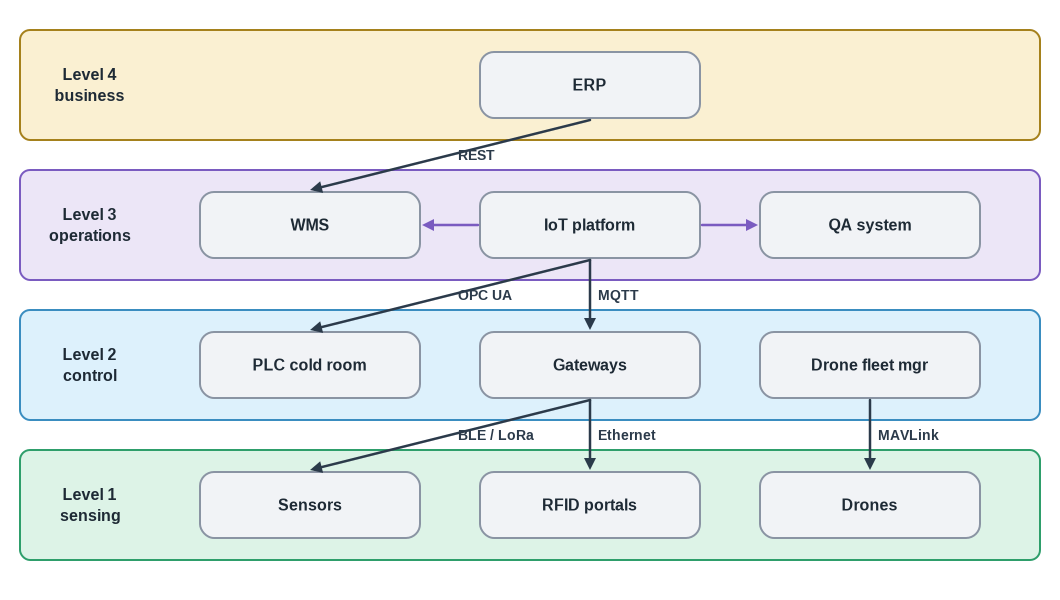
Each line in Figure 1 uses the integration pattern that fits its job.
| Pattern | Where | Why |
|---|---|---|
| Event messages over MQTT | Gateways to platform | Continuous data, many receivers (OASIS, 2019) |
| HTTP API (REST) | Platform to WMS and QA system, WMS to ERP | Request-and-reply tasks that need confirmation, using GET, POST and status codes as defined in RFC 9110 (Fielding et al., 2022) |
| OPC UA | Platform to refrigeration PLCs | Industrial control standard with built-in data models and security (International Electrotechnical Commission, 2025) |
RFC 9110 separates idempotent methods, where repeating a request has the same effect as sending it once (such as PUT and DELETE), from methods that are not (such as POST). A request sent over a network may be resent when no reply arrives, so the system must make resending always safe. A common way is to give each request an ID derived from the source data; a receiver that sees the same ID does not act again.
Example 1 From an excursion event to WMS hold requests
The platform confirms an excursion at sensor T2-07, which covers three locations according to temperature mapping, and asks the WMS which pallets are at those locations (assumed data).
import json
# turn a confirmed excursion into hold requests for the WMS (assumed data)
excursion = {"event_id": "EXC-20261001-003", "sensor": "T2-07", "zone": "Z2",
             "covers": ["R03-L4", "R03-L5", "R04-L5"], "start": "2026-10-01T02:11:00+07:00",
             "end": "2026-10-01T02:38:00+07:00", "max_c": 9.4}
wms_stock = {"R03-L4": ["SSCC-0501", "SSCC-0502"], "R03-L5": ["SSCC-0517"], "R04-L5": [],
             "R05-L5": ["SSCC-0530"]}
requests = []
for loc in excursion["covers"]:
    for sscc in wms_stock.get(loc, []):
        requests.append({"request_id": f'{excursion["event_id"]}/{sscc}',   # same input gives the same ID
                         "sscc": sscc, "location": loc, "action": "HOLD",
                         "reason": "TEMP_EXCURSION", "evidence": excursion["event_id"]})
print(f"{len(requests)} pallets to hold")
print(json.dumps(requests[0], indent=1))
3 pallets to hold
{
"request_id": "EXC-20261001-003/SSCC-0501",
"sscc": "SSCC-0501",
"location": "R03-L4",
"action": "HOLD",
"reason": "TEMP_EXCURSION",
"evidence": "EXC-20261001-003"
}The request ID combines the event ID and the SSCC, so if the platform resends after a network glitch, the WMS sees the same ID and does not create a duplicate task. Location R04-L5 is empty, so no request is made, and pallet SSCC-0530 at R05-L5 is not held because it lies outside the sensor’s coverage. Which locations a sensor “covers” must therefore come from temperature mapping, not guesswork. Every request cites its evidence, the event ID, which links to the measurements in the module 8 database.
Pallet status and who decides
The safe approach is to treat pallet status as a state machine, with clearly defined states, and for each transition a rule on who may make it. Automation should only make transitions that increase safety, such as holding a pallet. Releasing a pallet or rejecting it belongs to QA, who assess against the product’s stability data.
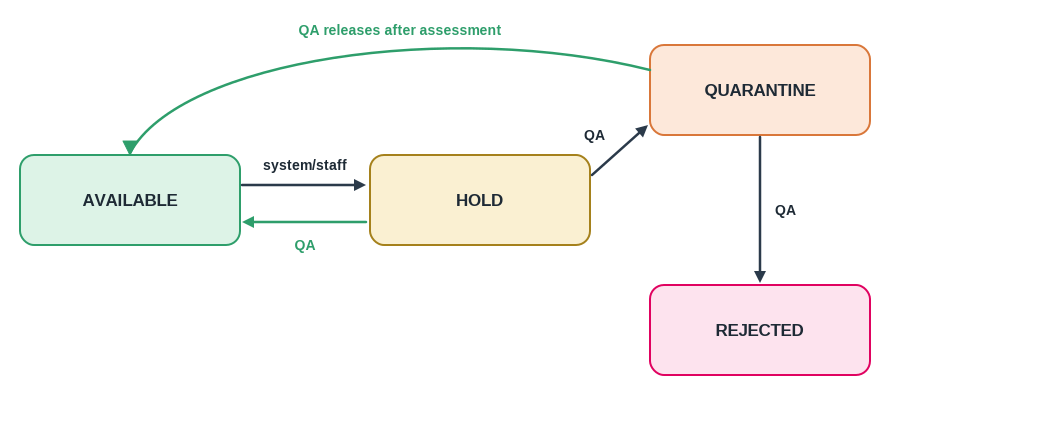
Example 2 Enforcing who may change status
The centre’s policy is written as a table of allowed transitions, then the actual sequence of incoming requests is processed, including a duplicate and an unauthorised request (assumed policy).
# allowed status changes of a pallet in the WMS; only QA may release or reject (assumed policy)
ALLOWED = {("AVAILABLE", "HOLD"): {"system", "staff"}, ("HOLD", "QUARANTINE"): {"QA"},
           ("HOLD", "AVAILABLE"): {"QA"}, ("QUARANTINE", "AVAILABLE"): {"QA"},
           ("QUARANTINE", "REJECTED"): {"QA"}}
status = {"SSCC-0501": "AVAILABLE", "SSCC-0502": "AVAILABLE", "SSCC-0517": "AVAILABLE"}
log = [("SSCC-0501", "HOLD", "system"), ("SSCC-0502", "HOLD", "system"), ("SSCC-0517", "HOLD", "system"),
       ("SSCC-0517", "HOLD", "system"), ("SSCC-0502", "AVAILABLE", "staff"),
       ("SSCC-0501", "QUARANTINE", "QA"), ("SSCC-0502", "AVAILABLE", "QA"), ("SSCC-0501", "REJECTED", "QA")]
for sscc, new, who in log:
    old = status[sscc]
    if old == new:
        print(f"{sscc}: already {new}, ignored (duplicate)")
    elif who in ALLOWED.get((old, new), set()):
        status[sscc] = new
        print(f"{sscc}: {old} -> {new} by {who}")
    else:
        print(f"{sscc}: {old} -> {new} by {who} REFUSED")
print(status)
SSCC-0501: AVAILABLE -> HOLD by system
SSCC-0502: AVAILABLE -> HOLD by system
SSCC-0517: AVAILABLE -> HOLD by system
SSCC-0517: already HOLD, ignored (duplicate)
SSCC-0502: HOLD -> AVAILABLE by staff REFUSED
SSCC-0501: HOLD -> QUARANTINE by QA
SSCC-0502: HOLD -> AVAILABLE by QA
SSCC-0501: QUARANTINE -> REJECTED by QA
{'SSCC-0501': 'REJECTED', 'SSCC-0502': 'AVAILABLE', 'SSCC-0517': 'HOLD'}A staff member trying to release pallet 0502 to meet a shipment is refused and must wait for QA, who assess that this pallet was on the lower level where the temperature stayed in range and release it. Pallet 0501 is quarantined and then rejected. The duplicate request for pallet 0517 is ignored harmlessly. Every line of this output belongs in the WMS audit trail with the person’s name and time.
Automation: alarm logic
Automation in the distribution centre works at several levels. Closest to the equipment, PLCs control refrigeration. At the gateway, local lights and horns are switched on. At the platform, hold requests are sent, staff are alerted by duty roster, and the PLC is told to switch to the standby unit when the main unit fails. At the heart of every level is alarm logic that separates real events from transients.
WHO Supplement 6 says alarm limits may be set only by authorised users, and that an integrated system should allow alarm schedules by alert level for workdays, weekends and holidays (World Health Organization, 2015a). Supplement 8 on temperature mapping allows temperature to leave the range for at most 30 minutes after a door opening if that is part of the study’s acceptance criteria (World Health Organization, 2015b). In other words, door openings are normal events the design must absorb, not something to alarm on every time. There are three main tools.
- On-delay: alarm when the value has exceeded the limit for consecutive readings
- Clearing deadband: clear the alarm only when the value drops below the limit minus a band, so the alarm does not toggle when the value hovers near the limit
- Levels: a pre-alarm at 7.6 °C (from the module 6 guard band) shows on the dashboard immediately without waking anyone, while a delayed high alarm at 8.0 °C calls the on-duty staff
Example 3 Four door openings and one refrigeration fault
Simulate one cold-room day, one value a minute, with four loading door openings that spike the temperature for 5 to 12 minutes, and a real refrigeration fault at 18:00 that warms the room by 0.08 °C a minute until it is repaired (simulated data).
# a cold-room day, one value per minute: door openings and one real refrigeration fault (simulated)
def temp_at(m):
    t = 5.2
    for start, length, peak in ((480, 7, 8.6), (615, 12, 8.9), (750, 5, 8.3), (905, 9, 8.8)):
        if start <= m < start + length:
            t = peak                          # short warm spikes while the door is open
    if 1080 <= m < 1170:                      # 18:00 fault: warms 0.08 °C per minute, then repaired
        t = min(5.2 + 0.08 * (m - 1080), 11.0)
    return t
temp = [temp_at(m) for m in range(1440)]
def alarms(values, high, delay, deadband):
    out, active, above = [], False, 0
    for m, v in enumerate(values):
        above = above + 1 if v > high else 0
        if not active and above >= delay:
            active = True; out.append(m)
        elif active and v < high - deadband:
            active = False
    return out
naive = alarms(temp, 8.0, 1, 0.0)
smart = alarms(temp, 8.0, 15, 0.5)
pre = alarms(temp, 7.6, 1, 0.3)
hhmm = lambda m: f"{m // 60:02d}:{m % 60:02d}"
print("high alarm, no delay:", [hhmm(m) for m in naive])
print("high alarm, 15-min delay:", [hhmm(m) for m in smart])
print("pre-alarm 7.6 °C, no delay:", [hhmm(m) for m in pre])
first_above = next(m for m in range(1080, 1440) if temp[m] > 8.0)
print(f"fault: above 8.0 °C from {hhmm(first_above)}, delayed alarm at {hhmm(smart[0])}")
high alarm, no delay: ['08:00', '10:15', '12:30', '15:05', '18:36']
high alarm, 15-min delay: ['18:50']
pre-alarm 7.6 °C, no delay: ['08:00', '10:15', '12:30', '15:05', '18:31']
fault: above 8.0 °C from 18:36, delayed alarm at 18:50An undelayed alarm wakes staff five times, four of them door openings needing no action. A 15-minute delay leaves just the one real event, at the price of alerting 14 minutes later. Combined with the module 6 time budget (60-second interval) and the 55 minutes the room stays in range after a power cut, about 18 minutes of margin remain (31.7 − 14 = 17.7). The pre-alarm shows the event on the dashboard from 18:31, five minutes before the temperature actually passes 8 °C. The two-level design gets both early warning and no needless wake-up calls.
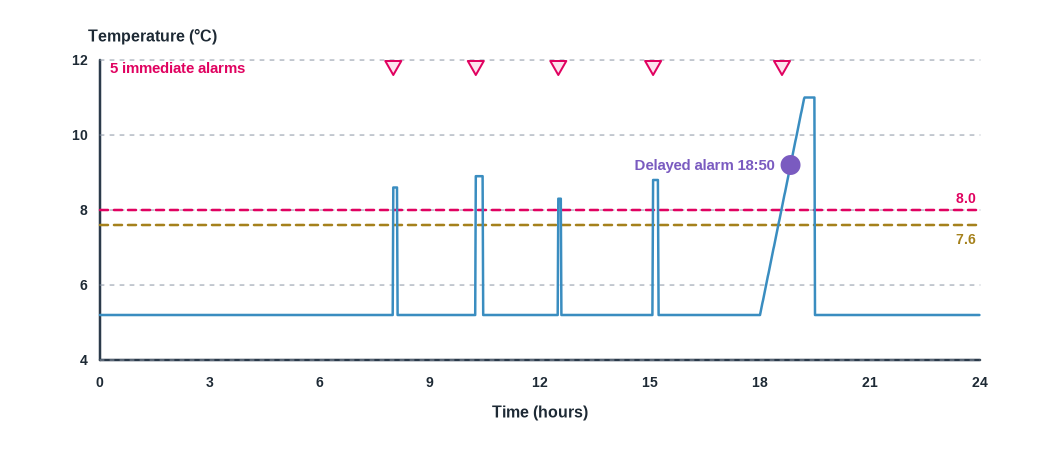
Delays have limits: too long and a real event is reported after the damage is done, so they must be set from the time budget, not from annoyance. Automation that drives real equipment, such as refrigeration switchover, must be tested at system acceptance; when a room has standby units, WHO asks for mapping over a period that includes each refrigeration unit running on its own.
Managing alarm load
The 1994 explosion at the Milford Haven refinery is a classic lesson: in the last 11 minutes before it, two operators had to recognise, acknowledge and act on 275 alarms. The Health and Safety Executive guidance Better alarm handling (Health and Safety Executive, n.d.) therefore sets a target long-term average alarm rate in normal operation of no more than one every ten minutes, and no more than ten in the first ten minutes after a major upset. It recommends reviewing alarms with no defined operator response, tuning nuisance alarm settings and adjusting deadbands on repeating alarms. Although written for the chemical industry, the principle of human capacity applies equally to a pharmaceutical store’s control room.
Example 4 One week’s alarm rate and the main culprits
Alarms from one week of the platform log are counted by source (assumed data).
from collections import Counter
# one week of alarm log from the monitoring platform (counts per alarm source, assumed)
week = Counter({"Z4 dock door D3 open": 410, "Z2 T2-07 high": 96, "G3 gateway offline": 74,
                "Z1 T1-31 low RH": 52, "Z3 freezer door": 31, "Z2 T2-11 low": 9, "UPS on battery": 3})
total = sum(week.values())
per_10min = total / (7 * 24 * 6)
print(f"{total} alarms in 7 days = {per_10min:.2f} per 10 min (guide: no more than 1)")
cum = 0
for name, n in week.most_common(3):
    cum += n
    print(f"{name:<24} {n:4d}  cumulative {cum / total:.0%}")
675 alarms in 7 days = 0.67 per 10 min (guide: no more than 1)
Z4 dock door D3 open 410 cumulative 61%
Z2 T2-07 high 96 cumulative 75%
G3 gateway offline 74 cumulative 86%The average of 0.67 per ten minutes meets the target, but the average is misleading: 61% of alarms come from door D3 alone, probably from a work procedure that props the door open or a badly mounted sensor. The top three sources make 86%. Fixing these three would cut alarms to about one seventh, and the remaining alarms would mean more. Gateway G3 dropping out is a module 7 problem, not the duty staff’s, and should become a maintenance task rather than an alarm.
Drones can be part of the automation too. When the upper sensors of hall Z1 report a slow temperature rise on a hot afternoon, the platform could create a task for the drone fleet manager to fly a vertical temperature profile that night (module 10). Such tasks go through the same steps as any other indoor drone mission: aisle locking and readiness checks as taught in modules 1–5 of this course and UAT 458. The drone’s results support QA decisions; they never change pallet status directly.
Warehouse automation equipment and where drones and IoT connect
A smart warehouse also moves goods with machines, and the drone and IoT systems must work beside them. Conveyors and sorters move cartons; a sorter is an expensive form of automation installed downstream of picking, and a conveyor splits the building into zones that people and trucks cannot easily cross (Bartholdi & Hackman, 2019). Automated storage and retrieval systems (AS/RS) put a simple robot in each aisle, which allows very narrow aisles and very high storage (Bartholdi & Hackman, 2019). Mobile robots carry pallets between points. None of them inspects the stock around it: machines move, drones and IoT sensors observe, and the WMS decides.
Control follows the ISA-95 levels of the integration map (International Society of Automation, n.d.). The WMS owns inventory and orders; a fleet control or equipment controller turns transport tasks into movements at level 2, beside the drone fleet manager, and PLCs and robot controllers act at level 1. For mobile robots, VDA 5050 defines the interface between fleet control and robots: MQTT with JSON messages (Verband der Automobilindustrie, 2026). An order is a route of nodes and edges. Its released part, the base, must be completed up to the last released node even if the connection drops, while the rest, the horizon, may still change. The standard is not a safety standard and leaves traffic management out. An IoT excursion or a drone count discrepancy therefore reaches the automation only as a request to the WMS, never as a direct command. Because wireless links lose and repeat messages, an order carries an orderId and an orderUpdateId, and the robot applies the resend-safe idea of Example 1.
Example 5 How a mobile robot accepts, ignores or rejects orders
The route and identifiers follow the example in the VDA 5050 text: order 1234 starts with nodes f, d, g released and b, h not yet released, and update 1 extends the base from g. Seven messages arrive, including a resend, a late old message, another order while the first is active, a changed copy of an update and an update that starts at the wrong node (rules simplified, edges omitted).
# how a mobile robot treats incoming orders (rules of VDA 5050 section 6.1.4, simplified; route and ids follow the standard's example)
def order(order_id, update_id, nodes):                    # nodes are (nodeId, released) in travel order; edges omitted
    return {"orderId": order_id, "orderUpdateId": update_id, "nodes": nodes}
def last_released(o):
    return [n for n, released in o["nodes"] if released][-1]      # the decision point
def accept(held, new):
    if held is None:
        return (new, f"accept  new order, base ends at {last_released(new)}") if new["orderUpdateId"] == 0 else (held, "reject  nothing to update")
    if new["orderId"] != held["orderId"]:
        return held, "reject  OTHER_ORDER_ACTIVE"
    if new["orderUpdateId"] < held["orderUpdateId"]:
        return held, "reject  OUTDATED_ORDER_UPDATE, keep the previous order"
    if new["orderUpdateId"] == held["orderUpdateId"]:
        return held, "ignore  identical resend" if new == held else "reject  SAME_ORDER_UPDATE_ID, content differs"
    if new["nodes"][0][0] != last_released(held):
        return held, f"reject  update must start at decision point {last_released(held)}, not {new['nodes'][0][0]}"
    return new, f"accept  update, base now ends at {last_released(new)}"
o0 = order("1234", 0, [("f", 1), ("d", 1), ("g", 1), ("b", 0), ("h", 0)])
o1 = order("1234", 1, [("g", 1), ("b", 1), ("h", 1), ("i", 0)])
messages = [o0, o0, o1, o0, order("5678", 0, [("a", 1)]), order("1234", 1, [("g", 1), ("b", 1)]), order("1234", 2, [("d", 1), ("g", 1)])]
held = None
for k, msg in enumerate(messages, 1):
    held, note = accept(held, msg)
    print(f"{k} order {msg['orderId']}/{msg['orderUpdateId']}  {note}")
1 order 1234/0 accept new order, base ends at g
2 order 1234/0 ignore identical resend
3 order 1234/1 accept update, base now ends at h
4 order 1234/0 reject OUTDATED_ORDER_UPDATE, keep the previous order
5 order 5678/0 reject OTHER_ORDER_ACTIVE
6 order 1234/1 reject SAME_ORDER_UPDATE_ID, content differs
7 order 1234/2 reject update must start at decision point h, not dMessage 2 is a resend, identical, so the robot ignores it and nothing runs twice. Message 4 shows ordering: a late copy of an old message cannot overwrite newer state. Message 6 reuses an update number with different content, an error and not a resend. Message 7 would rewrite part of a base the robot may already have driven, so an update must start at the decision point; the standard says the base cannot change because MQTT is asynchronous and wireless links lose messages. The same thinking, an ID that makes repeats harmless and a state that decides what may follow, governs the hold requests to the WMS earlier in this module.
Module lab
Lab: connect a mock platform to a mock WMS and design alarm logic
- Draw an integration map like Figure 1 for the group’s system, naming the owner of each data type, the protocol on each line and the steps needing human approval
- Build a mock WMS as a simple HTTP API (such as Flask or FastAPI) that accepts hold requests as in Example 1 and enforces the state machine of Example 2; test resent requests, unauthorised requests and the audit trail
- Feed data from the module 7 mock gateway through the alarm logic of Example 3, simulating at least five door openings and one real event; tune the delay and deadband and show that the module 6 time budget still holds
- Build a week of alarm log (real or simulated), compute the rate per ten minutes and the main culprits as in Example 4, and propose three fixes
Common mistakes
Watch out
- Letting the IoT platform edit WMS status directly instead of sending requests the WMS checks
- Resent requests creating duplicate tasks because there is no stable request ID
- Letting automation release pallets once temperature returns to normal, when that decision belongs to QA
- Delaying alarms out of annoyance without checking the time budget and how long the room can hold
- Looking only at the average alarm rate without finding the few sources that cause most alarms
- Letting an IoT alarm or a drone result command a machine directly, instead of a request through the WMS
Summary
- An ISA-95 map shows that the WMS owns pallet status, the IoT platform owns measurements and QA owns product decisions; MQTT, HTTP APIs and OPC UA are used by type of task
- Cross-system requests must be safe to resend, using a request ID derived from source data, and must cite evidence
- Pallet status is a state machine: automation may hold, but only QA may release or reject
- Alarm logic uses delays, deadbands and two levels checked against the time budget; the average alarm load should not exceed one per ten minutes, fixing the main culprits first
- Machines move, drones and IoT observe and the WMS decides; automation orders must be resend-safe, with an order ID, an update ID and a base that cannot be rewritten
Check your understanding
- Why should the IoT platform send a “hold request” to the WMS instead of changing pallet status in the WMS database itself?
- A hold request has ID
EXC-20261001-003/SSCC-0501. If it is sent three times, what should the WMS do? - Minute-by-minute values are 7.9, 8.2, 8.4, 8.1, 7.8, 8.3 and 8.5 °C, with a limit of 8.0 °C and a delay of 3 readings. At which value does the alarm occur?
- A week has 1,260 alarms. What is the rate per ten minutes, and does it meet the HSE target?
- In Example 3, why use two alarm levels rather than a single delayed alarm?
Answers
- The WMS owns status and must check permissions, keep its audit trail and apply its own rules; if the platform edits the database directly, all of these are bypassed
- Act on the first one normally, then ignore the other two because the request ID is the same (or reply that it is already done), without creating duplicate tasks
- Values 2 to 4 (8.2, 8.4, 8.1) exceed the limit three times in a row, so the alarm occurs at value 4; values 6 and 7 are only two in a row after the drop, so the condition is not met again
- per ten minutes, above the target of one per ten minutes
- A delayed alarm avoids needless wake-up calls but alerts late; an undelayed pre-alarm shows the event early on the dashboard without calling anyone, so two levels give both speed and trustworthy call-outs
Key formulas
| Delayed alarm condition | |
| Alarm clear condition | |
| Average alarm rate |
Key references
- International Society of Automation. ISA-95 standard: Enterprise-control system integration (ANSI/ISA-95, IEC 62264). link
- International Electrotechnical Commission. (2025). OPC unified architecture – Part 1: Overview and concepts (IEC 62541-1:2025). link
- Fielding, R. (Ed.), Nottingham, M. (Ed.), & Reschke, J. (Ed.). (2022). HTTP semantics (RFC 9110). RFC Editor. link
- OASIS. (2019). MQTT version 5.0 (OASIS Standard, 7 March 2019). link
- World Health Organization. (2015). Temperature and humidity monitoring systems for fixed storage areas: Technical supplement to WHO Technical Report Series, No. 961, 2011, Annex 9 (Supplement 6). WHO. link
- World Health Organization. (2015). Temperature mapping of storage areas: Technical supplement to WHO Technical Report Series, No. 961, 2011, Annex 9 (Supplement 8). WHO. link
- World Health Organization. (2011). Model guidance for the storage and transport of time- and temperature-sensitive pharmaceutical products (WHO Technical Report Series, No. 961, Annex 9). WHO. link
- Health and Safety Executive. Better alarm handling (Chemicals Sheet No. 6). HSE. link
- Bartholdi, J. J., III, & Hackman, S. T. (2019). Warehouse & distribution science (Release 0.98.1). The Supply Chain & Logistics Institute, Georgia Institute of Technology. link
- Verband der Automobilindustrie. (2026). VDA 5050: Interface for the communication between mobile robots and a fleet control (Version 3.0.0). link
Further reading
Study the assigned knowledge units in advance, review media and take the module quiz
In class / field
Lab or field practice from worksheets with a safety checklist
Learning evidence: Checked worksheets and quiz results