Developing simulations and connecting SITL
Understand the roles of the autopilot, simulator, GCS and API before connecting them into an experimental system.

Divide the system so you know where a problem lies
SITL runs the flight control software on a computer. The simulator generates motion and sensor readings for the control system to respond to, while a GCS such as QGroundControl or MAVProxy is used for configuration, status monitoring and mission management. Having a 3D scene is therefore not the same as having complete training scenarios or an assessment system.
ArduPilot Gazebo plugin does not require ROS, although many systems also use ROS, while the PX4 Gazebo pathway has its own steps. Choose one set and get it working before connecting other tools.
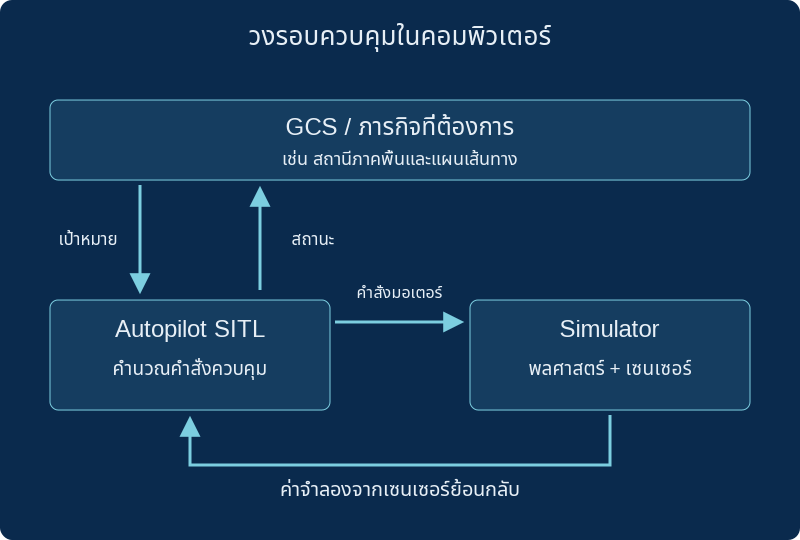
Minimum test sequence
- Choose ArduPilot or PX4, then pin the OS and simulator versions according to the manual.
- Get the simulator's basic scene working on its own first, and check the images and simulation time.
- Run the project's SITL example and check that there is a heartbeat and status data in the GCS.
- Use a basic simulated mission, check the state transitions and keep the logs.
- Only then add the remote controller, camera or API one part at a time, and compare with the baseline results.
At every step, record the commands from the manual for the version used and the results actually seen. If there is no telemetry, do not start changing controller values at random; check the processes, endpoints and plugin versions first.
Network and data boundaries
Keep computer-based experiments separate from real aircraft. Check the connection endpoints of the GCS and every program. Use local connections as far as the examples support, and do not expose control ports to the internet to solve connection problems.
If you add scenes or models from external sources, check the asset rights and plugin installation separately from the simulator's licence. ProjectAirSim states that external systems and assets have their own terms.
Reproducible deliverables
Keep a list of versions, launch commands, missions, logs and errors encountered. Another peer should be able to open the baseline case with the same steps before research begins. This chapter does not yet have SITL run results from this website development cycle.
Build on this with Computer Vision communication systems and computer-based mission simulation
Bibliography and original sources
Documents checked 23 September 2026 (B.E. 2569)
- ArduPilot: Using SITL with Gazebo
- ArduPilot Gazebo plugin
- PX4: Gazebo Simulation
- ProjectAirSim: repository and licensing
Activity linking MCU knowledge with simulation
Choose a DroneSim activity, a log-reading activity or a firmware SITL results study with objectives, steps, a worksheet and a summary of events from the stored ArduCopter 4.7.1 results, separating what each tool can confirm