Simulation tools for payloads and drone shows
Distinguish the roles of Skybrush, ArduPilot/Gazebo and Crazyswarm2, with download channels, licenses and limitations

Choose tools according to the question
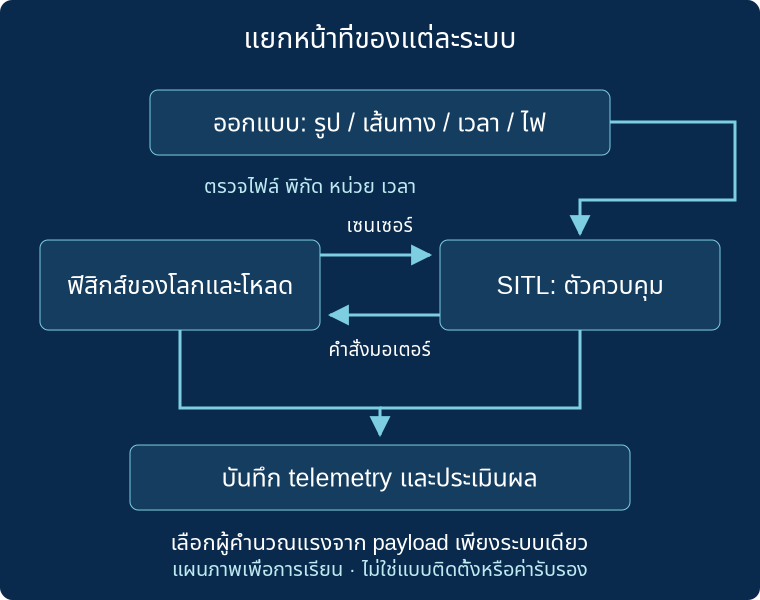
Use show-design tools to create formations and timing, use a simulator to study motion, and use SITL when you need to check how the control software responds. Connecting all three requires agreement on coordinates, time, units and data types; being able to export a file alone does not confirm that another system reads it correctly.
Tools from original sources
| Tool / download | What to start with | Limitations to know |
|---|---|---|
| Skybrush Studio · GitHub | Design formations, timing and lights, and check the show | addon uses GPL-3.0-or-later; planning/export relies on Studio Server, and Community requires an internet connection |
| ArduPilot Gazebo plugin | Connect SITL with worlds and models | plugin uses LGPL-3.0; check the licenses of other parts separately, and do not assume a slung payload is fully supported automatically |
| Crazyswarm2 | Crazyflie swarms on ROS 2 | MIT; record whether dynamics are enabled or which visualization mode is used |
| gym-pybullet-drones | Control and multi-vehicle problems in Python | MIT; a research base that requires adjusting the model and checking the environment |
| Skybrush Server | Study swarm communication and management | GPL-3.0; separate from Studio Server, which handles transition planning |
| FSC Lab / px4_command | Study slung payloads and controllers | GPL-3.0; documentation uses older ROS/Gazebo versions, so migration must be assessed |
This license information comes from repositories checked on 23 September 2569 (2026). Before using the code, check the LICENSE of the actual revision, and check dependencies and assets separately.
Getting started on Windows and Linux
For design work, check which Blender versions the addon supports and use the developer installer. For SITL/ROS work, start from the OS specified in that package documentation. Linux does not mean every distribution works, and Windows via WSL is not the same as native support. See Preparing the computer
Skybrush starting path: install the Blender version matching the guide → install the addon ZIP from the developer → open a simple example → check the visualization and limitations → record the plan with the versions. If the planning service is unavailable, record that limitation; do not treat the visualization as a completed transition check.
Crazyswarm2 starting path: prepare ROS 2 per the guide → test a simulation example → check the backend in server.yaml → keep logs before increasing the number of vehicles Simulation guide contains example commands specifically for the simulated backend
Agreements before connecting systems
State whether coordinates are ENU or NED and how the body frame axes are defined. Use the same simulation time when comparing data. Check the drone ID mapping and the m/s units. The .skyc file of Skybrush packages trajectories and light programs, but this lesson has not yet built a DroneSim importer or confirmed a .skyc connection to Gazebo
Exercise: choose two tools, write down the data that must be passed if they are connected, and the evidence still missing. You pass when you can separate the roles of planner, physics and controller. See Download sources
Bibliography and original sources
Documents checked on 23 September 2569 (2026)
- Skybrush. Studio: features and service limitations
- Skybrush. Studio for Blender: source and license
- ArduPilot. ardupilot_gazebo: plugin and installation guide
- IMRCLab. Crazyswarm2: ROS 2 stack for Crazyflie
- IMRCLab. Crazyswarm2 Usage: Simulation
- Learning Systems Lab. gym-pybullet-drones
- Skybrush. Server: fleet communication and management
- FSC Lab / Longhao Qian. px4_command: tethered payload flight control