MQTT and IoT
UAT 105 Digital Technology and Networks
Lesson
By the end of this module you will be able to
- Explain IoT architecture from devices through gateways to the cloud
- Design topic structures and use the + and
- Choose QoS levels, retained messages and Last Will to suit each kind of data
- Configure Mosquitto securely and assess data age when queues build up
Why this matters
A flood-watch mission might involve three drones, ten water-level sensors, a ground station, a command-centre dashboard and a database. If every device connects point to point with every other, the number of connections grows fast, and each new device means changing every machine. MQTT solves this with a middleman that receives and distributes messages. UAT 314 module 1 introduced MQTT; this module goes deep enough to design and configure a real system.
IoT architecture
The Internet of Things (IoT) is a system in which many devices measure, send data and receive commands over a network. It usually has four layers.
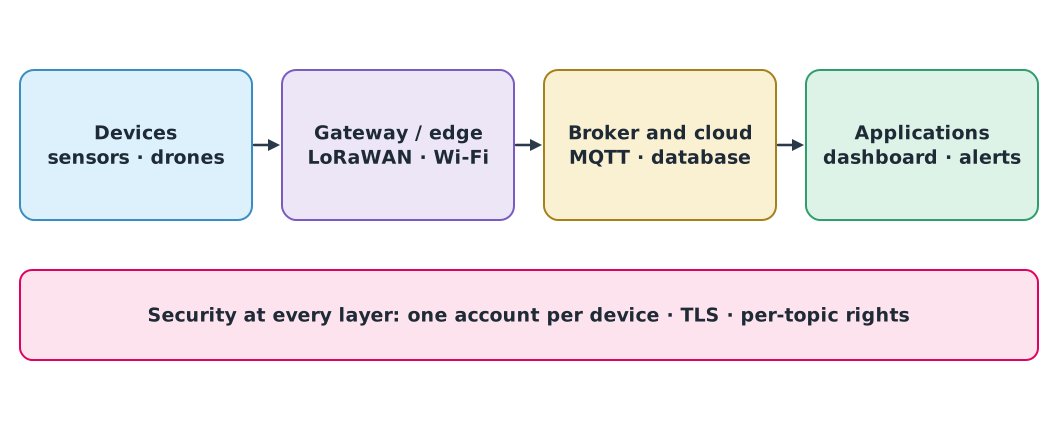
End devices often have little power and computing capacity. A gateway collects data from devices on low-power long-range radio such as LoRaWAN and forwards it into the IP network. An example in the drone knowledge hub is ChirpStack, a LoRaWAN network server that publishes every device message as JSON over MQTT, on topics such as application/APPLICATION_ID/device/DEV_EUI/event/up.
Publish/subscribe and topics
In MQTT a sender (publisher) sends messages to a topic on a middleman called the broker, and a receiver (subscriber) tells the broker which topics it wants. The broker forwards each message to the matching subscribers. Publishers and subscribers do not need to know each other or be online at the same time, and new subscribers can be added without changing the publishers.
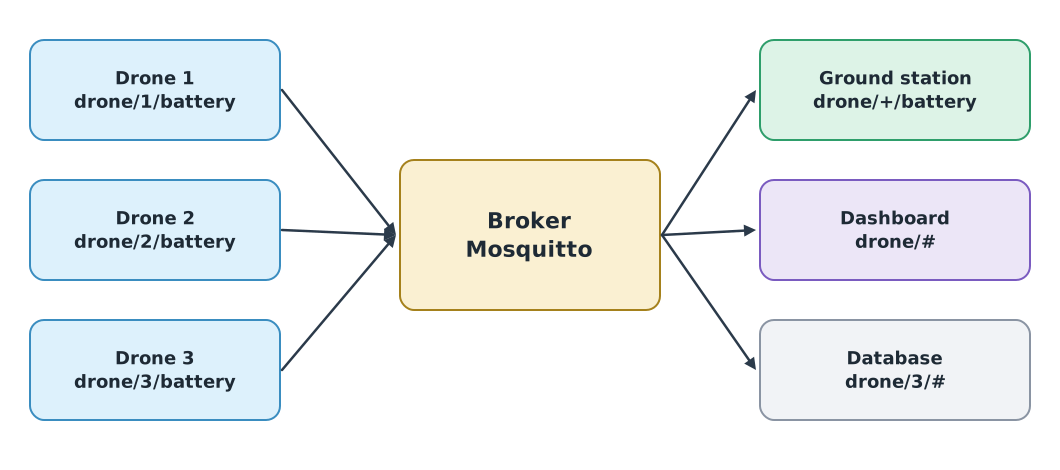
A topic is a multi-level string separated by /, like a file path. Subscribers can use two wildcards, as defined in MQTT 5.0:
+matches exactly one level:drone/+/batterymatchesdrone/3/batterybut notdrone/3/gps#matches all remaining levels, must come last, and also matches the parent:drone/#matches bothdrone/3/gps/fixanddrone
def topic_matches(topic_filter, topic):
    f_parts, t_parts = topic_filter.split("/"), topic.split("/")
    for i, f in enumerate(f_parts):
        if f == "#":
            return True
        if i >= len(t_parts):
            return False
        if f != "+" and f != t_parts[i]:
            return False
    return len(f_parts) == len(t_parts)


cases = [("drone/+/battery", "drone/3/battery"), ("drone/+/battery", "drone/3/gps"), ("drone/#", "drone/3/gps/fix"),
         ("drone/+", "drone/3/battery"), ("drone/#", "drone"), ("fleet/+/+/alt", "fleet/a/7/alt")]
for f, t in cases:
    print(f"{f:<16} {t:<18} {topic_matches(f, t)}")
drone/+/battery drone/3/battery True
drone/+/battery drone/3/gps False
drone/# drone/3/gps/fix True
drone/+ drone/3/battery False
drone/# drone True
fleet/+/+/alt fleet/a/7/alt TrueTopic design principles
Order levels from broad to narrow, such as mission/drone/datatype. Use lowercase English with no spaces. Keep measurement topics separate from command topics, such as drone/3/telemetry and drone/3/cmd, so their permissions can differ. Never put personal data or secrets in a topic name.
QoS: three delivery guarantees
MQTT sets a Quality of Service (QoS) for each message.
| QoS | Meaning in the standard | Messages exchanged | Suits |
|---|---|---|---|
| 0 | At most once; may be lost | PUBLISH | High-rate telemetry where new data replaces old |
| 1 | At least once; may be duplicated | PUBLISH, PUBACK | Status and alerts |
| 2 | Exactly once | PUBLISH, PUBREC, PUBREL, PUBCOMP | Commands that must not repeat or be lost |
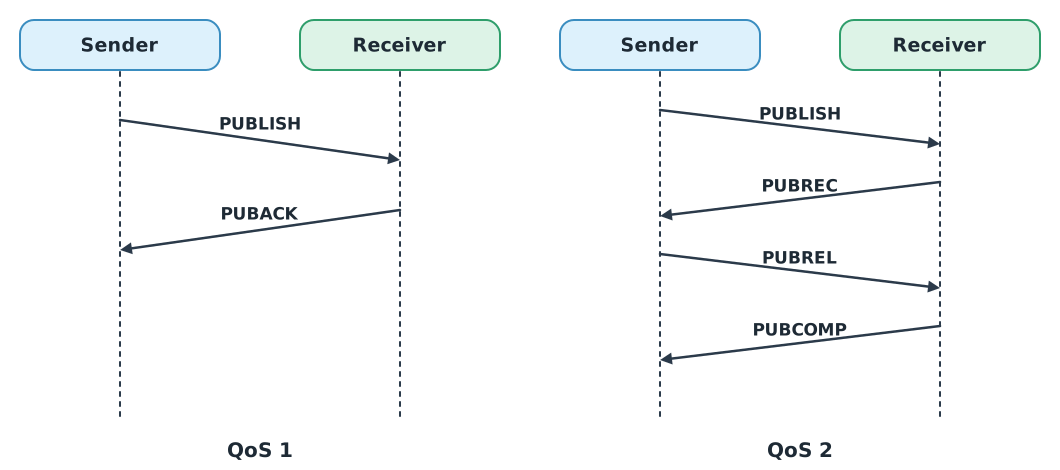
Higher QoS costs more messages and time. In QoS 1, if the PUBACK is lost, the sender sends the PUBLISH again, so the receiver gets the same message twice. The receiving program must be ready for that.
Example 1 A duplicated command under QoS 1
Simulate RTL command number 7 whose first PUBACK is lost, then have the receiver drop duplicates by message number.
received = []


def deliver_qos1(msg_id, payload, puback_lost):
    attempts = 0
    while True:
        attempts += 1
        received.append((msg_id, payload))
        if not puback_lost or attempts > 1:
            return attempts


print("attempts:", deliver_qos1(7, "RTL", puback_lost=True), "received:", received)

seen, actions = set(), []
for msg_id, payload in received:
    if msg_id in seen:
        continue
    seen.add(msg_id)
    actions.append(payload)
print("actions:", actions)
attempts: 2 received: [(7, 'RTL'), (7, 'RTL')]
actions: ['RTL']Commands designed so that repeating them gives the same result as doing them once (idempotent), such as “set mode to RTL”, are safer than cumulative ones such as “climb another 10 m”, which would climb 20 m if repeated.
Retained messages and Last Will
- Retained message: a message sent with the RETAIN flag is kept by the broker as the latest message for that topic, replacing any earlier retained one. A subscriber that joins later gets the latest value at once instead of waiting for the next update. It suits status such as
online, or mission settings. - Last Will: a device leaves a message with the broker when it connects. If the connection closes abnormally, the broker publishes that message, such as
drone/1/status = offline, so the command centre knows the drone has dropped off.
class MiniBroker:
    def __init__(self):
        self.subs = []
        self.retained = {}

    def subscribe(self, name, topic_filter):
        self.subs.append((topic_filter, name))
        for topic, payload in self.retained.items():
            if topic_matches(topic_filter, topic):
                print(f"  {name} <- {topic} = {payload} (retained)")

    def publish(self, topic, payload, retain=False):
        if retain:
            self.retained[topic] = payload
        for topic_filter, name in self.subs:
            if topic_matches(topic_filter, topic):
                print(f"  {name} <- {topic} = {payload}")


broker = MiniBroker()
broker.subscribe("gcs", "drone/+/battery")
broker.publish("drone/1/status", "online", retain=True)
broker.publish("drone/1/battery", "76%")
print("dashboard joins late:")
broker.subscribe("dashboard", "drone/#")
print("drone 1 link drops, broker sends its will:")
broker.publish("drone/1/status", "offline", retain=True)
gcs <- drone/1/battery = 76%
dashboard joins late:
dashboard <- drone/1/status = online (retained)
drone 1 link drops, broker sends its will:
dashboard <- drone/1/status = offlineThe dashboard that joins late gets the online status at once because it was retained, but not the 76% battery value, because that message was not retained. This toy broker only illustrates the principle.
MQTT 5.0 (an OASIS standard from 2019) adds important features over 3.1.1, such as reason codes that explain failures, session expiry, which sets how long the broker remembers a subscriber’s subscriptions, and the message expiry interval, which discards messages older than a limit so that expired commands are not delivered.
Data freshness and queues
A delivered message is not necessarily still useful. Data age is the time from measurement to use. If messages enter a queue faster than the receiver can process them (), the queue keeps growing and new messages wait longer and longer. These formulas come from the MQTT and Mosquitto knowledge unit of the drone knowledge hub.
Example 2 A dashboard that cannot keep up
Several drones send 50 messages per second in total, but the dashboard processes 40 per second, starting from an empty queue.
lam, mu, q0 = 50, 40, 0
for t in (10, 60, 300):
    q = max(0, q0 + (lam - mu) * t)
    print(f"after {t:>3} s  queue {q:>4} messages  a new message waits about {q / mu:.1f} s")
after 10 s queue 100 messages a new message waits about 2.5 s
after 60 s queue 600 messages a new message waits about 15.0 s
after 300 s queue 3000 messages a new message waits about 75.0 sAfter 5 minutes a new message waits about 75 seconds, so positions on the dashboard are over a minute old even though no message was lost. The fixes are to lower the send rate, batch messages, add processing power or use message expiry to drop stale messages, and to always show data age on screen.
Mosquitto and security
Eclipse Mosquitto is a widely used open-source MQTT broker. The latest release at the time of writing is 2.1.2 (February 2026). It comes with mosquitto_pub and mosquitto_sub for testing. IANA registers port 1883 for plain MQTT and 8883 for MQTT over TLS.
Since Mosquitto 2.0, a broker with no listener configured accepts only local (loopback) connections, and once a listener is configured allow_anonymous defaults to false. These defaults prevent accidentally exposing a broker to the network. Real deployments should add three more layers:
- TLS encrypts data in transit over port 8883, preventing eavesdropping.
- One account per device: each drone has its own username and password or certificate.
- Per-topic rights (ACL): drone 1 may publish only to
drone/1/#, so it cannot pose as drone 2.
An example client with paho-mqtt version 2, which requires CallbackAPIVersion (this code needs a real broker, so the automatic check does not run it):
import os
import paho.mqtt.client as mqtt


def on_connect(client, userdata, flags, reason_code, properties):
    print("connected:", reason_code)
    client.subscribe("drone/+/battery", qos=1)


def on_message(client, userdata, msg):
    print(msg.topic, msg.payload.decode())


client = mqtt.Client(mqtt.CallbackAPIVersion.VERSION2, client_id="gcs-01", protocol=mqtt.MQTTv5)
client.username_pw_set("gcs-01", os.environ["MQTT_PASSWORD"])
client.tls_set(ca_certs="ca.crt")
client.will_set("gcs/gcs-01/status", "offline", qos=1, retain=True)
client.on_connect = on_connect
client.on_message = on_message
client.connect("broker.field.lan", 8883)
client.loop_forever()
The password is read from an environment variable, not written in the code, following UAT 104 module 5.
Module lab
Lab: a battery-reporting system for a drone fleet
- Install Mosquitto on your machine, run
mosquitto_sub -t "drone/#" -vin one window, and send messages withmosquitto_pubfrom another. Try+and#. - Write a paho-mqtt program that simulates three drones sending their battery level every second at QoS 0, plus a retained
onlinestatus and a Last Will ofoffline. - Write a subscriber that shows the latest battery level with its data age, then kill one drone program abruptly to see whether the Last Will fires.
- Enable TLS and an ACL following the MQTT and Mosquitto knowledge unit, and test that drone 1 cannot publish to drone 2’s topics.
Common mistakes
Watch out
- Exposing a broker on port 1883 with no password: anyone can eavesdrop and send fake commands
- Using QoS 2 for everything: four times the messages for no benefit on telemetry where new data replaces old
- Not handling QoS 1 duplicates: cumulative commands get executed twice
- Retaining fast-changing telemetry: new subscribers may get a very old value without knowing it
- Only checking that messages arrive: without checking data age, you miss queues that make data stale
Summary
- IoT has devices, gateways, broker and cloud, and applications; MQTT links every layer with publish/subscribe
+matches one level;#matches all remaining levels and must come last- QoS 0 may lose, QoS 1 may duplicate, QoS 2 delivers exactly once but is slowest; retained messages give new subscribers the latest value, and Last Will reports dropped devices
- Configure Mosquitto with TLS, separate accounts and ACLs, and always check data age, because queues can make data stale without any loss
Check your understanding
- Does
site/+/drone/#matchsite/a/drone/2/gps? - Does
drone/+matchdrone/2/battery? Why? - Which QoS should a “land” command use, and how should the command be designed?
- Messages arrive at 30 per second and are processed at 25 per second, starting from an empty queue. After 2 minutes, how long is the queue and about how long does a new message wait?
- Why should a broker not be open on port 1883 on a network others can join?
Answers
- Yes:
+matchesaand#matches2/gps - No, because
+matches only one level, and2/batteryis two levels - QoS 1 or 2 so it is not lost, and design it to be idempotent so that repeating it gives the same result
- messages, and a wait of about seconds
- Port 1883 carries plain, unencrypted messages that anyone on the network can read, and without authentication anyone can also send fake commands
Key formulas
| Age of data at the user | |
| Queue length when messages arrive faster than they are processed | |
| Wait of a new message at the back of the queue |
Key references
- OASIS. (2019). MQTT version 5.0 (OASIS Standard, 7 March 2019). link
- OASIS. (2014). MQTT version 3.1.1 (OASIS Standard, 29 October 2014). link
- Eclipse Foundation. Eclipse Mosquitto: An open source MQTT broker. link
- Eclipse Foundation. Migrating from 1.x to 2.0. Eclipse Mosquitto documentation. link
- Eclipse Foundation. paho-mqtt: MQTT version 5.0/3.1.1 client class (Python package). link
- ChirpStack. MQTT integration. ChirpStack documentation. link
- Kurose, J. F., & Ross, K. W. (2025). Computer networking: A top-down approach (9th ed.). Pearson. link
- Fagan, M., Megas, K., Cuthill, B., Marron, J., & Hoehn, B. (2026). Foundational cybersecurity activities for IoT product manufacturers (NIST IR 8259 Rev. 1). National Institute of Standards and Technology. link
Further reading
Study the assigned knowledge units in advance, review media and take the module quiz
Deep dive: MQTT and Eclipse Mosquitto for drone and IoT systems
Cloud and IoT data services
Deep dive: coordinating drone swarms over LoRa mesh networks
In class / field
Lab or field practice from worksheets with a safety checklist
Learning evidence: Checked worksheets and quiz results