TCP/IP and UDP networks
UAT 105 Digital Technology and Networks
Lesson
By the end of this module you will be able to
- Explain protocol layers and how data is encapsulated from MAVLink down to radio waves
- Plan IPv4 addresses and subnets with the ipaddress module, and recognise special address types
- Compare TCP with UDP and explain why telemetry usually uses UDP
- Set up and test a ground-station network, and calculate data load and free-space loss
Why this matters
One day in the field, the ground-station laptop joins the Wi-Fi but QGroundControl cannot see the drone. The cause could be addresses in different ranges, a wrong port, a firewall block or a weak signal. Someone who understands networks as layers can check one layer at a time, instead of trying random fixes.
Protocol layers and encapsulation
A protocol is an agreement on the format of data and how to respond to it. The Internet splits the work into layers; each layer does one job and uses the services of the layer below. Kurose and Ross describe five layers.
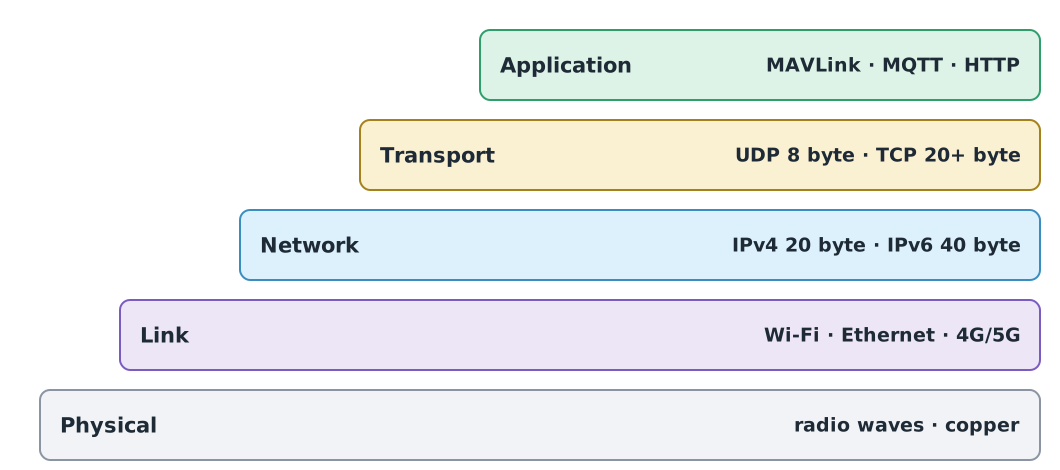
When a ground station sends a MAVLink message, the message is encapsulated layer by layer, like a letter placed in an envelope and the envelope in a parcel.
- The application layer builds the MAVLink frame.
- The transport layer adds an 8-byte UDP header with the source and destination port, which says which program the data is for.
- The network layer adds an IPv4 header of at least 20 bytes with the source and destination IP address, which says which machine the data is for.
- The link and physical layers, for example Wi-Fi, turn it into a wireless frame and radio waves.
The receiver unwraps the layers in reverse. These headers mean more bytes travel than our own data.
Example 1 Data load when headers are counted
A 50-byte MAVLink message is sent 10 times a second over UDP on IPv4 (no options, one message per packet). The example comes from the communications and MAVLink knowledge unit of the drone knowledge hub.
mavlink_bytes, rate_hz = 50, 10
udp_ip_header = 8 + 20
print(8 * mavlink_bytes * rate_hz, "bit/s at the MAVLink layer")
print(8 * (mavlink_bytes + udp_ip_header) * rate_hz, "bit/s including UDP and IPv4 headers")
print(f"header overhead {udp_ip_header / (mavlink_bytes + udp_ip_header):.0%}")
4000 bit/s at the MAVLink layer
6240 bit/s including UDP and IPv4 headers
header overhead 36%The headers take 36% of what is sent, and the Wi-Fi header is not even counted yet. When comparing with link capacity, count every layer at the same level.
IPv4 addresses and subnets
An IPv4 address is 32 bits, written as four decimal numbers separated by dots, such as 192.168.10.20. It has two parts: the network part and the host part. CIDR notation such as /24 says the first 24 bits are the network part. Machines whose network parts match are in the same subnet and can talk directly.
A subnet holds addresses, but the first names the network and the last is the broadcast address that reaches every machine, leaving for hosts.
import ipaddress

net = ipaddress.ip_network("192.168.10.0/24")
print(net.num_addresses, net.num_addresses - 2, net.netmask, net.broadcast_address)
for sub in net.subnets(new_prefix=26):
    hosts = list(sub.hosts())
    print(sub, hosts[0], "-", hosts[-1], len(hosts), "hosts")
256 254 255.255.255.0 192.168.10.255
192.168.10.0/26 192.168.10.1 - 192.168.10.62 62 hosts
192.168.10.64/26 192.168.10.65 - 192.168.10.126 62 hosts
192.168.10.128/26 192.168.10.129 - 192.168.10.190 62 hosts
192.168.10.192/26 192.168.10.193 - 192.168.10.254 62 hostsSplitting a /24 into four /26 ranges separates devices into groups, for example one for ground stations and one for drones, each still with 62 host addresses.
Special addresses to know
- Private addresses under RFC 1918:
10.0.0.0/8,172.16.0.0/12and192.168.0.0/16, used inside local networks and not routed on the Internet - Loopback
127.0.0.0/8loops back into the same machine, which is how SITL and a ground station on one computer talk through127.0.0.1 - Link-local
169.254.0.0/16is what a machine gives itself when it cannot find a DHCP server; seeing it means the machine has not got an address from the router
RFC1918 = [ipaddress.ip_network(n) for n in ("10.0.0.0/8", "172.16.0.0/12", "192.168.0.0/16")]
for a in ["10.1.2.3", "172.20.0.5", "192.168.10.20", "8.8.8.8", "127.0.0.1", "169.254.7.9"]:
    ip = ipaddress.ip_address(a)
    rfc1918 = any(ip in n for n in RFC1918)
    print(f"{a:<14} rfc1918={rfc1918!s:<5} is_private={ip.is_private!s:<5} loopback={ip.is_loopback!s:<5} link_local={ip.is_link_local}")
10.1.2.3 rfc1918=True is_private=True loopback=False link_local=False
172.20.0.5 rfc1918=True is_private=True loopback=False link_local=False
192.168.10.20 rfc1918=True is_private=True loopback=False link_local=False
8.8.8.8 rfc1918=False is_private=False loopback=False link_local=False
127.0.0.1 rfc1918=False is_private=True loopback=True link_local=False
169.254.7.9 rfc1918=False is_private=True loopback=False link_local=TrueNotice that Python’s is_private is also True for loopback and link-local addresses. Python defines it as “not globally reachable according to the IANA registry”, which is wider than RFC 1918. To test only the RFC 1918 private ranges, write the check yourself.
IPv6 uses 128-bit addresses to solve the shortage of IPv4 addresses, with a fixed 40-byte header. Mobile networks and cloud systems use IPv6 more and more, but small field networks still mostly use private IPv4.
TCP versus UDP
The transport layer has two main protocols:
- TCP starts with a three-way handshake and guarantees complete, in-order data, resending lost packets. It suits data that must arrive byte for byte, such as downloading a log file or a web page.
- UDP sends individual datagrams with no handshake, no acknowledgement and no resending, and has only an 8-byte header. It suits data that must be fresh.
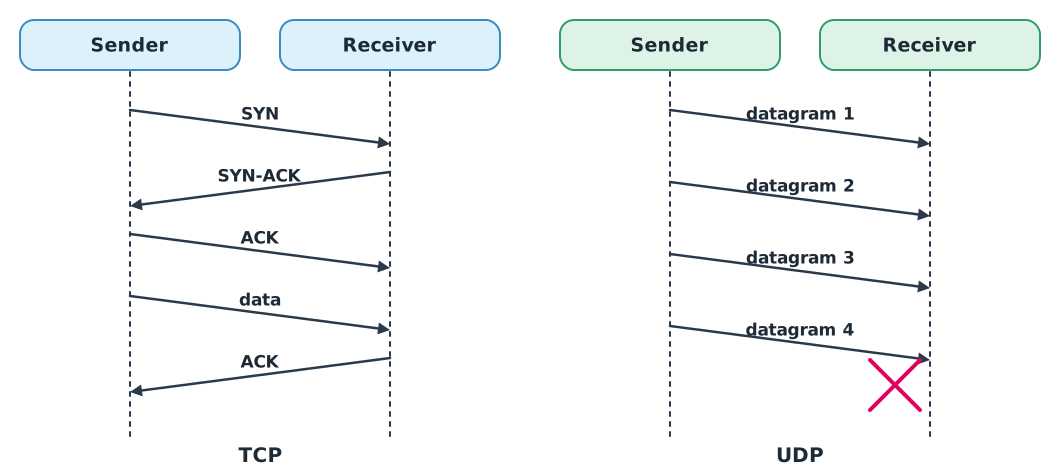
MAVLink over IP networks usually runs on UDP, and ground stations such as QGroundControl listen on UDP port 14550. Telemetry is data where new values replace old ones. If the position from half a second ago is lost, making TCP resend it forces all the newer data behind it to wait, so the whole stream falls behind. Losing an occasional packet but getting the latest data sooner is the better trade.
import socket

rx = socket.socket(socket.AF_INET, socket.SOCK_DGRAM)
rx.bind(("127.0.0.1", 0))
rx.settimeout(2)
port = rx.getsockname()[1]

tx = socket.socket(socket.AF_INET, socket.SOCK_DGRAM)
heartbeat = bytes.fromhex("fd 09 00 00 00 01 01 00 00 00 04 00 00 00 02 03 51 03 03 7e 22")
tx.sendto(heartbeat, ("127.0.0.1", port))

data, sender = rx.recvfrom(2048)
print(len(data), "bytes, first byte", hex(data[0]), "same as sent:", data == heartbeat, "from", sender[0])
tx.close()
rx.close()
21 bytes, first byte 0xfd same as sent: True from 127.0.0.1This program sends the HEARTBEAT frame from module 1 over UDP on loopback. In real use, bind the receiving port to 14550 instead of 0 (port 0 lets the system pick a free port, which avoids clashing with other programs during tests), and always set settimeout, or the program waits forever when no data arrives.
Wireless links and signal loss
- Wi-Fi, under IEEE 802.11, uses the 2.4, 5 and 6 GHz bands. The newest generation, Wi-Fi 7 (IEEE 802.11be), was approved in September 2024 and published in July 2025. Ordinary Wi-Fi has short range and suits visual line-of-sight work.
- 4G/5G mobile networks: the first full set of 5G standards is 3GPP Release 15, and 3GPP specification TS 22.125 covers support for unmanned aircraft, such as identifying drones and carrying command-and-control links over cellular networks.
- Telemetry radios such as SiK use a serial port rather than IP. They reach further than Wi-Fi but are much slower.
Signal power drops with distance even with no obstacles. ITU-R P.525-5 gives the formula for free-space loss, where the wave spreads out as a sphere. Doubling the distance adds dB of loss.
Example 2 Power budget of a 2.4 GHz link
Using the synthetic values from the drone knowledge hub: transmit power 20 dBm, 2 dBi antennas at both ends, 2 dB of other losses and receiver sensitivity −90 dBm.
import math


def fspl_db(d_m, f_hz):
    return 20 * math.log10(4 * math.pi * d_m * f_hz / 299_792_458)


for d in (500, 1000, 2000):
    loss = fspl_db(d, 2.4e9)
    received = 20 + 2 + 2 - loss - 2
    print(f"{d:>5} m  loss {loss:6.2f} dB  received {received:7.2f} dBm  margin {received + 90:5.2f} dB")
print(f"1000 m at 5.8 GHz {fspl_db(1000, 5.8e9):.2f} dB, at 433 MHz {fspl_db(1000, 433e6):.2f} dB")
500 m loss 94.03 dB received -72.03 dBm margin 17.97 dB
1000 m loss 100.05 dB received -78.05 dBm margin 11.95 dB
2000 m loss 106.07 dB received -84.07 dBm margin 5.93 dB
1000 m at 5.8 GHz 107.72 dB, at 433 MHz 85.18 dBThe margin shrinks by about 6 dB each time the distance doubles, and higher frequencies lose more than lower ones at the same distance. This is a free-space model only, with no obstacles, reflections or interference, so a positive margin does not guarantee a real link will work.
Radio frequency rules
The frequencies and transmit powers allowed in Thailand are set by announcements of the NBTC (กสทช.), and the rules for drone radios are being revised. Check the latest announcement before using a real radio. The transmit power in the example is for practice calculations only, not an approved value.
Setting up a ground-station network
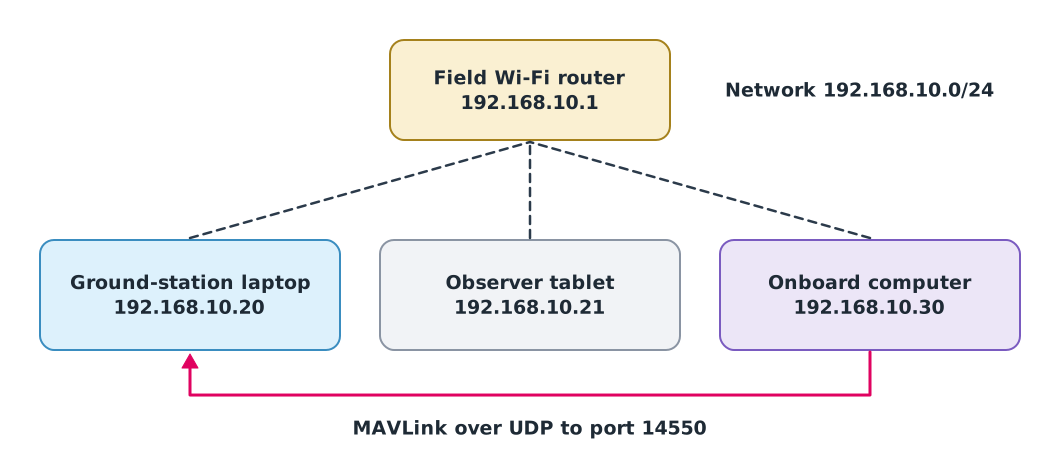
When the ground station cannot see the drone, check from the bottom layer up:
- Link: is it joined to the right Wi-Fi network, and is the signal strong enough?
- Network: check the address with
ipconfig(Windows) orip addr(Linux). Are both machines in the same subnet? A169.254.x.xaddress means no address was assigned. Test reachability withping 192.168.10.30. - Transport: is the drone sending to the port the ground station listens on, and does the Windows firewall allow UDP 14550?
- Application: look at the traffic itself in Wireshark with the filter
udp.port == 14550.
Module lab
Lab: capturing SITL telemetry with Wireshark
- Run SITL and QGroundControl on one computer, then start Wireshark capturing on the loopback interface (on Windows, install the Npcap driver that comes with Wireshark first).
- Apply the filter
udp.port == 14550, count packets per second, open one packet’s bytes, and find the0xFDthat starts the MAVLink frame beneath the UDP and IP headers. - Pause SITL’s data forwarding (following the knowledge unit “C2 and abnormal events in simulation”) and record what QGroundControl shows and whether the log shows a flight-mode change.
- Build the network in Figure 3 with a real router, give the onboard computer a static IP,
pingevery pair, and draw the network with addresses and ports on the worksheet.
Common mistakes
Watch out
- Machines in different subnets:
192.168.1.20/24and192.168.10.30/24cannot reach each other directly - No socket timeout: the program hangs silently when no data arrives
- Using TCP for telemetry on a lossy link: resending delays the whole stream
- Forgetting the firewall: Windows often blocks incoming ports for newly installed programs
- Treating free-space margin as real range: obstacles and interference can cut range sharply
Summary
- Networks are layered; data is wrapped in UDP/TCP and IP headers before it reaches the link, and headers add significant load
- An IPv4 address is 32 bits, split into network and host parts by the prefix; know the private, loopback and link-local ranges
- TCP guarantees completeness but can lag; UDP is fast but gives no guarantees, so MAVLink telemetry usually uses UDP port 14550
- Free-space loss grows about 6 dB per doubling of distance; troubleshoot networks from the bottom layer up
Check your understanding
- How many host addresses does a
/27subnet have? - Is
172.31.5.9in an RFC 1918 private range? - A 40-byte MAVLink message is sent 20 times a second over UDP/IPv4. How many bit/s including headers?
- Going from 1 km to 4 km, about how many dB does free-space loss increase?
- What does a laptop address of
169.254.12.3tell you?
Answers
- hosts
- Yes, because
172.16.0.0/12covers 172.16.0.0 to 172.31.255.255 - bit/s
- Four times the distance is two doublings, adding dB
- The machine found no DHCP server and gave itself a link-local address; check the connection or set an IP manually
Key formulas
| Addresses in a subnet with prefix length p | |
| Bit rate including headers | |
| Free-space loss (ITU-R P.525) | |
| Received power and margin |
Key references
- Kurose, J. F., & Ross, K. W. (2025). Computer networking: A top-down approach (9th ed.). Pearson. link
- Postel, J. (1981). Internet Protocol (RFC 791). RFC Editor. link
- Postel, J. (1980). User Datagram Protocol (RFC 768). RFC Editor. link
- Eddy, W. (Ed.). (2022). Transmission Control Protocol (TCP) (RFC 9293). RFC Editor. link
- Deering, S., & Hinden, R. (2017). Internet Protocol, version 6 (IPv6) specification (RFC 8200). RFC Editor. link
- Rekhter, Y., Moskowitz, B., Karrenberg, D., de Groot, G. J., & Lear, E. (1996). Address allocation for private internets (RFC 1918). RFC Editor. link
- Fuller, V., & Li, T. (2006). Classless inter-domain routing (CIDR): The Internet address assignment and aggregation plan (RFC 4632). RFC Editor. link
- Internet Assigned Numbers Authority. IANA IPv4 special-purpose address registry. link
- IEEE. (2025). IEEE Std 802.11be-2024: Amendment 2, enhancements for extremely high throughput (EHT). link
- 3GPP. Unmanned Aerial System (UAS) support in 3GPP (TS 22.125). link
- International Telecommunication Union. (2024). Calculation of free-space attenuation (Recommendation ITU-R P.525-5). link
- Wireshark Foundation. Wireshark user's guide. link
- Python Software Foundation. ipaddress, socket, hashlib and hmac modules. The Python standard library (3.14). link
Further reading
Study the assigned knowledge units in advance, review media and take the module quiz
TCP/IP networking for field operations
Wireshark
Drone communications and MAVLink
C2 and abnormal events in simulation
In class / field
Lab or field practice from worksheets with a safety checklist
Learning evidence: Checked worksheets and quiz results