C2 links, telemetry and video
UAT 207 Communication and Data Network Systems
Lesson
By the end of this module you will be able to
- Compute telemetry bandwidth from MAVLink message sizes and rates
- Compare the demand with the SiK radio air rate and the effect of ECC
- Compute Shannon capacity from SNR and assess the margin of a video link
- Distinguish the roles of C2, telemetry and mission data
Why this matters
A drone link carries three kinds of data with different needs. C2 carries commands that must arrive reliably and quickly; telemetry carries status that must arrive steadily; and mission data, such as video, needs high bandwidth but tolerates some loss. Send telemetry faster than the radio can carry and important messages are delayed or lost; give the video link no margin and the picture freezes as the drone flies out.
Telemetry bandwidth budget
Each MAVLink 2 message has a payload of its type’s size plus a 10-byte header and a 2-byte CRC (MAVLink serialization guide). Multiply by its rate and sum over all types to get the bandwidth needed.
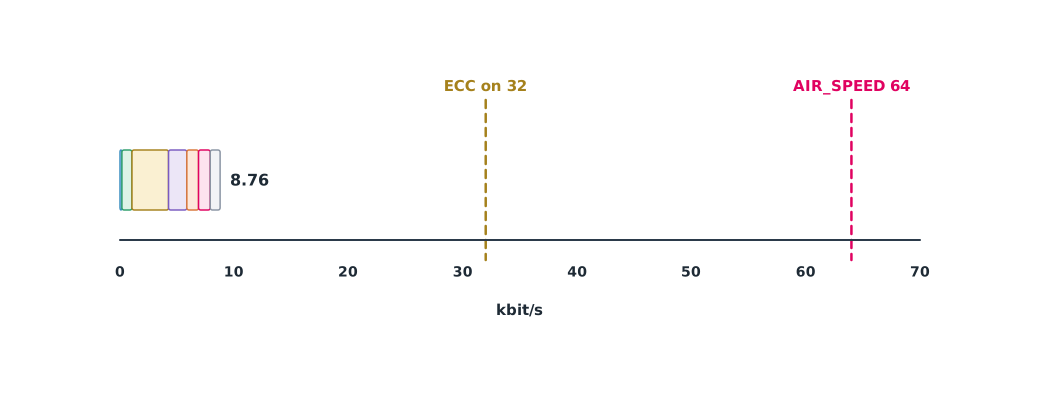
SiK telemetry radios, common with ArduPilot, default to AIR_SPEED 64 kbps. The guide says enabling ECC halves the supported data rate, and ECC is no longer recommended. The radio must also share time with uplink data from the station, so it should not run close to its full rate.
Example 1 How much bandwidth telemetry uses
Payload sizes are the full sizes of each message in MAVLink 2; rates are set by the team.
MSGS = {                                  # name: (payload bytes, times per second)
    "HEARTBEAT": (9, 1),
    "SYS_STATUS": (43, 2),
    "ATTITUDE": (28, 10),
    "GLOBAL_POSITION_INT": (28, 5),
    "VFR_HUD": (20, 4),
    "GPS_RAW_INT": (52, 2),
    "RC_CHANNELS": (42, 2),
}
OVERHEAD = 12                              # 10-byte header + 2-byte CRC (unsigned)

def total_kbps(msgs):
    return sum((size + OVERHEAD) * 8 * hz for size, hz in msgs.values()) / 1000

base = total_kbps(MSGS)
for air, label in ((64, "AIR_SPEED 64"), (32, "ECC on (half)")):
    print(f"{label:<14}: telemetry {base:.2f} kbit/s uses {base / air:.0%} of the air rate")
fast = dict(MSGS, ATTITUDE=(28, 50), GLOBAL_POSITION_INT=(28, 25))
print(f"attitude 50 Hz + position 25 Hz: {total_kbps(fast):.2f} kbit/s = {total_kbps(fast) / 64:.0%} of 64 kbit/s")
AIR_SPEED 64 : telemetry 8.76 kbit/s uses 14% of the air rate
ECC on (half) : telemetry 8.76 kbit/s uses 27% of the air rate
attitude 50 Hz + position 25 Hz: 27.96 kbit/s = 44% of 64 kbit/sThe normal settings use less than a sixth of the air rate, but raising ATTITUDE and position rates for detailed plots uses almost half, and with ECC on as well it would take about 87% of the remaining 32 kbps. Raise rates only when needed, such as during tuning, then lower them again.
Shannon capacity and video links
Shannon (1948) proved that a channel of bandwidth and signal-to-noise ratio SNR can carry at most : a theoretical upper bound that real systems always fall short of. SNR falls with distance through free-space loss, and capacity falls with it. Thermal noise is dBm/Hz plus plus the receiver’s noise figure.
Example 2 Capacity of a 2.4 GHz video link against distance
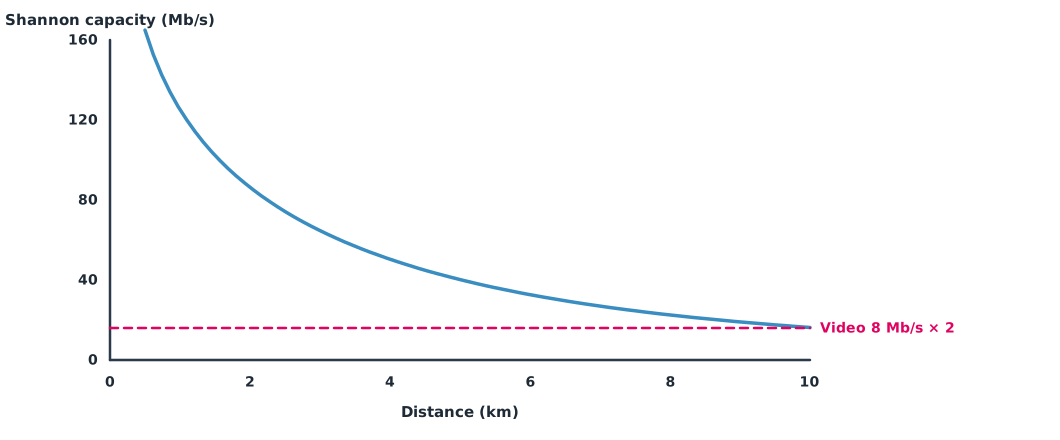
Assume 20 dBm transmit power, 2 dBi antennas at both ends, 20 MHz bandwidth, a 6 dB noise figure, 8 Mbit/s video and a required margin of two.
import math

PT_DBM, GAINS_DB, B_HZ, NF_DB, F_HZ = 20.0, 4.0, 20e6, 6.0, 2.44e9
VIDEO_MBPS, MARGIN = 8.0, 2.0
noise = -174 + 10 * math.log10(B_HZ) + NF_DB
print(f"noise floor {noise:.1f} dBm")
for d_km in (1, 2, 5, 8, 10):
    fspl = 20 * math.log10(d_km * 1000) + 20 * math.log10(F_HZ) - 147.55
    snr_db = PT_DBM + GAINS_DB - fspl - noise
    cap = B_HZ * math.log2(1 + 10 ** (snr_db / 10)) / 1e6
    ok = "ok" if cap >= VIDEO_MBPS * MARGIN else "not enough"
    print(f"{d_km:>2} km: SNR {snr_db:5.1f} dB, Shannon limit {cap:6.1f} Mbit/s -> {ok}")
noise floor -95.0 dBm
1 km: SNR 18.8 dB, Shannon limit 125.2 Mbit/s -> ok
2 km: SNR 12.8 dB, Shannon limit 86.3 Mbit/s -> ok
5 km: SNR 4.8 dB, Shannon limit 40.2 Mbit/s -> ok
8 km: SNR 0.7 dB, Shannon limit 22.5 Mbit/s -> ok
10 km: SNR -1.2 dB, Shannon limit 16.3 Mbit/s -> okEven the theoretical bound falls from over a hundred megabits at 1 km to near the required line at 10 km. A real system achieving about half the bound or less runs into trouble much sooner. Fixes include adapting video bitrate automatically to link quality, using directional antennas, or keeping video on a separate link from C2, whose performance RTCA DO-362 specifies separately.
Module lab
Lab: bandwidth budget and link quality
- Read the real message rates from the GCS or SITL and enter them into the code from Example 1.
- Read the lab’s SiK radio settings (AIR_SPEED, ECC) and compute the share used.
- Raise the ATTITUDE rate in SITL and see whether other messages slow down.
- Use Example 2 with the specifications of the lab’s video link to find where problems are expected to start.
- Record RSSI and video bitrate while flying out in a straight line and compare with the calculation.
Common mistakes
Watch out
- Raising every telemetry rate without considering bandwidth.
- Forgetting headers and uplink data.
- Treating Shannon capacity as the achievable rate.
- Sending video and C2 on one link without priorities.
- Mismatched radio settings at the two ends.
Summary
- Telemetry bandwidth = sum of (payload + header) × 8 × rate.
- SiK radios default to 64 kbps, and ECC halves the rate.
- Shannon capacity is an upper bound that falls with SNR; real systems achieve less.
- Separate the needs of C2, telemetry and video, and give each its own margin.
Check your understanding
- A 28-byte payload sent at 10 Hz in unsigned MAVLink 2 uses how much bandwidth?
- With SiK AIR_SPEED 64 kbps and ECC on, about how much data is supported?
- With B = 10 MHz and SNR = 15 (not dB), what is the Shannon capacity?
- What is the thermal noise in 1 MHz of bandwidth (NF 0 dB)?
- Why separate the video link from C2?
Answers
- bit/s
- About 32 kbps.
- Mbit/s
- dBm
- Video uses a lot of bandwidth and tolerates loss, while C2 must arrive reliably; separating them keeps video from competing with commands.
Key formulas
| Telemetry bandwidth | |
| Shannon capacity | |
| Thermal noise power |
Key references
- ArduPilot Dev Team. SiK radio – advanced configuration. ArduPilot Copter documentation. link
- MAVLink Development Team. Packet serialization. MAVLink developer guide. link
- Shannon, C. E. (1948). A mathematical theory of communication. Bell System Technical Journal, 27(3), 379–423; 27(4), 623–656. link
- RTCA. (2016). Command and control (C2) data link minimum operational performance standards (MOPS) (terrestrial) (DO-362). link
- Kurose, J. F., & Ross, K. W. (2025). Computer networking: A top-down approach (9th ed.). Pearson. link
Further reading
Study the assigned knowledge units in advance, review media and take the module quiz
C2 link design and lost-link procedures
Drone communications and MAVLink
In class / field
Lab or field practice from worksheets with a safety checklist
Learning evidence: Checked worksheets and quiz results