MAVLink and packet analysis
UAT 207 Communication and Data Network Systems
Lesson
By the end of this module you will be able to
- Compute packet loss from MAVLink sequence numbers that wrap after 255
- Split MAVLink 2 frames from a byte stream and verify the CRC with CRC_EXTRA
- Set up SITL, MAVProxy, a GCS and Wireshark data paths to analyse messages
- Distinguish network packet rate from data freshness in the application
Why this matters
When telemetry stutters, the first question is whether packets are really lost or just late, and where along the path. MAVLink puts the data to answer this in every frame: a sequence number and a CRC. This module shows how to use them to analyse a link, following on from reading messages with pymavlink in UAT 104.
Wrapping sequence numbers
The MAVLink guide specifies the sequence number as a uint8 from 0 to 255; the sender increments it for every message, and it is used to detect packet loss. After 255 the next message is 0, so correct counting needs modulo-256 arithmetic. Subtracting directly turns 255 → 0 into a loss of 255 packets.
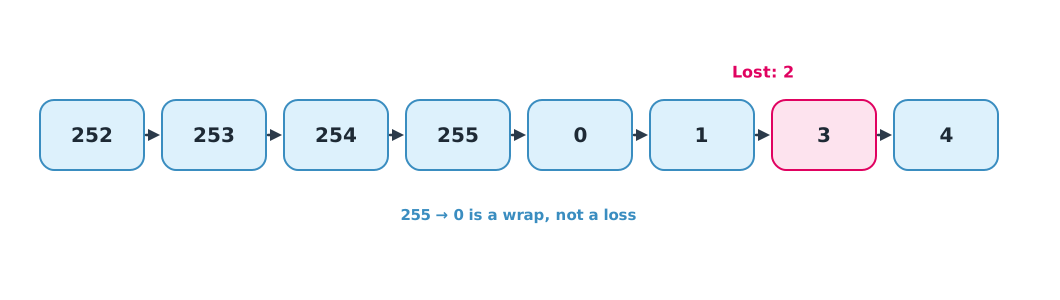
Example 1 Packet loss from sequence numbers
Sequence numbers the station received from one sender (system 1, component 1) over a period.
seqs = [250, 251, 252, 253, 254, 255, 0, 1, 3, 4, 5, 9, 10, 11, 12, 13]

lost = 0
for prev, cur in zip(seqs, seqs[1:]):
    gap = (cur - prev - 1) % 256
    if gap:
        print(f"after {prev:>3} came {cur:>3}: {gap} packet(s) lost")
    lost += gap
naive = sum(max(cur - prev - 1, 0) + (255 if cur < prev else 0) for prev, cur in zip(seqs, seqs[1:]))
print(f"received {len(seqs)}, lost {lost}, loss rate {lost / (lost + len(seqs)):.1%}")
print(f"(a naive count that ignores the wrap would report {naive} lost)")
after 1 came 3: 1 packet(s) lost
after 5 came 9: 3 packet(s) lost
received 16, lost 4, loss rate 20.0%
(a naive count that ignores the wrap would report 259 lost)Count separately for each sender (system ID and component ID), since each has its own sequence. If a tool such as MAVProxy merges several senders, the computed rate will be wrong.
Splitting frames from a byte stream
A serial radio sends bytes back to back without frame boundaries. The receiver must find the MAVLink 2 start byte 0xFD, read the length, then check the CRC, computed over the header (excluding the start byte), the payload and the message type’s CRC_EXTRA. This value comes from the message definition, for example HEARTBEAT = 50 and ATTITUDE = 39. If sender and receiver use different versions of a message definition, the CRC fails, so it also catches incompatibility.
Example 2 Splitting frames and catching a bad one
A stream is built from four frames with junk bytes between them, and one byte of the third frame is corrupted. The instructor checked that pymavlink 2.4.50 reads these hand-built frames correctly.
import struct

def crc_x25(data, crc=0xFFFF):
    for b in data:
        tmp = b ^ (crc & 0xFF)
        tmp = (tmp ^ (tmp << 4)) & 0xFF
        crc = ((crc >> 8) ^ (tmp << 8) ^ (tmp << 3) ^ (tmp >> 4)) & 0xFFFF
    return crc

CRC_EXTRA = {0: 50, 30: 39}                    # HEARTBEAT, ATTITUDE
NAMES = {0: "HEARTBEAT", 30: "ATTITUDE"}

def frame(seq, msgid, payload):
    hdr = bytes([0xFD, len(payload), 0, 0, seq, 1, 1]) + msgid.to_bytes(3, "little")
    crc = crc_x25(hdr[1:] + payload + bytes([CRC_EXTRA[msgid]]))
    return hdr + payload + struct.pack("<H", crc)

hb = struct.pack("<IBBBBB", 0, 2, 3, 0x81, 4, 3)
att = struct.pack("<Iffffff", 12000, 0.05, -0.02, 1.57, 0.01, 0.0, 0.02)
stream = bytearray(b"\x00\x13" + frame(10, 0, hb) + frame(11, 30, att) + b"\x55" + frame(12, 30, att) + frame(13, 0, hb))
bad_at = stream.index(bytes([0xFD, 28, 0, 0, 12])) + 15
stream[bad_at] ^= 0xFF                          # corrupt the payload of frame seq 12

i, good, bad = 0, {}, 0
while i < len(stream):
    if stream[i] != 0xFD or i + 12 > len(stream):
        i += 1
        continue
    n = stream[i + 1]
    fr = stream[i:i + 12 + n]
    msgid = int.from_bytes(fr[7:10], "little")
    crc = struct.unpack("<H", fr[10 + n:12 + n])[0]
    if msgid in CRC_EXTRA and crc_x25(fr[1:10 + n] + bytes([CRC_EXTRA[msgid]])) == crc:
        good[NAMES[msgid]] = good.get(NAMES[msgid], 0) + 1
        print(f"seq {fr[4]:>3}: {NAMES[msgid]:<9} ok")
        i += 12 + n
    else:
        bad += 1
        print(f"seq {fr[4]:>3}: CRC failed, resync")
        i += 1
print("good frames:", good, "| bad frames:", bad)
seq 10: HEARTBEAT ok
seq 11: ATTITUDE ok
seq 12: CRC failed, resync
seq 13: HEARTBEAT ok
good frames: {'HEARTBEAT': 2, 'ATTITUDE': 1} | bad frames: 1When the CRC fails, the receiver advances one byte at a time to find a new start byte, so junk bytes do not spoil the next frame, and the bad frame is discarded instead of passing wrong values to the application.
Analysis in simulation
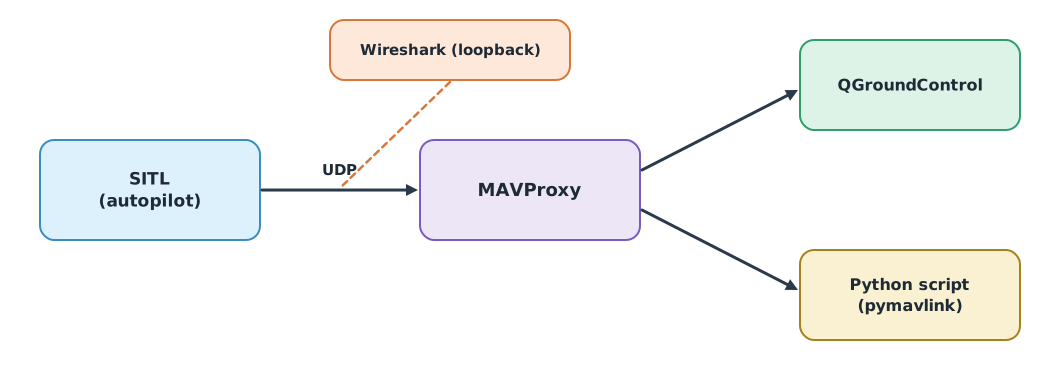
Lab L09 in the drone knowledge base connects SITL to MAVProxy and forwards to a GCS and a Python script while Wireshark captures loopback packets, to compare the network packet rate with the rate the application reads. The unit stresses that packet rate is not data freshness: messages may arrive often while the values inside are stale.
Module lab
Lab: capturing and analysing MAVLink (L09)
- Start SITL and MAVProxy and record the endpoints, ports and system IDs used.
- Write a pymavlink script that reads ATTITUDE and stores sequence numbers and times to CSV.
- Use the code from Example 1 to compute packet loss per sender.
- Capture loopback packets with Wireshark and compare the packet rate with the rate the script reads.
- Record raw bytes from the radio’s serial port (if available) and use Example 2 to count bad frames.
Common mistakes
Watch out
- Subtracting sequence numbers directly without handling the wrap.
- Merging several senders into one sequence.
- Using different message definition versions so the CRC fails.
- Treating packet rate as data freshness.
- Exposing control ports to the internet during experiments.
Summary
- MAVLink sequence numbers are uint8; count losses modulo 256 per sender.
- The MAVLink CRC includes a per-message CRC_EXTRA, catching both corrupted data and mismatched definitions.
- The receiver resynchronises on a new start byte when a frame is bad.
- Compare Wireshark data with the application, and separate packet rate from data freshness.
Check your understanding
- Sequence 254 is followed by 2. How many packets were lost?
- 95 packets received and 5 lost: what is the loss rate?
- What is CRC_EXTRA for?
- Why count sequences separately per sender?
- Messages arrive at 10 Hz but the position value never changes. What does that suggest?
Answers
- packets (255, 0, 1).
- It adds a per-message-type value into the CRC to check that sender and receiver use the same message definition.
- Each sender has its own sequence; merging them looks like false losses or duplicates.
- The data may be stale, for example a sensor or estimator stopped updating, even though the link works.
Key formulas
| Packets lost between two sequence numbers | |
| Packet loss rate |
Key references
- MAVLink Development Team. Packet serialization. MAVLink developer guide. link
- MAVLink Development Team. MAVLink developer guide. link
- ArduPilot and MAVLink contributors. (2026). pymavlink (Version 2.4.50) [Computer software]. PyPI. link
- Kurose, J. F., & Ross, K. W. (2025). Computer networking: A top-down approach (9th ed.). Pearson. link
Further reading
Study the assigned knowledge units in advance, review media and take the module quiz
Reading MAVLink telemetry from SITL
MAVProxy + MAVExplorer
Wireshark
In class / field
Lab or field practice from worksheets with a safety checklist
Learning evidence: Checked worksheets and quiz results