Link loss and failsafes
UAT 207 Communication and Data Network Systems
Lesson
By the end of this module you will be able to
- Distinguish telemetry loss, GCS failsafe and RC failsafe
- Explain ArduPilot and PX4 failsafe parameters and the defaults to check
- Build a link state machine from heartbeat arrival times
- Choose a timeout by computing the chance of a false failsafe from packet loss
Why this matters
Link loss is one of the most common events in flight, and the system must decide on its own what to do. Set it too sensitive and the drone returns home mid-mission every time the signal stutters; too slow and the drone flies on with nobody able to control it. Lab L10 and the knowledge base’s C2 simulation unit warn that telemetry loss, GCS failsafe and RC loss are different events, and not every case should end in a return home.
Different kinds of failsafe
- Heartbeat: the MAVLink guide says that on RF links components typically send heartbeats at 1 Hz and consider another system disconnected after four or five are missed, while stressing the numbers depend on the channel.
- ArduPilot GCS failsafe: triggers when no GCS heartbeat arrives for
FS_GCS_TIMEOUT(default 5 s), butFS_GCS_ENABLEis disabled by default; you must enable it and choose an action such as RTL or land. - ArduPilot radio (RC) failsafe:
FS_THR_ENABLEdefaults to RTL, andFS_THR_VALUE975 PWM is the throttle level treated as loss of the transmitter signal. - PX4:
COM_DL_LOSS_T(default 10 s) withNAV_DLL_ACT, disabled by default, for the data link;COM_RC_LOSS_T(0.5 s) withNAV_RCL_ACT(default Return) for the RC link.
These defaults come from the documentation and source of the versions checked; always verify them against the firmware actually in use. RTCA DO-400 on lost-C2 procedures gives the overall picture of how to plan ahead.
A link state machine
Example 1 Link state from heartbeat times
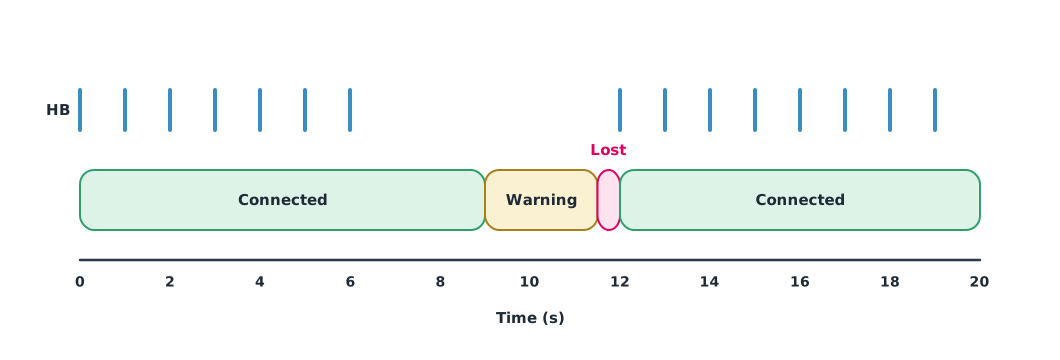
Times at which the station received heartbeats (seconds). Warn after 2.5 s without one and declare the link lost after 5 s, matching the default FS_GCS_TIMEOUT.
beats = [0, 1, 2, 3, 4, 5, 6, 12, 13, 14, 15, 16, 17, 18, 19]
WARN_S, LOST_S, DT = 2.5, 5.0, 0.5

state, events = "connected", []
t = 0.0
while t <= 20:
    last = max(b for b in beats if b <= t)
    age = t - last
    new = "lost" if age > LOST_S else "warning" if age > WARN_S else "connected"
    if new != state:
        events.append((t, state, new, age))
        state = new
    t += DT
for t, old, new, age in events:
    print(f"t = {t:4.1f} s: {old:<9} -> {new:<9} (last heartbeat {age:.1f} s ago)")
t = 9.0 s: connected -> warning (last heartbeat 3.0 s ago)
t = 11.5 s: warning -> lost (last heartbeat 5.5 s ago)
t = 12.0 s: lost -> connected (last heartbeat 0.0 s ago)When the link returns, the system should not always resume the old mission automatically; that depends on the settings and the team’s procedure. Check in the log how the mode changed.
Choosing a timeout with numbers
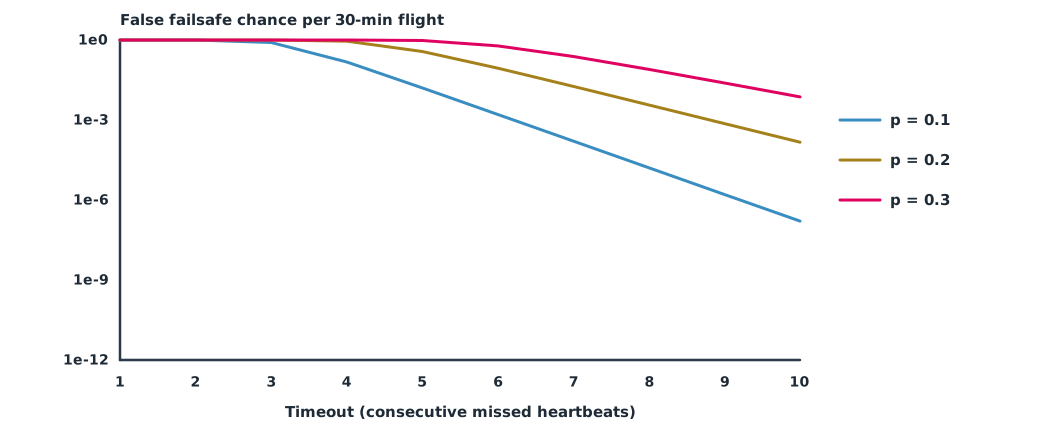
If each heartbeat is lost independently with probability , a run of consecutive losses occurs with probability at any given point. But a flight contains thousands of such points, so the chance of meeting at least one is far higher.
Example 2 Chance of a false failsafe per flight
Heartbeats at 1 Hz over a 30-minute flight (1,800 beats); the chance of at least one run of N consecutive losses, computed by tracking the current run length.
def false_failsafe(p, n_timeout, n_beats=1800):
    run = [1.0] + [0.0] * n_timeout        # run[r] = chance of currently having r consecutive losses
    for _ in range(n_beats):
        new = [0.0] * (n_timeout + 1)
        for r in range(n_timeout):
            new[0] += run[r] * (1 - p)
            new[r + 1] += run[r] * p
        new[n_timeout] += run[n_timeout]
        run = new
    return run[n_timeout]

print("loss p | N=3        N=5        N=10")
for p in (0.05, 0.1, 0.2, 0.3):
    print(f"{p:6.2f} | " + "  ".join(f"{false_failsafe(p, n):9.2e}" for n in (3, 5, 10)))
loss p | N=3 N=5 N=10
0.05 | 1.92e-01 5.33e-04 1.66e-10
0.10 | 8.03e-01 1.60e-02 1.61e-07
0.20 | 1.00e+00 3.69e-01 1.47e-04
0.30 | 1.00e+00 9.54e-01 7.38e-03With 10% packet loss, a 3-second timeout gives about an 80% chance of a false failsafe in a half-hour flight; 5 seconds brings it to about 2%, and 10 seconds makes it negligible. But a long timeout means the drone flies on longer when the link really is lost, so both sides must be weighed. This model assumes independent losses, which is often untrue because losses come in bursts, so check against real logs.
Module lab
Lab: cutting and restoring the link in SITL (L10)
- Start SITL and a GCS, recording all failsafe parameters before starting.
- Enable the GCS failsafe with the action the team chose and set the timeout from your calculation.
- Stop MAVProxy forwarding, recording when you stopped it and when the mode changed.
- Restore it and record the behaviour, comparing with the code from Example 1.
- Separate the results for telemetry loss, GCS failsafe and RC loss in the report.
Common mistakes
Watch out
- Assuming the failsafe is enabled by default.
- A timeout too short, causing frequent returns.
- A timeout too long without considering how far the drone flies on.
- Not testing failsafes in simulation first.
- Using documented defaults without checking the real firmware.
Summary
- Telemetry loss, GCS failsafe and RC loss are different events that need separate settings.
- ArduPilot: FS_GCS_TIMEOUT 5 s but FS_GCS_ENABLE off by default · PX4: COM_DL_LOSS_T 10 s with NAV_DLL_ACT off by default.
- A link state machine uses the age of the latest heartbeat to set the state.
- Choose the timeout from the false failsafe chance and the distance flown on a real loss.
Check your understanding
- According to the MAVLink guide, when is a system usually considered disconnected on a radio link?
- Heartbeats are lost with probability 0.1. What is the chance of three consecutive losses at one point?
- Why is the false failsafe chance per flight much higher than ?
- What is the default of ArduPilot’s FS_GCS_ENABLE?
- A drone flies at 20 m/s with a 10 s timeout. How far does it fly after a real link loss before the failsafe starts?
Answers
- After four or five missed heartbeats (at 1 Hz).
- A flight has thousands of time points, each a chance for it to happen.
- 0, disabled.
- m
Key formulas
| Chance of N consecutive losses at one point | |
| Time the link is declared lost |
Key references
- MAVLink Development Team. Heartbeat/connection protocol. MAVLink developer guide. link
- ArduPilot Dev Team. GCS failsafe. ArduPilot Copter documentation. link
- ArduPilot Dev Team. Radio failsafe. ArduPilot Copter documentation. link
- PX4 Autopilot. Safety configuration (failsafes). PX4 user guide (main). link
- RTCA. (2023). Guidance material: Lost C2 link procedures (DO-400). link
Further reading
Study the assigned knowledge units in advance, review media and take the module quiz
In class / field
Lab or field practice from worksheets with a safety checklist
Learning evidence: Checked worksheets and quiz results