Cascade control
UAT 305 Autopilot and Control Technology
Lesson
By the end of this module you will be able to
- Explain the structure of ArduPilot's attitude controller from angle to rate
- Simulate a cascade loop and see the effect of the outer-loop gain on the response
- Compute the time to reach a target angle under an angular acceleration limit
- Choose attitude controller parameters to suit the mission
Why this matters
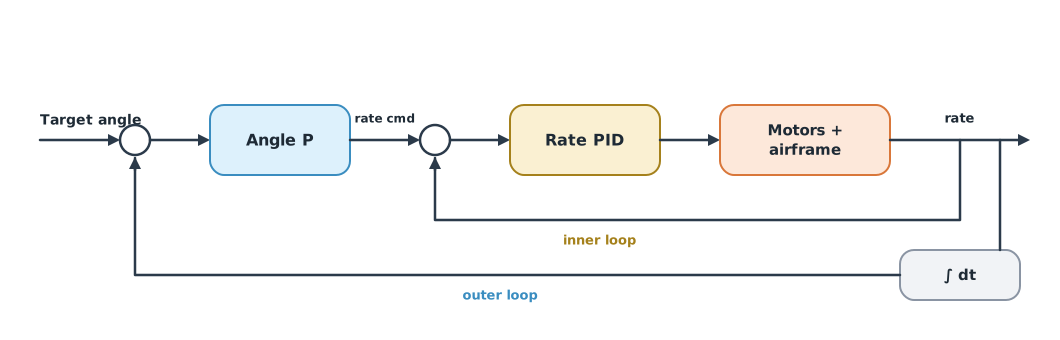
Every autopilot uses cascade control: nested loops in which the outer loop commands the inner loop. Understanding how the layers interact tells you which value to adjust when a drone oscillates, responds slowly or jerks. The drone knowledge base’s unit on cascade control and flight-controller tuning explains the rate, attitude and position loops and reading logs to tune them. Beard and McLain’s textbook applies the same principle to fixed-wing aircraft.
ArduPilot’s attitude controller
The ArduPilot developer documentation explains that a P controller converts the angle error into a desired rotation rate, and a PID controller then converts the rate error into motor commands. The Copter 4.6.3 defaults are ATC_ANG_RLL_P = 4.5 (range 3–12) and a rate loop of ATC_RAT_RLL_P = 0.135, I = 0.135, D = 0.0036. There is also feedforward of the desired rate and a square-root controller that keeps the approach to the target within the set acceleration. PX4 uses a similar structure: a PID rate loop and a quaternion P law for attitude.
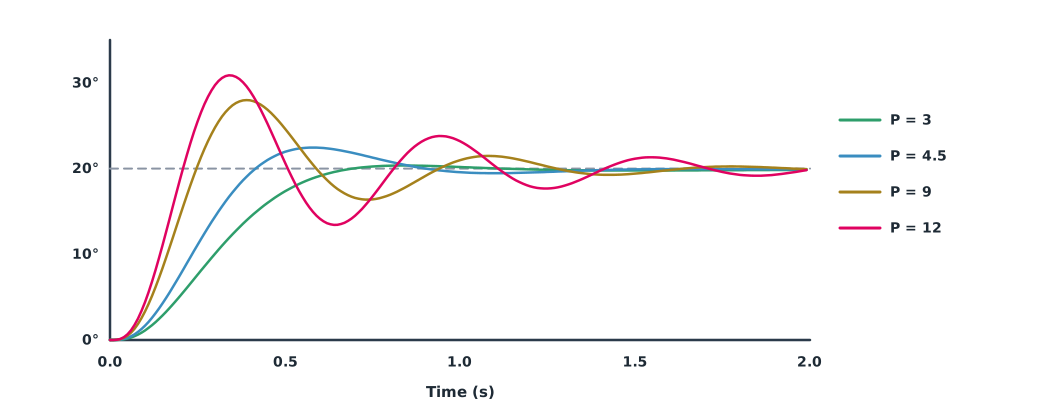
Example 1 What happens when the outer-loop gain is too high?
A simple roll model: a PI rate loop, motors with a 30 ms time constant and a 10 ms delay. Command a 20° tilt and change only the angle gain (the model’s values are not ArduPilot units, except that the angle gain uses the same range).
import math
import numpy as np

def step(k_angle, k_rp=0.15, k_ri=0.1, T=2.0, dt=0.0025, tau=0.03, J=0.02, delay=0.01):
    n = int(T / dt)
    ang = rate = u_act = integ = 0.0
    buf = [0.0] * int(delay / dt)
    out = []
    for _ in range(n):
        rate_cmd = k_angle * (math.radians(20) - ang)      # outer loop: angle -> rate
        e = rate_cmd - rate
        integ += e * dt
        buf.append(k_rp * e + k_ri * integ)                # inner loop: PI on rate
        u_act += (buf.pop(0) - u_act) * dt / tau           # motor lag
        rate += u_act / J * dt
        ang += rate * dt
        out.append(math.degrees(ang))
    out = np.array(out)
    overshoot = (out.max() - 20) / 20
    outside = np.where(abs(out - 20) > 0.4)[0]
    settle = (outside[-1] + 1) * dt
    rise = np.argmax(out >= 18) * dt
    return overshoot, settle, rise

for k in (3, 4.5, 9, 12):
    os_, ts, tr = step(k)
    print(f"angle P {k:>4}: rise {tr:.2f} s, overshoot {os_:5.1%}, settle (2%) {ts:.2f} s")
angle P 3: rise 0.53 s, overshoot 1.8%, settle (2%) 0.64 s
angle P 4.5: rise 0.37 s, overshoot 12.3%, settle (2%) 1.25 s
angle P 9: rise 0.23 s, overshoot 40.0%, settle (2%) 1.55 s
angle P 12: rise 0.20 s, overshoot 54.4%, settle (2%) 1.96 sThe higher the outer-loop gain, the faster the approach, but the larger the overshoot and the longer the settling, because the outer loop commands rates faster than the inner loop can follow. The inner loop must be clearly faster than the outer loop, so tune the inner loop first and then raise the outer loop. These numbers belong to the model; a real drone must be checked with logs.
Limiting angular acceleration
Commanding an angle change instantly would jerk the motors, so ArduPilot limits angular acceleration with ATC_ACCEL_R_MAX (in Copter 4.6.3, units of cdeg/s², default 110000, i.e. 1,100 deg/s²) and smooths commands with the time constant ATC_INPUT_TC (default 0.15 s). The next development version renames it ATC_ACC_R_MAX in deg/s². The minimum time to rotate by , accelerating fully for half the way and braking fully for the other half, is .
Example 2 Tilting 20° at different accelerations
import math

presets = {"default 110000": 110000, "Medium 108000": 108000, "Slow 72000": 72000, "VerySlow 30000": 30000}   # cdeg/s²
ANGLE = 20                                      # degrees
for name, cdeg in presets.items():
    a = cdeg / 100                              # deg/s²
    t = 2 * math.sqrt(ANGLE / a)
    peak = math.sqrt(ANGLE * a)
    print(f"{name:<15} {a:6.0f} deg/s2: {t:.2f} s to {ANGLE} deg, peak rate {peak:5.1f} deg/s")
default 110000 1100 deg/s2: 0.27 s to 20 deg, peak rate 148.3 deg/s
Medium 108000 1080 deg/s2: 0.27 s to 20 deg, peak rate 147.0 deg/s
Slow 72000 720 deg/s2: 0.33 s to 20 deg, peak rate 120.0 deg/s
VerySlow 30000 300 deg/s2: 0.52 s to 20 deg, peak rate 77.5 deg/sSlow settings suit camera drones or large drones with slow motors, while fast settings suit small, agile drones. Setting it faster than the motors can deliver saturates them and makes control worse, so match it to the aircraft rather than setting it as fast as possible.
Module lab
Lab: nested loops in SITL
- Start SITL and log step tilt commands in Stabilize or AltHold
- Look at the RATE and ATT messages, comparing desired and actual values in both loops
- Try three values of
ATC_ANG_RLL_Pwithin the allowed range and compare with Example 1 - Try the documented presets of
ATC_ACCEL_R_MAXand compare rotation times with Example 2 - Restore all defaults and record which values suit the training drone
Common mistakes
Watch out
- Tuning the outer loop before the inner loop
- Raising gains to fix slowness when the real limit is the acceleration setting
- Setting acceleration beyond the motors’ capability
- Using parameter units from the wrong version, such as cdeg/s² versus deg/s²
- Drawing conclusions from a model without confirming with real logs
Summary
- ArduPilot converts angle error to a rate with P and controls the rate with PID plus feedforward
- An outer loop that is too strong for the inner loop overshoots and oscillates; tune the inner loop first
- Limiting angular acceleration smooths commands; the minimum rotation time is
- Parameter names and units change between firmware versions
Check your understanding
- With an angle gain of 4.5 and a 10° angle error, what rate is commanded?
- How many deg/s² is
ATC_ACCEL_R_MAX= 72000? - What is the minimum time to rotate 45° at 900 deg/s²?
- Why tune the inner loop before the outer loop?
- What happens if the acceleration is set beyond the motors’ capability?
Answers
- deg/s
- 720 deg/s²
- s
- The outer loop commands the inner loop; if the inner loop cannot follow, adjusting the outer loop fixes the wrong thing
- The motors saturate, control worsens and the aircraft may oscillate
Key formulas
| Outer (angle) loop commands a rate | |
| Minimum rotation time under an acceleration limit |
Key references
- ArduPilot Dev Team. Copter attitude control. ArduPilot developer documentation. link
- ArduPilot Dev Team. ArduPilot source code, tag Copter-4.6.3 [Computer software]. GitHub. link
- ArduPilot Dev Team. Parameter list (Copter stable V4.6.3). ArduPilot Copter documentation. link
- PX4 Autopilot. Controller diagrams. PX4 user guide (main). link
- Beard, R. W., & McLain, T. W. (2012). Small unmanned aircraft: Theory and practice. Princeton University Press. link
Further reading
Study the assigned knowledge units in advance, review media and take the module quiz
In class / field
Lab or field practice from worksheets with a safety checklist
Learning evidence: Checked worksheets and quiz results