Failsafes and geofences
UAT 305 Autopilot and Control Technology
Lesson
By the end of this module you will be able to
- Configure altitude, circle and polygon geofences, both inclusion and exclusion
- Check with a program whether points are inside or outside the fences, or within the margin of an edge
- Verify from a log that the GCS failsafe acted at the configured time
- Design failsafe and geofence tests before real use
Why this matters
UAT 312 computed geofence margins and UAT 304 stepped through failsafe events in missions. This module looks from the autopilot’s side: how to configure them and how to prove they work. The drone knowledge base’s unit on PX4 and ArduPilot architecture covers failsafes and geofences, and its lab on stopping and resuming a simulated link records the behaviour when telemetry drops.
Types of geofence in ArduPilot
FENCE_TYPE is a bitmask: 1 = maximum altitude, 2 = circle around home, 4 = inclusion and exclusion polygons and circles, 8 = minimum altitude. The Copter 4.6.3 default is 7. FENCE_ACTION sets what happens on a breach, for example 1 = RTL or land (the default), 2 = always land, 4 = brake then land, and FENCE_MARGIN is the distance kept from the edge (default 2 m). The documentation on inclusion and exclusion fences explains that an inclusion fence is an area the vehicle must stay inside and an exclusion fence is an area it must not enter; polygons can have up to 70 points and are uploaded from the GCS over MAVLink2.
Example 1 Checking points against inclusion and exclusion fences
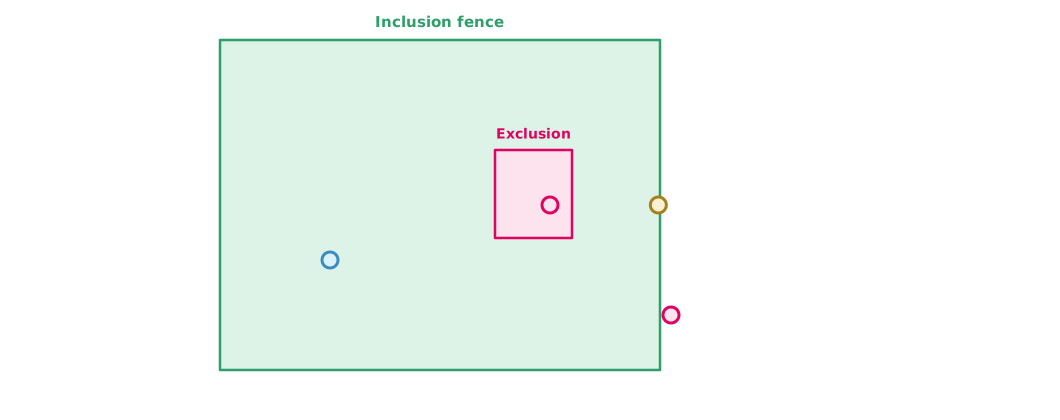
The inclusion fence is a 400 × 300 m rectangle with an exclusion fence around a tall building inside. Ray casting checks whether a point is inside, and the distance to the nearest edge is computed.
import math

INCLUSION = [(0, 0), (400, 0), (400, 300), (0, 300)]            # m
EXCLUSION = [(250, 120), (320, 120), (320, 200), (250, 200)]    # tall building
MARGIN = 2.0                                                    # FENCE_MARGIN

def inside(p, poly):
    x, y, c = p[0], p[1], False
    for i in range(len(poly)):
        (x1, y1), (x2, y2) = poly[i], poly[(i + 1) % len(poly)]
        if (y1 > y) != (y2 > y) and x < x1 + (y - y1) * (x2 - x1) / (y2 - y1):
            c = not c
    return c

def dist_to_edge(p, poly):
    best = math.inf
    for i in range(len(poly)):
        (ax, ay), (bx, by) = poly[i], poly[(i + 1) % len(poly)]
        dx, dy = bx - ax, by - ay
        t = max(0.0, min(1.0, ((p[0] - ax) * dx + (p[1] - ay) * dy) / (dx * dx + dy * dy)))
        best = min(best, math.hypot(p[0] - (ax + t * dx), p[1] - (ay + t * dy)))
    return best

for p in [(100, 100), (398.5, 150), (300, 150), (410, 50)]:
    if not inside(p, INCLUSION):
        verdict = "BREACH: outside inclusion fence"
    elif inside(p, EXCLUSION):
        verdict = "BREACH: inside exclusion zone"
    elif min(dist_to_edge(p, INCLUSION), dist_to_edge(p, EXCLUSION)) < MARGIN:
        verdict = "within margin of a fence edge"
    else:
        verdict = "ok"
    print(f"{p}: {verdict}")
(100, 100): ok
(398.5, 150): within margin of a fence edge
(300, 150): BREACH: inside exclusion zone
(410, 50): BREACH: outside inclusion fenceThe point only 1.5 m from the edge has not breached the fence but is within the margin, which ArduPilot uses to keep missions or guided flight from getting too close to the edge. Checking missions against fences with a program before upload catches misplaced waypoints before flight.
Proving the GCS failsafe from a log
The GCS sends HEARTBEAT messages to the aircraft regularly. According to the MAVLink documentation, radio links typically send them at 1 Hz and consider the connection lost after about four or five missed messages, but MAVLink does not define a fixed rate or timeout. ArduPilot uses FS_GCS_TIMEOUT (default 5 seconds, range 2–120): if no heartbeat arrives for longer than this, the GCS failsafe acts according to FS_GCS_ENABLE.
Example 2 Did the failsafe act on time?
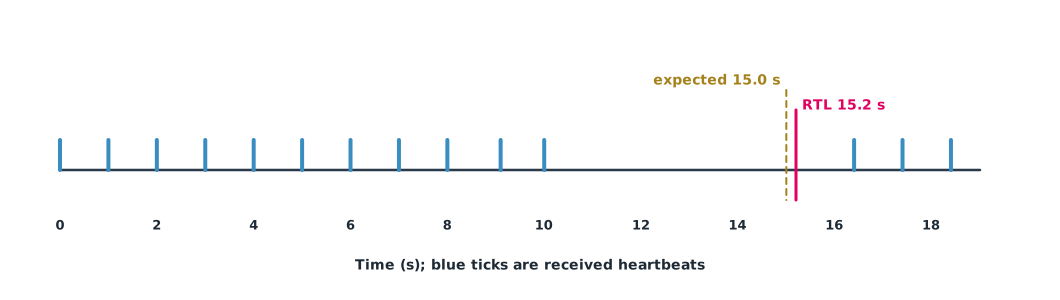
The times at which the aircraft received GCS heartbeats, and the time the log recorded the mode change to RTL, from a SITL test (simulated data).
TIMEOUT = 5.0                                   # FS_GCS_TIMEOUT
TOLERANCE = 0.5                                 # s, tolerance accepted by the team
heartbeats = [0, 1, 2, 3, 4, 5, 6, 7, 8, 9.1, 10, 16.4, 17.4, 18.4]   # s
mode_change_rtl = 15.2                          # s from the log

gaps = [(heartbeats[i], heartbeats[i + 1] - heartbeats[i]) for i in range(len(heartbeats) - 1)]
for start, gap in gaps:
    if gap > TIMEOUT:
        expected = start + TIMEOUT
        diff = mode_change_rtl - expected
        print(f"link lost after t={start}s for {gap:.1f}s -> failsafe expected at {expected:.1f}s")
        print(f"logged RTL at {mode_change_rtl}s ({diff:+.1f}s) -> {'as configured' if abs(diff) <= TOLERANCE else 'CHECK SETTINGS'}")
print(f"largest gap without failsafe: {max(g for _, g in gaps if g <= TIMEOUT):.1f}s")
link lost after t=10s for 6.4s -> failsafe expected at 15.0s
logged RTL at 15.2s (+0.2s) -> as configured
largest gap without failsafe: 1.1sThe failsafe acted only slightly after the expected time, so it worked as configured. A gap of just over 1 second did not trigger it, which is the intended behaviour. If the timing differs a lot, check whether FS_GCS_ENABLE is set correctly and whether another GCS is still sending heartbeats.
The test plan
Test every failsafe and geofence type in SITL first, then test some for real in a safe area, such as a low altitude ceiling and cutting the GCS link while hovering. Every test needs a measurable pass criterion, for example acting within 0.5 seconds of the expected time and breaching the fence by no more than 2 m, and results must be recorded with the firmware version and parameter file.
Module lab
Lab: testing failsafes and geofences in SITL
- Draw inclusion and exclusion fences in the GCS, upload them to SITL and set
FENCE_TYPEandFENCE_ACTION - Export the fence and mission points and check them with Example 1
- Fly towards the fence in SITL and observe the stopping distance and action
- Cut the GCS link in SITL, collect heartbeat and mode-change times from the log and check them with Example 2
- Write a test report with the firmware version and parameter values
Common mistakes
Watch out
- Enabling the fence with
FENCE_ACTIONset to report only - Drawing an exclusion fence over the take-off point, so the vehicle cannot arm or behaves wrongly
- Not testing failsafes for real because the settings look right
- Confusing log time with the time shown on the GCS
- Changing values in the field without retesting
Summary
FENCE_TYPEcombines ceiling, circle, polygons and minimum altitude;FENCE_ACTIONsets the action andFENCE_MARGINthe distance from edges- An inclusion fence is where the vehicle must stay and an exclusion fence where it must not go; both can be checked with ray casting and edge distance
- The GCS failsafe acts when heartbeats are missing for longer than
FS_GCS_TIMEOUT(default 5 seconds), which can be verified from the log - Test every type in SITL with measurable pass criteria before real use
Check your understanding
- Which fences does
FENCE_TYPE= 5 enable? - Is the point (5, 5) inside the square (0,0)–(10,10), and how far is it from the nearest edge?
- The last heartbeat arrives at t = 20 s with
FS_GCS_TIMEOUT= 5 s. When should the failsafe act? - What is an exclusion fence for?
- Why record the firmware version with test results?
Answers
- Bits 1 and 4: the altitude ceiling and polygons or circles
- Inside, 5 m from the edge
- At about t = 25 s
- To mark no-go areas inside the flying area, such as around tall buildings or crowds
- Names, defaults and behaviour change between versions, so results apply only to the version tested
Key formulas
| Distance from a point to a segment |
Key references
- ArduPilot Dev Team. Inclusion and exclusion fences. ArduPilot Copter documentation. link
- ArduPilot Dev Team. Parameter list (Copter stable V4.6.3). ArduPilot Copter documentation. link
- ArduPilot Dev Team. ArduPilot source code, tag Copter-4.6.3 [Computer software]. GitHub. link
- ArduPilot Dev Team. GCS failsafe. ArduPilot Copter documentation. link
- MAVLink Development Team. Heartbeat/connection protocol. MAVLink developer guide. link
Further reading
Study the assigned knowledge units in advance, review media and take the module quiz
PX4 and ArduPilot architecture
Dropping and restoring a simulated link
In class / field
Lab or field practice from worksheets with a safety checklist
Learning evidence: Checked worksheets and quiz results