File management and production quality assessment
UAT 472 Fundamentals of Aerial Photography and Videography with Drones
Lesson
By the end of this module you will be able to
- Compute file sizes from bitrate and image count, and choose a memory card that is fast enough
- Offload files from the card, verify them and back them up under the 3-2-1 rule
- Organise folders, name files and add metadata so files can be found and traced, while protecting privacy
- Assess production quality on technical, aesthetic and communication grounds and against the shot list
- Use a five-grade quality scale and the mean opinion score to decide which shots pass, need fixing or must be reshot
Why this matters
After a shoot day, one team formatted its card to keep shooting, believing the files were already copied to the computer. The copy had stopped halfway without anyone noticing, and the festival sunset footage, which could never be shot again, was gone. This happens far more often than drones crash. A shoot is therefore not finished when the drone lands; it is finished when the files are safe, organised and quality checked. This module closes the Bang Suwari job (fictional) with these two tasks before the files go to editing in UAT 473.
File sizes and memory cards
Video data rate is given as bitrate in megabits per second (Mbps), but file sizes and card capacities are in megabytes (MB) and gigabytes (GB). One byte is eight bits, so divide by 8. This lesson counts 1 GB = 1,000 MB, as card and drive makers do.
Example 1 How much space do two shoot days need?
4K 25 fps video at 100 Mbps; the team records 45 minutes of video and 300 RAW stills of 25 MB each (assumed).
- Data rate: MB/s, or GB per minute
- Video: MB GB
- Stills: MB GB
- Total GB; with three copies under the 3-2-1 rule, GB of space
- A 128 GB card holds minutes of this video
mbps, video_min, raws, raw_mb = 100, 45, 300, 25     # assumed values for the Bang Suwari job
mb_s = mbps / 8                                      # one byte is eight bits
video_gb = mb_s * video_min * 60 / 1000
photo_gb = raws * raw_mb / 1000
total = video_gb + photo_gb
print(f"{mbps} Mbps = {mb_s} MB/s = {mb_s * 60 / 1000:.2f} GB per minute")
print(f"video {video_gb:.2f} GB + photos {photo_gb:.1f} GB = {total:.2f} GB")
print(f"3-2-1 backup needs {3 * total:.2f} GB across three copies")
print(f"a 128 GB card holds {128e3 / mb_s / 60:.0f} min of this video")
100 Mbps = 12.5 MB/s = 0.75 GB per minute
video 33.75 GB + photos 7.5 GB = 41.25 GB
3-2-1 backup needs 123.75 GB across three copies
a 128 GB card holds 171 min of this videoA card must write fast enough continuously, or video stutters or stops recording. The SD Association defines speed class symbols that state a minimum write speed, such as the Video Speed Classes V10, V30, V60 and V90 (SD Association, n.d.); the number is megabytes per second. 100 Mbps video needs 12.5 MB/s, so a V10 card is not enough but V30 is, and V30 also covers 150 Mbps ( MB/s). Use the cards the drone maker recommends and carry at least one spare.
Offloading the card safely
The team’s ingest routine after every shoot:
- Label used cards and keep them apart from empty ones; do not put them back in the drone until backed up
- Copy the whole card folder, not just favourite files; companion files such as flight logs or the subtitle files some drones write beside each video must come too
- Verify by comparing file count and total size with the card, or use copy software that checks checksums, and open a few random files to see that they play
- Make the second copy on another medium straight away
- Log it in the job book: which card, which day, who copied, how many files
- Clear the card by formatting it in the drone only when every step is done; never delete files one by one on a computer
Folder structure and file names
A project with thousands of files from several days and cameras needs the same structure on every job, so everyone can find a file without asking.
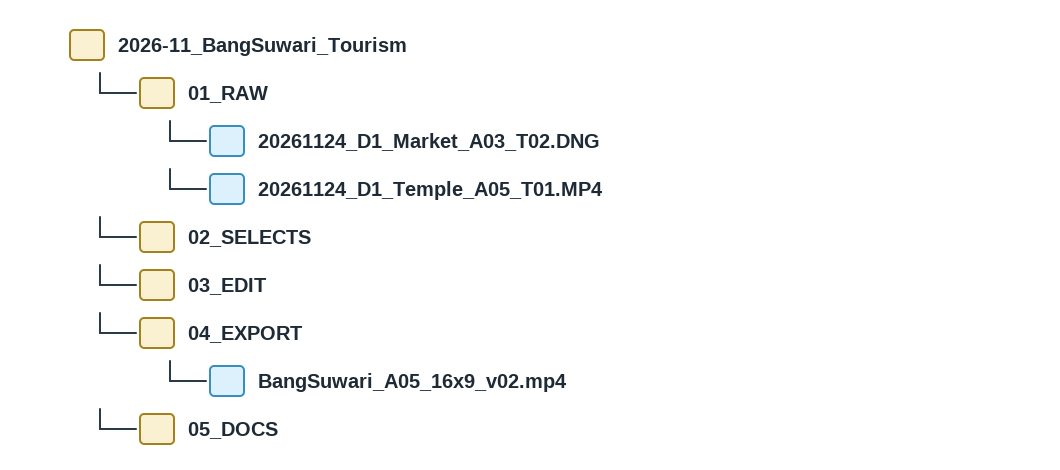
- 01_RAW: original files from the cards, never edited or deleted
- 02_SELECTS: chosen shots (copied, never moved from the originals)
- 03_EDIT: photo-editing and editing project files
- 04_EXPORT: deliverables, named with ratio and version such as
_16x9_v02 - 05_DOCS: shot list, call sheet, permission letters and quality report
File names follow date_day_place_shotcode_take, for example 20261124_D1_Market_A03_T02, which sorts by date by itself and links straight back to module 4’s shot list. Use English letters, numbers and underscores with no spaces so every program and operating system can open them.
3-2-1 backup
The widely used rule is 3-2-1: keep three copies of important files (one primary and two backups) on two different media types to guard against different hazards, and keep one copy off site (Ruggiero and Heckathorn, 2012). A fire, theft or flood at the office then cannot destroy all the work.
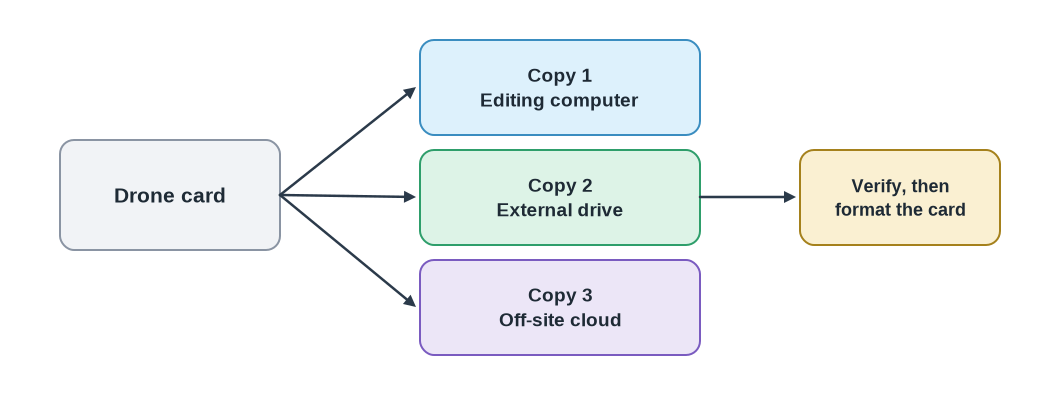
The Bang Suwari job needs 123.75 GB for three copies (Example 1). The team uses the editing computer, an external drive and the university’s cloud storage. Files containing people or places that must be kept confidential belong in a university-approved service with controlled access, not in a personal cloud account shared by open link.
Metadata
Image and video files carry metadata inside them, of two main kinds:
- Exif is written automatically by the camera: date and time, camera model, shutter speed, aperture, ISO and, on drones, usually GPS position and height. The standard keeps being revised; the latest is Exif 3.1 (CIPA DC-008, 2026) (Camera & Imaging Products Association, 2026)
- IPTC is added by people: Creator, Copyright Notice, Description (caption), Keywords, location (such as Sublocation and City) and the release status of people in the image (Model Release), under the IPTC Photo Metadata Standard 2025.1 (IPTC, 2025)
For the municipality, IPTC metadata makes the archive searchable: search “market” and get every market image, each stating its photographer and rights holder (copyright and image rights are taught in UAT 473). Beware of GPS coordinates in Exif: they reveal exact positions. For images of private homes or places that should not be disclosed, strip the coordinates from public files but keep them in the originals for traceability. Data that identifies people must be handled under the Personal Data Protection Act B.E. 2562 (2019), as noted in module 4.
File formats: keep originals as RAW (for example DNG) and the camera’s original video; deliver stills as JPEG for the web and video as MP4 to each channel’s specification (UAT 473). The US Library of Congress publishes recommended formats for long-term preservation and updates them every year; the current edition is 2025-2026 (Library of Congress, 2025). Use it to check that the formats the team picks will still open in the future.
Assessing production quality
The team checks every selected shot at three levels.
Level 1, technical quality, checked with tools and at 100% zoom:
- Sharpness: correct focus, no motion blur, no shake from wind or propellers
- Exposure: the histogram does not hit the edges and important highlights are not clipped (module 2)
- Colour: consistent white balance across the set, colours true to life
- Noise and compression: no colour grain or blocky patches in sky and water
- Video: level horizon, constant movement speed, no stutter or jelly-like wobble from vibration, no flicker bands (module 3)
- Intruders: propellers in frame, dust or marks on the lens, unintended flare, identifiable people who were not asked
Level 2, aesthetics and communication: composition, light and movement as in modules 1 to 3, and whether the shot does the job stated in the shot list.
Level 3, completeness: are all “must” shots done, and are all the ratios the media need delivered?
Example 2 Shot-list completeness
The combined aerial and ground shot list has 20 shots. The team has 18 that pass level 1, or . The two missing shots are one “should” and one “must” (assumed). Despite the high percentage the job cannot be delivered, because a must-have shot is missing. Completeness must be checked shot by shot, not only as a percentage.
Level 2 is a matter of judgement, so the team borrows the approach of Recommendation ITU-R BT.500 from the International Telecommunication Union, a method for assessing television picture quality with viewers. Several viewers score each shot on the five-grade quality scale: 5 excellent, 4 good, 3 fair, 2 poor and 1 bad (International Telecommunication Union, 2023), and the team computes the mean opinion score (MOS). The full BT.500 method specifies viewing room, display and number of viewers in detail; the team uses a simplified classroom version.
Example 3 Which shots pass?
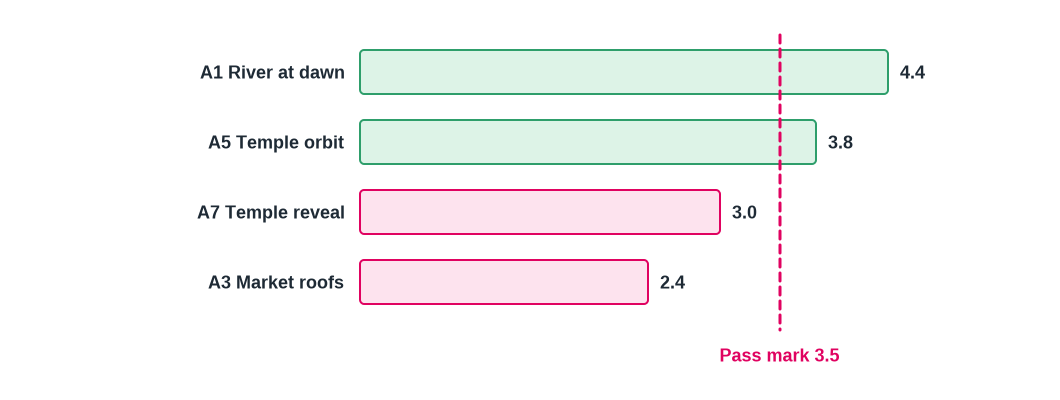
Five viewers (students from another team and the instructor) score four shots on the same screen. The team’s pass mark is an MOS of at least 3.5 (assumed).
- A1 River at dawn: 5, 4, 5, 4, 4, total 22, MOS , pass
- A5 Temple orbit: 4, 4, 3, 4, 4, total 19, MOS , pass
- A7 Temple reveal: 3, 3, 4, 2, 3, total 15, MOS , fail; viewers noted the rise was too fast and the horizon tilted, which can be fixed by levelling the image and trimming the start
- A3 Market roofs: 2, 3, 2, 3, 2, total 12, MOS , fail; viewers found the light harsh and the frame empty, because it was shot later than planned as vendors began packing up their umbrellas, so it must be reshot in the reshoot window on the second morning
The results of all three levels become a one-page quality report listing shots that pass, shots fixable in editing, and a reshoot list that feeds back into module 4’s reshoot window. This loop (plan, shoot, check, fix) raises quality on every job.
Module lab
Lab: from card to quality report
- Ingest and backup (hour 1): using real cards from the module 3 and 4 labs, follow the six ingest steps, build the folder structure, name files in the pattern and make 3-2-1 copies; compare the actual space used with Example 1
- Metadata (hour 2): in an image manager (such as Lightroom or a free program that reads IPTC), add Creator, Copyright Notice, Description, Keywords and location to the selected images; export one image without GPS coordinates and check they are really gone
- Technical check (hour 3): check the selected shots against the level 1 list at 100% zoom and record problems in a table
- Viewer panel (hour 4): swap shots with another team, score them on the five-grade scale, compute MOS and shot-list completeness, then write a one-page quality report with a reshoot list
Common mistakes
Watch out
- Formatting the card before verifying the copy: footage that cannot be reshot is lost for good
- Confusing megabits with megabytes: storage estimates off by a factor of eight
- Slow cards: video stutters or stops mid-shot
- Keeping files in one place: one failed drive loses the whole job
- Unsystematic names or renamed originals: files cannot be found or linked to the shot list
- Publishing images with GPS coordinates of private places: an accidental privacy breach
- Checking quality on a phone screen: blur and noise go unseen
- Looking only at the completeness percentage: a missing must-have shot slips through
Summary
- Bitrate in Mbps divided by 8 gives MB/s; 100 Mbps video uses 0.75 GB per minute; the card needs a high enough speed class
- Ingest is a routine: label, copy the whole folder, verify, make the second copy, log, and only then format the card
- A systematic folder structure and file names link files back to the shot list
- 3-2-1 backup: three copies, two media, one off site
- Exif records camera settings and position automatically; IPTC adds creator, rights, caption and keywords; watch for coordinates in public files
- Assess quality at three levels (technical, aesthetic and communication, completeness) and use the five-grade scale and MOS to decide on each shot
Check your understanding
- 150 Mbps video recorded for 20 minutes makes how many GB?
- 400 RAW stills of 30 MB each plus 30 GB of video: how much space does 3-2-1 backup need in total?
- Can a V10 card record 100 Mbps video? Why?
- Five viewers score 4, 3, 4, 4, 3. Does the shot pass an MOS mark of 3.5?
- Why strip GPS coordinates from some images before publishing but keep them in the originals?
Answers
- MB/s times seconds gives MB GB
- Stills MB GB; with the video GB; three copies GB
- No: the video needs MB/s but V10 guarantees only 10 MB/s
- Total 18, MOS , so it passes
- Coordinates reveal exact positions and may expose homes or private places to the public, but the originals still need them to trace where and when each shot was taken
Key formulas
| Data rate in megabytes per second | |
| Video size | |
| Mean opinion score |
Key references
- SD Association. Speed class standards for video recording. link
- Ruggiero, P., & Heckathorn, M. A. (2012). Data backup options. United States Computer Emergency Readiness Team (US-CERT), Cybersecurity and Infrastructure Security Agency. link
- International Press Telecommunications Council. (2025). IPTC photo metadata standard 2025.1. link
- Camera & Imaging Products Association. (2026). Exchangeable image file format for digital still cameras: Exif version 3.1 (CIPA DC-008-Translation-2026). link
- Library of Congress. (2025). Recommended formats statement 2025-2026. link
- International Telecommunication Union. (2023). Methodologies for the subjective assessment of the quality of television images (Recommendation ITU-R BT.500-15). link
- พระราชบัญญัติคุ้มครองข้อมูลส่วนบุคคล พ.ศ. 2562. ราชกิจจานุเบกษา, 136(69 ก), 52–95. link
Further reading
Study the assigned knowledge units in advance, review media and take the module quiz
Planning the data lifecycle before drone imaging
Camera settings and image-quality checks
In class / field
Lab or field practice from worksheets with a safety checklist
Learning evidence: Checked worksheets and quiz results