Sound, music, typography, graphics and basic motion graphics
UAT 473 Aerial Storytelling and Creative Content Production
Lesson
By the end of this module you will be able to
- Layer dialogue, ambience, music and sound effects and set loudness to each channel's target
- Cut picture to the music from its BPM and choose music whose licence covers the real use
- Choose and place on-screen text that is easy to read, meets the contrast threshold and stays in the safe area
- Build basic graphics and motion graphics that explain the story with keyframes and easing
Why this matters
Viewers forgive imperfect pictures far more than bad sound. Wind rumble, mumbled speech or music drowning everything makes people scroll on at once. At the same time, many people watch on phones with the sound off, so on-screen text must be able to tell the story instead of sound and be readable on a small screen. Music is where student work is most often removed or muted, because the team used a track it had no right to use. This module adds sound, music, text and graphics to the Fah Sai clip (assumed) that was picture-locked in module 3.
Layers of sound
Good clip sound has several layers you can adjust separately:
- Dialogue: Mae Kham’s two sentences or a narrator; always the clearest layer
- Ambience: wind, roosters, water in the dye pot; makes viewers feel they are there
- Sound effects: specific sounds such as the loom beater or cloth snapping in the wind
- Music: sets mood and pace
Drone footage has almost no usable sound, because the microphone on the aircraft hears only the propellers. The team must record ground sound separately in the same place, such as wind over the morning rice fields, and lay it under the aerial shots. Record dialogue with a lavalier (clip-on) microphone near the mouth with a windshield, and record 20 to 30 seconds of room tone to fill gaps in the edit.
Loudness and standards
Perceived loudness is measured in LUFS (Loudness Units relative to Full Scale). The more negative, the quieter: LUFS is quieter than LUFS. Channels have different targets:
- Broadcast: the European Broadcasting Union’s recommendation EBU R 128 uses an average programme loudness of LUFS with a tolerance of LU (EBU, 2023), a good target for a booth screen playing for hours.
- Streaming platforms: many normalise every item to the same loudness themselves. Spotify, for example, normalises tracks to LUFS measured with the ITU 1770 method and recommends keeping true peak below dBTP (Spotify, n.d.).
Reaching a target means raising or lowering the gain of the whole mix by the difference .
Example 1 One clip, two loudness targets
The 90-second mix is finished and measures LUFS on average (assumed).
- For the booth screen, target LUFS: dB, so turn it down 5 dB.
- For a platform normalising to LUFS: dB. The platform will try to raise it, but if the peaks hit the ceiling it may not raise it fully, and our clip will sound quieter than others.
The team therefore exports two versions: a booth version at LUFS and an online version mixed louder, near the platform target, keeping true peak at or below dBTP. Both use the same picture; only the sound differs.
Music and cutting to the beat
Music has a steady pulse given as BPM (beats per minute). One beat lasts seconds, and most songs have four beats to a bar. Cutting on the start of a bar or a strong beat makes picture and music feel like one. You do not have to cut on every beat; a clip that does is exhausting.
Example 2 A 96 BPM track for the 60-second clip
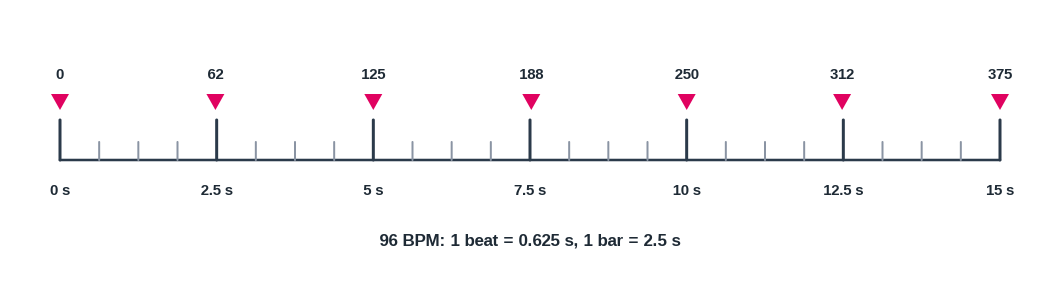
The team picks a modern phin (northeastern lute) track at 96 BPM (assumed) on a 25 fps timeline.
- One beat seconds; one bar (4 beats) seconds.
- 60 seconds holds beats, or bars.
- In frames: one beat frames, one bar frames.
One bar is 2.5 seconds, exactly the average ground shot length planned in module 2, so ground shots can change bar by bar. Aerial shots, a bar and a half long (3.75 seconds), cut mid-bar on the third beat. Because a bar is 62.5 frames, not a whole number, bar-line cuts fall on frames 0, 62, 125, 188, 250, 312, 375, 62 or 63 frames apart (gaps of 62, 63, 63, 62, 62, 63); the error is under half a frame, which neither eye nor ear can detect. The music should end on a strong beat with the logo. If the track is longer than the clip, cut out a middle section at a bar line rather than fading out mid-phrase.
Music copyright and licences
A song you can stream for free online is not a song you may use in your work. Thailand’s Copyright Act B.E. 2537 (1994) protects the musical work (the composer’s melody and lyrics) and the sound recording (the file a label or producer recorded) as separate works, and gives performers’ rights to singers and players on top (sections 6 and 44). One song can therefore have several rights holders. General copyright lasts for the author’s life plus 50 years after death (section 19), while a sound recording lasts 50 years from creation or first publication (section 21). Old songs may still be protected, and even where a folk melody has no owner, a new arrangement and its recording carry their own rights.
Safe options for brand work:
- Commission or record new music, for example local musicians playing the phin, with a written agreement on where and for how long it may be used and consent from the players as performers.
- Buy a licence from a music library, reading its scope in full: commercial use, which platforms, use at trade fairs, duration, and whose name the licence is in (the team or the client).
- A platform’s own library, such as YouTube’s Audio Library, which states that its tracks can be used in YouTube videos; some are Creative Commons tracks that require crediting the artist in the video description (Google, n.d.-c). That does not mean they may be used outside YouTube, for example on the booth screen.
- Creative Commons licences: BY requires credit to the creator, a link to the licence and an indication of changes (Creative Commons, n.d.); NC forbids commercial use; ND forbids adaptations; SA requires adaptations to be shared under the same licence. A community enterprise’s brand clip is commercial, so NC music is out, and the 4.0 licence text states that a musical work or sound recording synched in timed relation with a moving image always produces adapted material (Creative Commons, 2013), so ND music cannot be used in video either.
The real consequence of using the wrong music is not only legal action. Platforms run automatic content matching; YouTube states that Shorts longer than one minute with an active copyright claim are blocked globally (Google, n.d.-b). The client’s clip could vanish on the day the fair opens. Keep a licence log for every track and every font, and hand it to the client with the files.
On-screen text
On-screen text (typography) does three jobs: names and information (people, brand, booth location), subtitles for speech, and part of the mood of the piece. Principles:
- No more than two typefaces: one for titles, one for body text. For subtitles use a Thai typeface with loops (looped Thai letterforms) that reads easily on a small screen; the brand name can have more character.
- Large enough: test on a real phone at arm’s length, not on a computer monitor.
- On screen long enough to read twice, which is why short text beats long text.
- Fonts have licences too: check commercial use and embedding in video, just as with music.
Contrast between text and background matters most. The W3C’s WCAG 2.2 guideline requires a contrast ratio of at least 4.5:1 for normal text and 3:1 for large text, computed from the relative luminance of the two colours as , with the lighter colour (Campbell et al., 2024). The rule was written for the web but suits video well, because moving images are even harder to read than a web page.
Example 3 Which text colours can be read?
The team tries four colour pairs from the brand palette (assumed colour codes). The code below applies the WCAG formula.
# Contrast ratio using the WCAG formula
def channel(c):
    c = c / 255
    return c / 12.92 if c <= 0.04045 else ((c + 0.055) / 1.055) ** 2.4

def luminance(hex_colour):
    r, g, b = (int(hex_colour[i:i + 2], 16) for i in (1, 3, 5))
    return 0.2126 * channel(r) + 0.7152 * channel(g) + 0.0722 * channel(b)

def contrast(a, b):
    hi, lo = sorted((luminance(a), luminance(b)), reverse=True)
    return (hi + 0.05) / (lo + 0.05)

pairs = [("white on indigo", "#FFFFFF", "#1F2A5A"), ("indigo on cream", "#1F2A5A", "#F4EBD9"),
         ("white on light blue", "#FFFFFF", "#8FC1E3"), ("yellow on white", "#F2C230", "#FFFFFF")]
for name, text, bg in pairs:
    ratio = contrast(text, bg)
    print(f"{name:20s} {ratio:5.2f}:1  {'pass' if ratio >= 4.5 else 'fail'}")
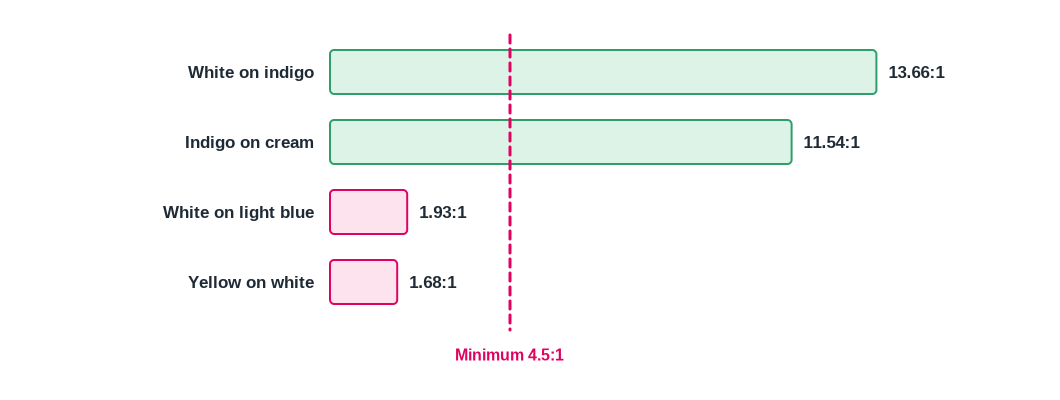
white on indigo 13.66:1 pass
indigo on cream 11.54:1 pass
white on light blue 1.93:1 fail
yellow on white 1.68:1 failWhite text on an indigo bar scores 13.66:1 and indigo on cream 11.54:1, passing easily. White on light blue scores only 1.93:1 even though it looks pretty on a monitor; placed over the sky in an aerial shot it would be almost unreadable. The team therefore puts subtitles on a semi-transparent indigo bar rather than straight onto the image. You do not need to code this; online contrast checkers do the same.
Subtitles help people watching muted, people with hearing loss and foreign visitors at the booth. The 90-second booth clip uses one-line English subtitles; the vertical clip uses Thai as the main language.
Graphics and safe areas
Short clips use few kinds of graphics: the logo, name bars (lower thirds), maps or arrows, and an end card with the page name and booth location. Every graphic uses the brand’s colours and typefaces.
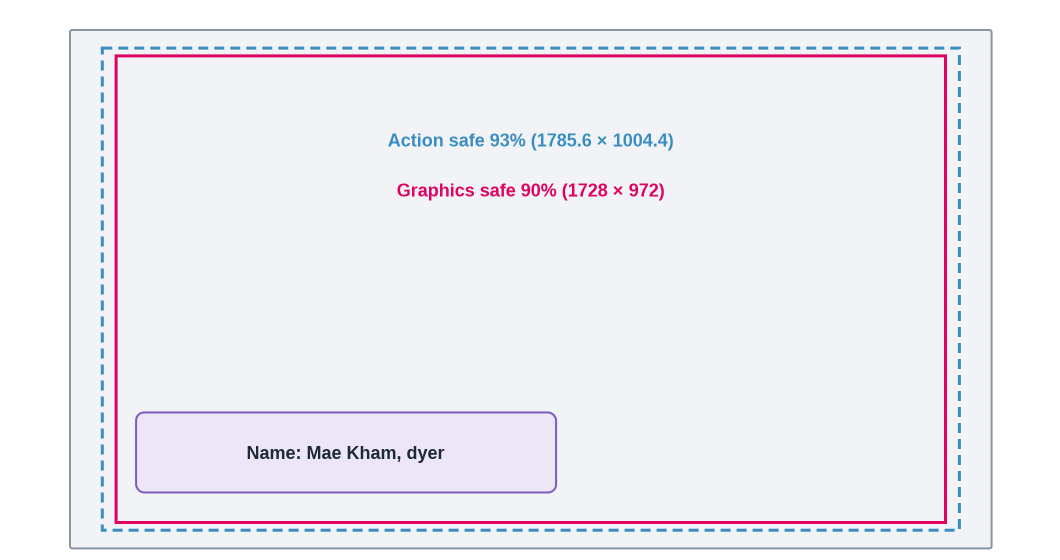
Screens crop the picture edge differently and platforms put buttons over it. The EBU R 95 recommendation sets the action safe area at 3.5% and the graphics safe area at 5% from every edge of a 16:9 picture (EBU, 2017). A 1920 × 1080 frame therefore has graphics margins of pixels left and right and pixels top and bottom, leaving by pixels for graphics. On vertical short-video apps, the like button, account name and caption sit over the bottom and right edge, so check with a screenshot of the current version of the real app.
Basic motion graphics
Motion graphics are graphics that move. Krasner (2013) explains that motion graphic design combines the principles of static design, such as type, colour and composition, with time and rhythm. Beginners need three ideas:
- Keyframes: points on the timeline where you set a value such as position or opacity; the software fills in between. A graphic sliding in needs only two keyframes: off screen and its final position.
- Easing: real objects do not start or stop instantly. Letting a graphic slow down before it stops (ease out) looks natural; constant speed looks mechanical.
- Timing: Mae Kham’s name bar slides in over 12 frames ( seconds), holds for 3 seconds (75 frames) and slides out over 10 frames (0.4 seconds), seconds in all: in fast, held long enough to read, out fast.
Use movement to explain, not to decorate. A good example here is a simple line map that draws a path from the fair to the village with an approximate distance, so viewers who might visit know they can get there. Text that spins, flashes and bounces on every line pulls the eye away from the story.
Module lab
Lab: sound, music, text and graphics (4 hours a week for 3 weeks)
Computer-lab work plus ground sound recording; no flying.
- Record dialogue with a lavalier microphone, ambience and room tone (with the speaker’s consent first).
- Layer dialogue, ambience, effects and music, using J-cuts or L-cuts on the sound.
- Choose music whose licence covers both online use and the fair, and fill in the licence log (title, rights holder, licence type, scope, date, required credit).
- Find the track’s BPM, calculate cut points in frames as in Example 2, and move key cuts onto bar lines.
- Measure loudness with the LUFS meter in your software, export a booth version at LUFS and an online version, and record the values before and after.
- Design name bars, subtitles and an end card; check contrast is at least 4.5:1 and keep them inside the safe area.
- Build one motion graphic (a name bar or a map) with keyframes and easing.
- Test the clip on a phone with sound on and off; ask three classmates whether they understood the story.
Common mistakes
Watch out
- Using the drone’s microphone, which records only propellers
- Using a popular track from the internet because “I gave credit”; credit is not permission
- Using an NC-licensed track in client work, which is commercial
- Not reading the licence scope: allowed on YouTube but not on the booth screen
- Music drowning the dialogue: duck the music whenever someone speaks
- White text over the sky, too little contrast to read
- Graphics hugging the edge, cropped or hidden under app buttons
- Too much motion, pulling the eye away from the story
Summary
- Sound layers are dialogue, ambience, effects and music; dialogue must be clearest, and drone footage needs separately recorded ground sound
- Loudness is measured in LUFS; EBU R 128 uses LUFS and many platforms normalise, Spotify to LUFS; adjust gain by
- One beat ; cut on bar lines or strong beats, not on every beat
- Music has layered rights; use tracks whose licence covers the real use, never NC for commercial work, and keep a licence log
- Text needs a contrast ratio of at least 4.5:1 and must sit inside the 5% safe area; motion graphics use keyframes and easing to explain, not to decorate
Self-check
- At 120 BPM, how long are one beat and one bar (4 beats), and how many frames is a bar at 25 fps?
- A clip measures LUFS. What gain change brings it to LUFS?
- Why can a CC BY-NC track not be used in the community enterprise’s brand clip?
- In a 3840 × 2160 frame, how many pixels are the left and top graphics-safe margins?
- White text on light blue scores 1.93:1. How should it be fixed?
Answers
- One beat seconds; one bar seconds, which is frames.
- dB, so raise it by 3 dB.
- NC forbids commercial use, and a brand clip made to promote and sell is commercial use.
- Left pixels; top pixels.
- It is far below 4.5:1. Put the text on a dark bar such as indigo (13.66:1), or use dark text on a light background, and recalculate.
Key formulas
| Length of one beat | |
| Contrast ratio | |
| Gain to reach a loudness target |
Key references
- European Broadcasting Union. (2023). EBU R 128: Loudness normalisation and permitted maximum level of audio signals (Version 5.0). link
- Spotify. (n.d.). Loudness normalization on Spotify. Spotify for Artists support. link
- Campbell, A., Adams, C., Bradley Montgomery, R., Cooper, M., & Kirkpatrick, A. (Eds.). (2024). Web content accessibility guidelines (WCAG) 2.2 (W3C Recommendation, 12 December 2024; definition of relative luminance). World Wide Web Consortium. link
- European Broadcasting Union. (2017). EBU R 95: Safe areas for 16:9 television production (Version 1.1). link
- Krasner, J. (2013). Motion graphic design: Applied history and aesthetics (3rd ed.). Routledge. link
- Google. (n.d.). Use music and sound effects from the Audio Library. YouTube Help. link
- Creative Commons. (n.d.). Attribution 4.0 International (CC BY 4.0) [License deed]. link
- Creative Commons. (2013). Attribution-NoDerivatives 4.0 International public license [Legal code]. link
- พระราชบัญญัติลิขสิทธิ์ พ.ศ. 2537 แก้ไขเพิ่มเติมโดย (ฉบับที่ 2) พ.ศ. 2558, (ฉบับที่ 3) พ.ศ. 2558, (ฉบับที่ 4) พ.ศ. 2561 และ (ฉบับที่ 5) พ.ศ. 2565 [ฉบับรวม]. WIPO Lex. link
Further reading
Study the assigned knowledge units in advance, review media and take the module quiz
In class / field
Lab or field practice from worksheets with a safety checklist
Learning evidence: Checked worksheets and quiz results