Obstacle avoidance
UAT 366 Indoor Autonomous and Multi-Unmanned Aircraft Systems
Lesson
By the end of this module you will be able to
- Explain potential fields and the local-minimum problem
- Choose a flight heading with the vector field histogram (VFH) from LiDAR ranges
- Explain PX4 Collision Prevention and its behaviour when range data stops
- Compare reactive avoidance with planned paths, and the idea of velocity obstacles
Why this matters
UAT 322 covered path planning on a map with A* and checking whether the drone can stop in time. In a real warehouse, though, a box may be left in the aisle or a pallet may stick out, and none of that is on the map. The drone must react to what its sensors see right now. Reactive methods are fast, but they have weaknesses you need to know. Without that knowledge, a drone may freeze in the middle of an aisle or oscillate between racks.
Potential fields
Khatib (1986) proposed the potential field, in which the goal attracts the robot and obstacles repel it, and the robot moves along the resultant force. The idea is simple and runs in real time, but Koren and Borenstein (1991) analysed its inherent limitations: getting stuck in a local minimum where forces cancel, failing to pass between closely spaced obstacles, and oscillating in narrow passages.
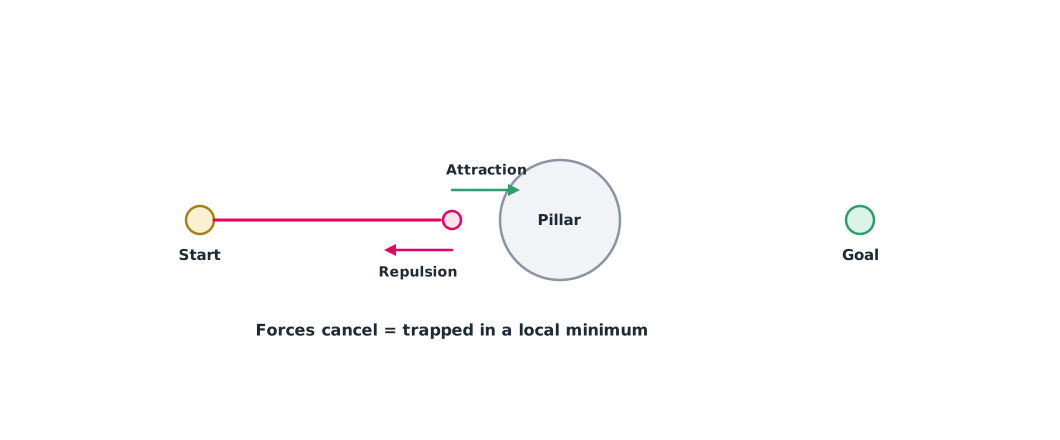
Example 1 Simulating a potential field in front of a pillar
A pillar with a 2.5 m radius of influence stands at (5, 0) and the goal is at (10, 0). Compare starting on the line with starting 0.5 m to the side.
import math

def fly(start, goal=(10, 0), obstacle=(5, 0), k_att=1.0, k_rep=5.0, rho0=2.5, step=0.05):
    x, y = start
    for i in range(2000):
        fx, fy = k_att * (goal[0] - x), k_att * (goal[1] - y)
        dx, dy = x - obstacle[0], y - obstacle[1]
        d = math.hypot(dx, dy)
        if d < rho0:
            m = k_rep * (1 / d - 1 / rho0) / d ** 2
            fx, fy = fx + m * dx / d, fy + m * dy / d
        f = math.hypot(fx, fy)
        if f < 1e-3:
            return f"stuck at ({x:.2f}, {y:.2f}) after {i} steps"
        x, y = x + step * fx / max(f, 1), y + step * fy / max(f, 1)
        if math.hypot(goal[0] - x, goal[1] - y) < 0.1:
            return f"reached goal after {i} steps"
    return "timeout"

print("start on the line:", fly((0, 0)))
print("start 0.5 m to the side:", fly((0, 0.5)))
start on the line: stuck at (4.17, 0.00) after 88 steps
start 0.5 m to the side: reached goal after 233 stepsStarting exactly on the line, the repulsive force points straight back against the attraction, so the drone stops in front of the pillar. A small offset gives a sideways force that carries it around. In practice you need a mechanism that detects being stuck and escapes, for example by switching to a path planner.
Vector field histogram
The VFH of Borenstein and Koren (1991) turns the obstacles around the robot into a polar histogram of obstacle density in each direction, then selects the “valley” below a threshold that is closest to the goal direction. It does not get trapped the way a potential field does, because it decides from the whole surroundings.
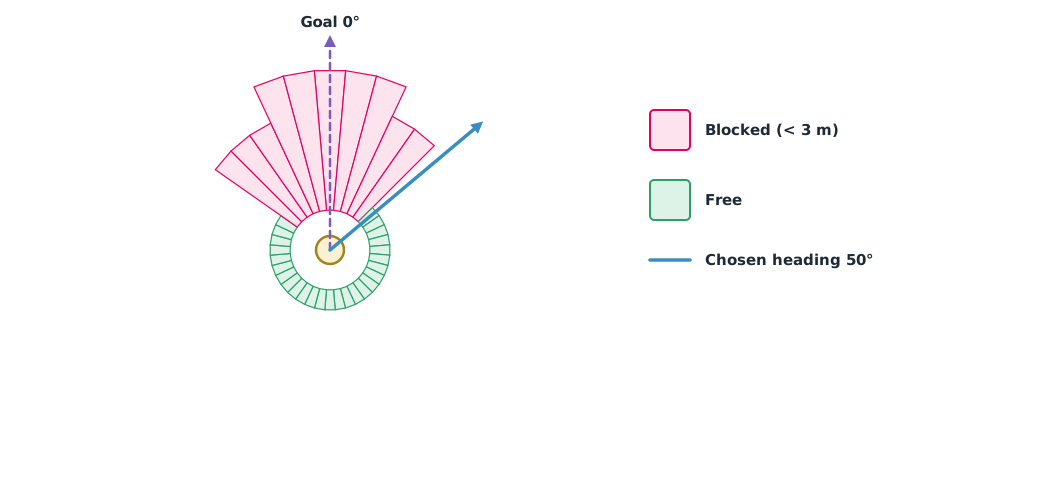
Example 2 Choosing a heading from LiDAR ranges
A simplified VFH: 36 sectors of 10° each; any sector with an obstacle closer than 3 m is blocked, and the free sector closest to the goal direction is chosen.
ranges = [6.0] * 36                                   # m per 10° sector, starting at 0°, clockwise
for k in (34, 35, 0, 1, 2): ranges[k] = 1.2           # box blocking the way ahead
for k in (3, 4): ranges[k] = 2.5
for k in (31, 32, 33): ranges[k] = 2.8
THRESH, GOAL_DEG = 3.0, 0

def angle_diff(a, b):
    return abs((a - b + 180) % 360 - 180)

blocked = [k * 10 for k, r in enumerate(ranges) if r < THRESH]
free = [k * 10 for k, r in enumerate(ranges) if r >= THRESH]
best = min(free, key=lambda a: angle_diff(a, GOAL_DEG))
print("blocked headings:", blocked)
print(f"chosen heading {best} deg ({angle_diff(best, GOAL_DEG)} deg from goal)")
blocked headings: [0, 10, 20, 30, 40, 310, 320, 330, 340, 350]
chosen heading 50 deg (50 deg from goal)A real VFH also checks the valley width so that it does not pick a gap too narrow for the drone, and it adjusts speed to the obstacle density ahead.
Flight-controller systems
PX4 Collision Prevention uses range data from sensors on the flight controller, or from the companion computer via MAVLink. It divides the surroundings into 72 sectors, works in Position mode, and slows and stops before a collision, with the distance set by CP_DIST and the delay by CP_DELAY. If range data stops for 0.5 s, movement is restricted; if it stops for 5 s, the vehicle switches to HOLD. ArduPilot has a similar Object Avoidance system. These systems prevent collisions but do not plan a way around.
For moving objects such as forklifts or other drones, the velocity obstacle of Fiorini and Shiller (1998) finds the set of velocities that would cause a future collision if both kept their current velocity, then chooses a velocity outside that set (extended in Module 4).
Module lab
Lab: avoidance in SITL and in the lab
- Experiment with the code from Example 1: change the start position, k_rep and the radius of influence, and find the conditions that trap the drone.
- Record LiDAR ranges in a simulated aisle, use the code from Example 2 to choose a heading, then add a valley-width condition.
- Enable Collision Prevention in PX4 SITL, try two values of
CP_DISTand fly toward a wall in Position mode. - Simulate a range-data dropout and check the behaviour at 0.5 s and 5 s.
- Test for real in the lab with soft obstacles at low speed, with a safety net and a pilot ready to take over.
Common mistakes
Watch out
- No mechanism to escape a local minimum.
- Choosing a gap narrower than the drone.
- Assuming the flight-controller system will plan a detour.
- Not testing the case where the sensor stops sending data.
- First tests at high speed near hard obstacles.
Summary
- Potential fields are simple but get stuck in local minima, cannot pass narrow gaps and oscillate.
- VFH uses a polar histogram to choose the free valley closest to the goal.
- PX4 Collision Prevention slows and stops before a collision and switches to HOLD after 5 s without range data.
- Reactive avoidance must work alongside path planning, and velocity obstacles for moving objects.
Check your understanding
- What causes a local minimum in a potential field?
- How does VFH choose a heading?
- The free sectors nearest the goal are at 40° and 320°, and the goal is at 10°. Which heading should be chosen?
- Into how many sectors does PX4 Collision Prevention divide the surroundings?
- What does PX4 do if range data stops for 5 s?
Answers
- The attractive and repulsive forces are equal and opposite, so the resultant is zero.
- It picks the valley whose obstacle density is below the threshold and which is closest to the goal direction.
- 40°, which is 30° from the goal; 320° is 50° away.
- 72 sectors.
- It switches to HOLD.
Key formulas
| Attractive force toward the goal | |
| Repulsive force from an obstacle (when d < ρ₀) |
Key references
- Khatib, O. (1986). Real-time obstacle avoidance for manipulators and mobile robots. The International Journal of Robotics Research, 5(1), 90–98. link
- Koren, Y., & Borenstein, J. (1991). Potential field methods and their inherent limitations for mobile robot navigation. In Proceedings of the 1991 IEEE International Conference on Robotics and Automation (pp. 1398–1404). IEEE. link
- Borenstein, J., & Koren, Y. (1991). The vector field histogram—Fast obstacle avoidance for mobile robots. IEEE Transactions on Robotics and Automation, 7(3), 278–288. link
- Fiorini, P., & Shiller, Z. (1998). Motion planning in dynamic environments using velocity obstacles. The International Journal of Robotics Research, 17(7), 760–772. link
- PX4 Autopilot. Collision prevention. PX4 user guide (main). link
- ArduPilot Dev Team. Object avoidance. ArduPilot Copter documentation. link
- Siegwart, R., Nourbakhsh, I. R., & Scaramuzza, D. (2011). Introduction to autonomous mobile robots (2nd ed.). MIT Press. link
Further reading
Study the assigned knowledge units in advance, review media and take the module quiz
Autonomous path planning and obstacle avoidance
LiDAR, radar and obstacle-avoidance sensors
In class / field
Intensive lab and field practice recorded in a lab notebook
Learning evidence: Lab notebook signed by the instructor