Preparing the aircraft, pre-flight checks, take-off and landing
UAT 471 UAS Operations for Aerial Photography and Creative Media
Lesson
By the end of this module you will be able to
- Prepare the drone, batteries, memory cards and documents the day before a flight
- Carry out a pre-flight check from a checklist and decide whether the flight can go
- Set a return-to-home height that clears the tallest obstacle with a margin
- Use Mode 2 sticks to control climb, turn and movement, including with the nose pointing towards you
- Take off and land safely by procedure, and work out how far the drone moves before the pilot reacts
Why this matters
Many camera-drone accidents happen before or after the filming, not during it: a cracked propeller nobody noticed, a battery not locked in, a return-to-home height lower than a building, or a take-off from a spot where people walk past. The 2015 Ministry of Transport notification therefore requires the pilot, before flying, to check that the aircraft and its control system are in a safe condition, to have the landowner’s permission, to study the area and airspace, and to have an emergency plan, and it requires the take-off and landing path to be free of obstacles (Ministry of Transport, 2015). This module turns those requirements into steps you can do every time, then practises the basic handling every flight needs.
In our case, the Creative Media Club is about to fly for real in the university’s practice area for the first time. Baitoey must make preparing, checking, taking off and landing a habit before thinking about beautiful shots.
Preparing the day before
Work at the site is quicker and nothing is forgotten if most of it is done the day before.
- Batteries: charge every drone and controller battery and the phone or tablet used for the live view; check for swollen or cracked packs (battery care is in module 4)
- Software: update firmware and apps at home or in the club room, never at the site, because an update can take long, fail halfway or change your settings; after an update, test fly in the practice area before using it on a real job
- Memory cards: enough free space, in the aircraft, plus a spare
- Propellers and airframe: check for cracks, chips or bends; damaged propellers are replaced in pairs as the manual says. Maintenance according to the manufacturer’s manual is one of the conditions for registered pilots (Ministry of Transport, 2015)
- Documents and equipment: the registration certificate or a copy, which must be carried at all times while flying, proof of insurance, the landowner’s permission, and a working fire extinguisher, which the 2015 notification requires registered pilots to carry while flying (Ministry of Transport, 2015)
The pre-flight checklist at the site
A checklist is a list you work through item by item and mark, not something you skim. Airline pilots use checklists on every flight even after thousands of hours, because human memory slips when rushed or tired. US rules likewise require the pilot to check the environment, equipment and control systems before every flight (Legal Information Institute, n.d.), and the FAA guidance has a table of conditions to inspect, such as a battery with a bulging case that can cause a sudden power loss or a fire (Federal Aviation Administration, 2021).
| Step | What to check |
|---|---|
| Area | Walk around: wires, trees, buildings, people, cars; a flat take-off spot away from people with a clear climb and descent path |
| Aircraft | Arms unfolded and locked, propellers tight and undamaged, gimbal clamp removed, battery locked in, lens clean |
| Controller and app | Enough controller and screen battery, connected, live view on, no red warnings |
| Settings | Return-to-home height, loss-of-signal action set to return home, height limit no more than 90 m |
| Position | Enough satellites, home point recorded, no compass warning (calibrate when the app asks, away from cars and steel) |
| People | Pilot fit to fly, observer in position, everyone knows the stop call |
Every item has three states: pass, fail and unknown. If any item fails or is unknown, you do not fly yet. “Unknown” is not “pass”, because not knowing is a risk that has not been checked.
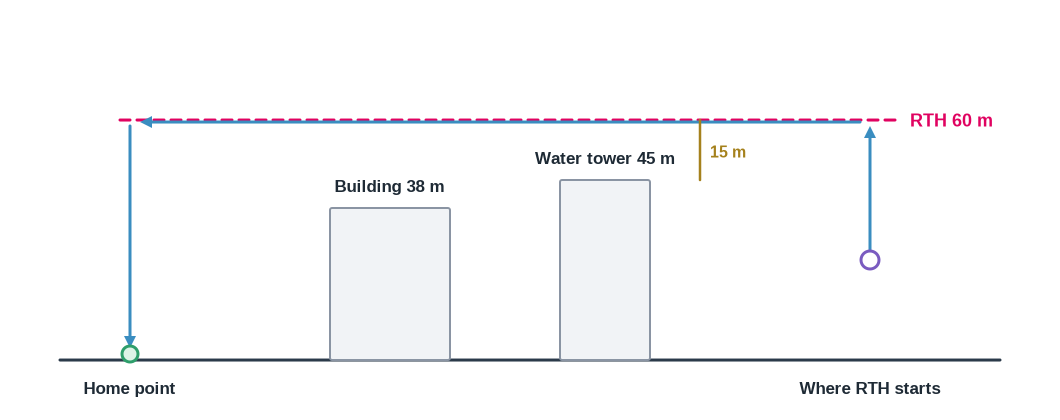
Example 1 What return-to-home height should be set?
In return-to-home mode many drones first climb to the set height and then fly straight back. If that height is lower than a building on the way, the drone may hit it. The club’s practice area has a 38 m classroom building and a 45 m water tower (assumed). The club uses a 15 m margin (assumed).
- Tallest obstacle: the water tower, 45 m
- Minimum return-to-home height: m
- Compare with the legal ceiling: m, so it can be set
Baitoey sets 60 m. If one day she flies where a building is taller than 75 m (), the return height would hit the legal ceiling, so she must move the take-off point or plan the route so the drone never has to cross that building, rather than setting more than 90 m.
Sticks and the drone’s orientation
Most camera-drone controllers are set to Mode 2: the left stick controls climb, descent and turning, the right stick controls forward, back and sideways. Released sticks spring back to centre, and a drone in position mode then hovers in place.
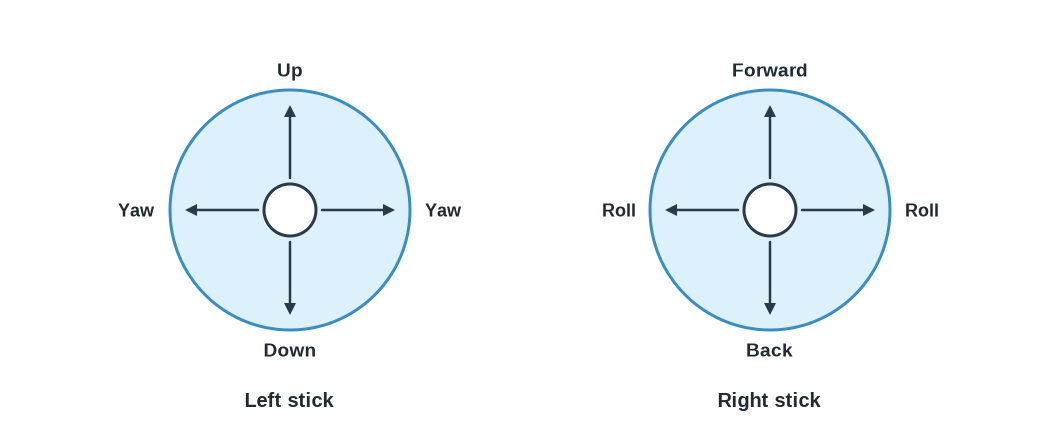
Right-stick commands refer to the drone’s nose, not to the pilot. With the nose pointing away from you, pushing the right stick left moves the drone to your left. With the nose pointing towards you (nose-in) everything reverses: push left and the drone goes to your right, just like steering a radio-controlled car driving towards you. Many beginners go the wrong way at this moment, so it has to be practised until automatic. The trick is to move the sticks gently and slowly, see which way the drone goes before adding more, and use the lights or the arrow on the app map to tell where the nose points.
Take-off and landing
Take-off procedure
- Place the drone on a pad or flat ground, nose pointing away from you, separated from the pilot and others by the club’s set distance
- Power on in the order the manual gives; wait for the home point and no warnings
- Call “take-off” loudly so everyone hears
- Start the motors and climb slowly to about 2 to 3 m, then hold a check hover for about 10 seconds: listen to the motors, watch for tilt or drift, and check that every stick direction responds correctly
- If all is normal, climb to work; if anything is abnormal, land at once
Landing procedure
- Fly back above the landing spot at a safe height and call “landing”
- Descend slowly, hover at about 1 to 2 m and check that the spot is still clear
- Descend until touchdown and hold the left stick down until the motors stop, as the manual says
- Power off in order, refit the gimbal clamp, and write the flight log (times, battery left, anything abnormal)
In this course nobody catches the drone by hand while the propellers turn, and if the wind is too strong to hold a steady check hover, land and do not continue.
Example 2 How far does the drone move while you look down at the screen?
A person needs a moment to see a problem, decide and move a finger. The club uses a reaction time of 1.5 seconds (assumed). The distance the drone travels before the pilot starts correcting is .
| Speed | Distance before reacting |
|---|---|
| 3 m/s | m |
| 5 m/s | m |
| 10 m/s | m |
| 15 m/s | m |
This does not include the distance the drone needs to brake. Flying at 10 m/s, 10 m from a branch, while Baitoey looks down at the screen, the drone reaches the branch before she starts moving her finger. The club therefore flies slowly (no more than 3 m/s) near obstacles and has an observer watch the drone at all times.
In the check hover, if the drone drifts by itself at 0.3 m/s for 10 seconds it moves m, meaning position hold is not working: land and find the cause.
After landing and keeping records
Records after each flight reveal problems that grow slowly, such as one battery that runs down unusually fast. The club’s flight log has the date, pilot, aircraft, which battery, take-off and landing times, battery percentage left and anything abnormal. These data are used to work out real flight time in module 4. The FAA study guide for drone pilots also stresses systematic inspection and maintenance (Federal Aviation Administration, 2016).
Module lab
Lab: first flights in the practice area (4 hours a week for three weeks)
- Week 4: continue in the simulator: nose-in hover, a square circuit with the nose following the path, and landing on a target, until done three times in a row without crashing
- Week 5: in the open practice area with the instructor, carry out the pre-flight checklist yourself and have a classmate check it again; set the return-to-home height from the real obstacles of the area; then take off, hold a 10-second check hover and land, 10 times
- Week 6: fly a slow square around cones at no more than 10 m height, practise nose-in hovering, and test return-to-home once at the low height the instructor sets
- Log every flight; fly in daylight, never over people, and stop at once when the instructor or observer calls stop
Common mistakes
Watch out
- Updating firmware at the site, then settings change or the update fails
- Setting return-to-home lower than buildings or trees on the way back
- Treating “unknown” as “pass” on the checklist
- Climbing high straight after take-off without a low check hover
- Pushing the sticks hard with the nose towards you, so the drone goes the wrong way
- Flying fast near obstacles although the distance before reacting is several metres
Summary
- Prepare batteries, software, cards, propellers, documents and the fire extinguisher the day before; never update at the site
- Work through the checklist item by item; any fail or unknown means no flight yet
- Return-to-home height must clear the tallest obstacle with a margin and stay within the legal ceiling
- Mode 2: left stick climbs and turns, right stick moves; directions reverse with the nose towards you
- Take off and hold a low check hover; distance before reacting is , so fly slowly near obstacles
Check your understanding
- Why should firmware not be updated at the site?
- An area has 25 m trees and a 52 m building; with a 15 m margin, what is the minimum return-to-home height?
- The drone’s nose points towards the pilot; the right stick is pushed left. Which way does the drone go, seen from the pilot?
- Flying at 8 m/s with a 1.5-second reaction time, how far does the drone move before the pilot starts correcting?
- On the checklist the controller battery is “unknown”. What should be decided?
Answers
- An update can take long, fail halfway or change settings; update in advance and test fly before real use
- m, which is still within 90 m
- To the pilot’s right, because commands refer to the drone’s nose
- m
- Do not fly yet; find out first (for example, read the battery level on the controller), because unknown is not pass
Key formulas
| Return-to-home height | |
| Distance moved before reacting |
Key references
- กระทรวงคมนาคม. (2558). ประกาศกระทรวงคมนาคม เรื่อง หลักเกณฑ์การขออนุญาตและเงื่อนไขในการบังคับหรือปล่อยอากาศยานซึ่งไม่มีนักบิน ประเภทอากาศยานที่ควบคุมการบินจากภายนอก พ.ศ. 2558. ราชกิจจานุเบกษา, 132(86 ง), 6–12. link
- Federal Aviation Administration. (2021). Small unmanned aircraft systems (small UAS) (Advisory Circular 107-2A). link
- 14 CFR § 107.49 – Preflight familiarization, inspection, and actions for aircraft operation. (Legal Information Institute, Cornell Law School). link
- Federal Aviation Administration. (2016). Remote pilot – small unmanned aircraft systems study guide (FAA-G-8082-22). link
- Civil Aviation Authority of Thailand. (2025). Flying a drone in Thailand [Leaflet]. link
Further reading
Study the assigned knowledge units in advance, review media and take the module quiz
In class / field
Lab or field practice from worksheets with a safety checklist
Learning evidence: Checked worksheets and quiz results