Editing, Quality Control and Platform Delivery
UAT 474 Commercial Drone Media Production
Lesson
By the end of this module you will be able to
- Manage a client's files from ingest through 3-2-1 backup, naming and versioning
- Edit and enhance media so that footage from several cameras matches, without retouching that misleads
- Run client review rounds and quality-check with technical and content checklists
- Calculate storage, file size from bitrate and the pixels left after cropping for each platform
Why this matters
Mekkhao Productions comes back from the resort with a stack of memory cards. Those files are the entire value of the job. If a card is lost or corrupted before it is backed up, the team must reshoot at its own cost, or worse, cannot reshoot at all because the launch event is over. After that the work still has to be edited, revised after client feedback and exported in several sizes for several platforms. Small slips, such as misspelling the resort’s name in the end card or sending a landscape file to a vertical slot, damage the client’s confidence more than a shot that is not quite beautiful enough.
Editing, colour, sound, type and graphics techniques were covered in UAT 473. This module focuses on what a commission adds: managing the client’s files, review rounds, quality control and delivery to each platform’s specification.
Ingest and backup
Ingest means copying files from the cards into the team’s storage. The rule recommended in a US cybersecurity agency paper is 3-2-1: keep 3 copies of important files (1 primary and 2 backups), on 2 different media types, with 1 copy stored offsite (Ruggiero & Heckathorn, 2012). The team follows these steps at every break during the shoot:
- Copy the card to drive 1 and drive 2 with software that verifies the copies afterwards (checksum comparison).
- Check that file counts and sizes match the card, and open a sample file.
- Do not format the card until two copies exist.
- Back at the office, upload the third copy offsite, for example to a cloud service the client accepts.
File naming must follow one system for the whole team, for example SLW_D1_A01_0012 meaning job Silawaree, day 1, shot A01, file 12, so people who were not on location can still find files.
Example 1 How much storage is needed?
Actual settings and volume (assumed): drone 4K video at 150 Mbps, 120 minutes in total; ground video at 100 Mbps, 180 minutes in total; and 600 RAW stills of 30 MB each.
Step 1, convert bitrate to file size. 150 Mbps means 150 megabits per second and 8 bits make 1 byte, so the size in megabytes (MB) is seconds times bitrate divided by 8.
Step 2, stills. MB GB.
Step 3, total and three copies. GB. Under 3-2-1 that means GB, so the team uses two 1 TB drives and at least 300 GB of cloud space, not counting proxies and project files (decimal units, 1 GB = 1,000 MB, as drive makers use).
Editing workflow for a client job
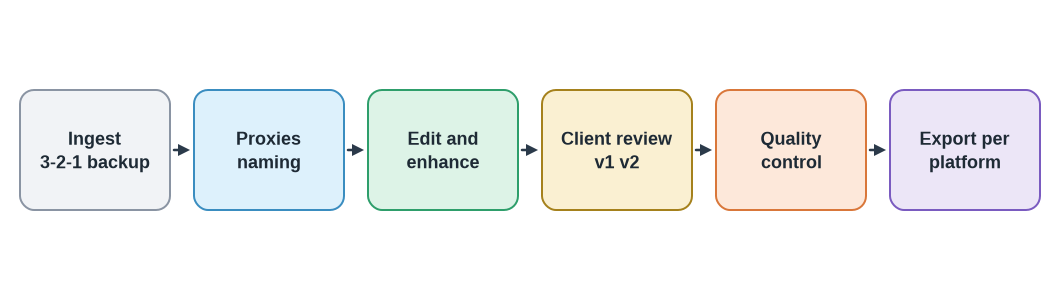
- Proxies are low-resolution copies of the 4K footage that edit smoothly on an ordinary computer; on export the software switches back to the originals.
- Selects: from the 300 minutes shot, mark the usable moments and rate them.
- Rough cut: lay out the story following the storyboard, with no detailed colour work yet.
- Fine cut: refine the rhythm, add licensed music, type and ambient sound.
- Versioning: every time something goes to the client it gets a new version name, such as
SLW_BrandFilm_v01thenv02, never overwriting the old one, so you can roll back and know which version each comment refers to.
Enhancing the media
Common enhancements for drone work are stabilising small shakes, levelling the horizon, reducing noise in low-light shots and matching colour between cameras, using the colour chart that both cameras shot in module 3 as the reference so that the sea looks the same colour from the drone and from the ground. Cinematography texts note that controlling colour and image at the shoot makes the later grade much easier (Brown, 2021).
The line to know is: you may enhance to look better, but not so that viewers misunderstand the facts. Correcting light, colour and stability is enhancement. Removing a neighbouring house, moving the beach or replacing the sky in a villa sales image is distortion. If the client asks for a sky replacement in a brand film that makes no factual claim about the place, the team may do it, but should record which images were changed and how.
Client review rounds
The client watches the work through a review link that takes comments tied to the clip’s timecode, or sends a list of comments with times, for example “00:00:23 logo too small”. The quote states that 2 review rounds are included and further rounds are charged (module 5), and asks the client to consolidate everyone’s comments through one coordinator to avoid conflicting notes from different people. When the client confirms the final version it is picture lock; changes after that are extra work.
Quality control
Quality control (QC) means checking every file against a checklist written in advance, not a quick look. The team splits it in two:
| Part | Checks |
|---|---|
| Technical | Resolution, frame rate, duration and file format match the specification; no unintended black or flash frames; no flicker from lights; no propellers or drone shadow in frame; level horizon; no dust on the lens; audio level on the target learned in UAT 473 |
| Content | Matches the deliverables in the brief; names, phone numbers and website spelled correctly; correct logo version and colours; every recognisable person has a release; music and fonts are licensed; no third-party logos or licence plates that should not be in shot |
Results go into a QC log: every file is marked pass, fail or waiting for information, with the checker’s name and date. This follows the same principle as the data delivery unit of the drone knowledge base: an item still missing evidence must never be reported as passed. Having someone who did not edit the piece do the checking catches errors that the editor no longer sees after many viewings.
Preparing media for digital platforms
Each platform wants different sizes, aspect ratios and files. Adapting content to platforms was covered in UAT 473 module 5; here the focus is delivering everything the client specified. YouTube’s upload recommendations include MP4 files with H.264 video and AAC-LC audio at 48 kHz, uploading at the frame rate you shot, recommended SDR bitrates at 24 to 30 fps of 35 to 45 Mbps for 4K and 8 Mbps for 1080p, and 16:9 as the standard ratio on computers, while vertical and square videos are also supported (Google, n.d.). Platform specifications change often, so open the latest specification before every export. The team keeps a delivery matrix with one row per file.
| File | Aspect ratio | Resolution | Used on |
|---|---|---|---|
| Brand film | 16:9 | 3840 × 2160 | Website, YouTube |
| 3 vertical videos | 9:16 | 1080 × 1920 | Social media |
| Villa sales video | 16:9 | 3840 × 2160 | Project sales page |
| Launch highlight | 16:9 and 9:16 | 1920 × 1080 and 1080 × 1920 | Social media, news |
| Stills | 3:2 and 4:5 | As the booking sites and printer require | Booking sites, brochure, news |
Example 2 Cropping 4K to vertical
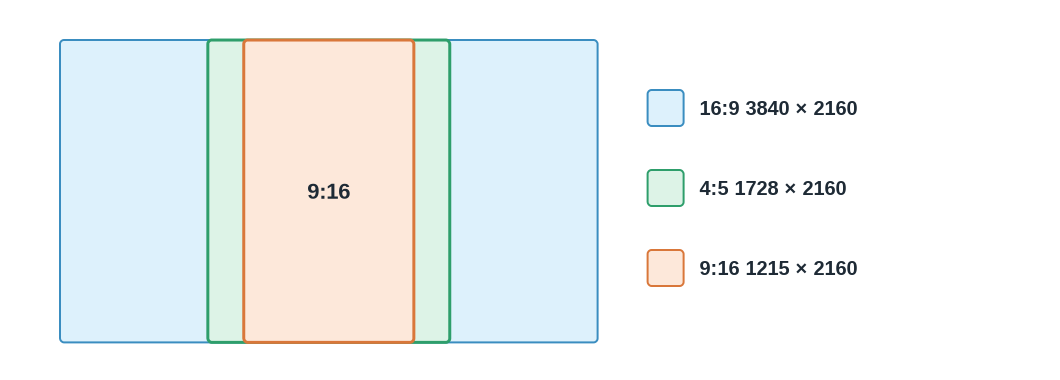
A landscape drone frame of 3840 × 2160 must be cropped to 9:16, keeping the 2160-pixel height.
Step 1, width left. pixels, which is of the original width, so the subject must sit inside this centre band when you shoot.
Step 2, scale to the delivery size. 1215 × 2160 scaled to 1080 × 1920 is a factor of , a reduction, so the image stays sharp.
Step 3, compare with a 1080p original. Shooting only 1920 × 1080 leaves pixels of width, which must be enlarged times to reach 1080 × 1920, so the result is soft. That is why jobs that need vertical crops should be shot in 4K.
4:5 crop for feed images. pixels.
Example 3 How big are the delivery files?
The team exports at the bitrates YouTube recommends for 24 to 30 fps, using 40 Mbps for 4K and 8 Mbps for 1080p (video only, audio not included), with :
- Brand film, 4K, 60 s: MB
- Vertical video, 1080 × 1920, 20 s: MB
- Villa sales video, 4K, 45 s: MB
- Highlight, 1080p, 90 s: MB
Files this size travel easily by download link with no need to post a drive, although high-quality archive masters are much larger.
Calculator for the curious
# file size (MB) = seconds x bitrate (Mbps) / 8
deliverables = [("brand film 4K", 60, 40), ("vertical reel", 20, 8),
                ("villa film 4K", 45, 40), ("event highlight", 90, 8)]
for name, seconds, mbps in deliverables:
    print(f"{name}: {seconds * mbps / 8:.0f} MB")

# width left when cropping from a frame 2160 px tall
for ratio, (aw, ah) in {"9:16": (9, 16), "4:5": (4, 5)}.items():
    print(f"crop {ratio}: {2160 * aw / ah:.0f} px wide")
brand film 4K: 300 MB
vertical reel: 20 MB
villa film 4K: 225 MB
event highlight: 90 MB
crop 9:16: 1215 px wide
crop 4:5: 1728 px wideModule lab
Lab: from memory card to QC-passed deliverables (no flying)
Use the footage your team shot in module 3.
- Hour 1: ingest under the 3-2-1 rule, check file counts and sizes, name files with the team’s system, and compare the storage actually used with your estimate.
- Hour 2: make proxies, pick selects and cut a rough cut v01 of 30 to 45 seconds; match the drone and ground camera colour using the colour chart.
- Hour 3: swap with another team acting as client, receive timecoded comments, revise to v02 and lock the picture.
- Hour 4: run QC with the technical and content checklists (a teammate who did not edit is the checker), export 16:9 and 9:16 versions per the delivery matrix, and compare calculated and actual file sizes.
Submit: ingest log, v01 and v02, the client comments and changes, the QC log and the two delivery files.
Common mistakes
Watch out
- Formatting a card before two backups exist, or keeping every copy in the same bag.
- Overwriting earlier versions, so nobody knows which version the client commented on.
- Taking comments directly from several client staff, which conflict and never end.
- Letting the editor be the only QC checker of their own work.
- Exporting from habit without opening the platform’s latest specification.
- Shooting 1080p and cropping to vertical, which forces enlargement and softness.
- Retouching villa sales images until they distort the facts.
Summary
- Back up at once under 3-2-1, verify after copying, name files systematically and version every delivery.
- Client workflow: proxies, selects, rough cut, fine cut, the agreed review rounds and picture lock.
- Enhance to improve, never to distort facts.
- QC covers technical and content checks, logs results per file and uses a checker other than the editor.
- File size and crop width ; always check the platform’s latest specification.
Self-check
- Explain the 3-2-1 rule and which parts are broken by keeping all three copies on one hard drive.
- A 60-second 4K video is exported at 60 Mbps. About how many MB is the file?
- Cropping a frame 2160 pixels tall to 4:5 leaves how many pixels of width?
- Why should the client consolidate comments through one coordinator?
- In a villa sales image, which of these is distortion: brightening the exposure or removing the neighbouring house? Why?
Answers
- Keep 3 copies (1 primary, 2 backups) on 2 media types with 1 copy offsite. One hard drive breaks both the two-media and the offsite parts: if the drive fails or is lost, everything is gone.
- MB
- pixels
- To get one set of comments with no contradictions, and to count review rounds clearly as agreed in the quote.
- Removing the neighbouring house is distortion because buyers would misread the surroundings; brightening the exposure is enhancement that does not change the facts.
Key formulas
| File size from bitrate | |
| Width left after a vertical crop |
Key references
- Ruggiero, P., & Heckathorn, M. A. (2012). Data backup options. United States Computer Emergency Readiness Team (US-CERT), Cybersecurity and Infrastructure Security Agency. link
- Google. (n.d.). YouTube recommended upload encoding settings. YouTube Help. link
- Brown, B. (2021). Cinematography: Theory and practice for cinematographers and directors (4th ed.). Routledge. link
- Honthaner, E. L. (2010). The complete film production handbook (4th ed.). Routledge. link
Further reading
Study the assigned knowledge units in advance, review media and take the module quiz
Accepting and packaging deliverables
Logs, handover and post-mission debrief
In class / field
Lab or field practice from worksheets with a safety checklist
Learning evidence: Checked worksheets and quiz results