Preparing and splitting datasets
A model can learn only as much as the data and labels support. Define the objects to detect, the image scope and the usage rights before collecting; split the data by groups that may be similar, such as flights or sites, then use validation to choose settings and hold the test set back
A01 · Exercises and case studies
A model can learn only as much as the data and labels support. Define the objects to detect, the image scope and the usage rights before collecting; split the data by groups that may be similar, such as flights or sites, then use validation to choose settings and hold the test set back
Read formulas, worked calculations and additional exercises ↓
Before you start
Use a Windows or Linux computer, read CSV files with a spreadsheet program or text editor, and save your work files separately from the originals. The basic Python set uses the standard library; actual AI programs and simulators have separate installation steps
By the end of this lesson
- Organise rights, labels and image provenance into a data card
- Split train/validation/test by mission unit to reduce data leakage
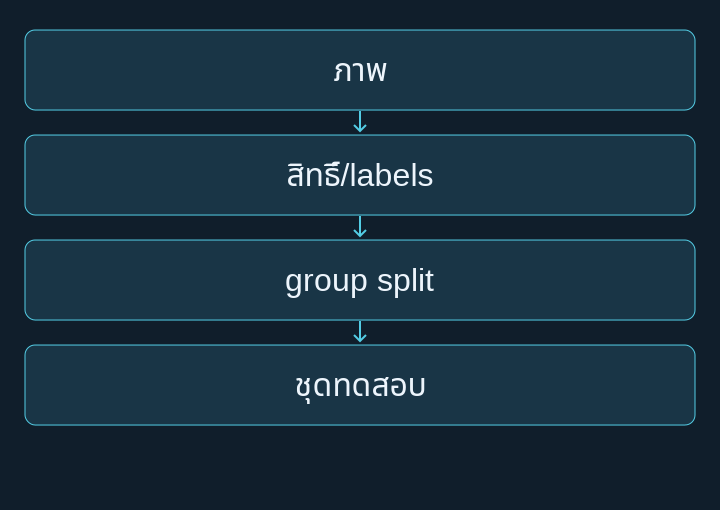
Task and hands-on steps
A project to detect parcel boxes in an authorised training area has many frames from the same flight, different lighting, and boxes so small that some annotators are unsure
Extract the ZIP and open A01-guide.md and A01-worksheet.csv . Keep assumptions and verified results separate. A blank in the worksheet means data must be collected, not that it has passed
- Create a data card: photographer/rights, purpose, area covered, what must not be claimed, and how copies are stored
- Write a label guide specifying boxes for occluded/small/uncertain objects; have two people annotate the same sample set and revise the criteria
- Do the linked 90-minute split-checking exercise, then assign groups before creating augmentation to prevent data leakage
- Keep a list of files/groups/rights, check the labels and hold the test set back; it must not be used to choose settings during experiments
Do the 90-minute split-checking lab and download the checker →
Deliverables and assessment criteria
Submit: data card and split manifest
Key criteria: no group ID repeated across splits; every source has verifiable usage rights; the test set is held back
Attach files that can be opened for checking, with dates, data version and reasons where no conclusion can yet be drawn. Completing the worksheet does not replace experimental results with a model, equipment or an actual skills assessment
Open the answer guide after completing the worksheet
Different image files from the same flight may be very similar, so they are not independent evidence. Finding no repeated group does not yet confirm that the sites differ or that there is no duplicate data of any kind
Activity plan for instructors
Spend 90 minutes outside the lab checking rights and quality, annotating real images with rights, and peer-reviewing the data card before starting model training
Review question: do different image files from the same flight count as independent data?
| Learning set | Explain | Practise | Assess | Total equipment stations |
|---|---|---|---|---|
| AI and drones: from images to model experiments | 105 min | 240 min | 75 min | 0 min |
Equipment station time is part of the total time in the plan and is not added again. Instructors separate PC results from observed tasks and have learners explain their work individually before opening the answer guide
See the full activity sequence and foundation extensions →Bibliography and citation scope
Additional sources checked 9 September B.E. 2569 (2026). Hypothetical cases, numbers, worksheets and activity criteria were newly compiled by PK-Research
- scikit-learn, Cross-validation and grouped data
Dataset splitting while keeping groups intact; flight-level splitting is this lesson's application
- NIST, AI Risk Management Framework 1.0
Voluntary AI risk management framework; does not certify model accuracy
Formulas and additional exercises · updated 2026-09-26
F19: The split is complete, but is it really new data?
Define the counting unit before calculating. This lesson counts images for proportions and uses flights as groups. Consecutive images from one flight must be in the same split. If you want to evaluate new areas, combine flights from the same area into a site-level group before splitting
split_ratio = nsplit / N
prevalencec = nimages containing class c / N
overlap_count = |Gtrain ∩ Gtest|
| Variable | Meaning and unit | Range and source of values |
|---|---|---|
| N | Total number of images meeting the inclusion criteria, images | Integer > 0 from the locked manifest version |
| n_split | Number of images in the split, images | Integer 0–N; each image is in only one split |
| n_images containing class c | Images containing at least one object of class c, images | Integer 0–N from labels; one image may contain several classes |
| G_train, G_test | Set of group IDs in each split | Derived from the declared flight_id or site_id |
| ratio, prevalence | Proportion, dimensionless | 0–1; multiply by 100 for % |
| overlap_count | Number of shared groups, groups | Integer ≥ 0; the design criterion is 0 for every split pair |
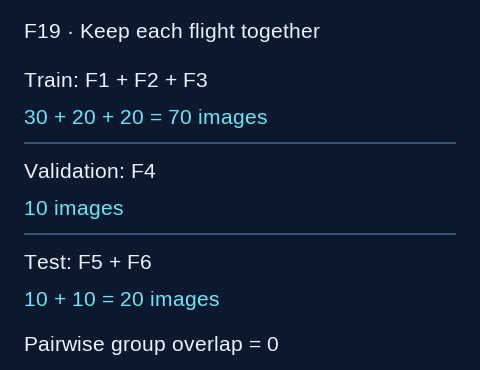
The figure shows train = {F1,F2,F3}, validation = {F4}, test = {F5,F6}. Every pair has an empty intersection, but checking group IDs alone does not detect near-duplicate images or the same area under different IDs
Step-by-step worked example
Suppose F1/F2/F3 have 30/20/20 images, F4 has 10 images and F5/F6 have 10/10 images, giving N = 30+20+20+10+10+10 = 100 images . Therefore train = 70/100 = 70%, validation = 10/100 = 10%, test = 20/100 = 20% , the total is 100%, and overlap_count for all three pairs = 0 groups . These proportions are an example, not proportions suitable for every task
If 24 images contain at least one parcel, the prevalence of images with parcels = 24/100 = 24% , even though the labels contain 40 parcels in total. 40/100 = 0.4 objects/image is object density, not prevalence under this definition. Multi-class tasks may have prevalences summing to more than 100% because one image can contain several classes. Report image and object counts per class separately
Assumptions and scope
Check duplicate IDs, exact duplicates, near-duplicates, time, scene and site before splitting. Keep augmentations of a source image in the same split and fit preprocessing on train only. Use validation to select the model and threshold; use test after decisions are locked. Group splitting may make image proportions miss the target slightly; report the actual values instead of moving some frames across groups to adjust the numbers
The principles of group separation and the test set reference scikit-learn: Cross-validation, grouped data , checked 26 September B.E. 2569 (2026). The manifest and counts in this lesson are synthetic data designed for practice. The overlap definition checks only the group IDs entered and does not certify that the data is free of every type of leakage
Exercise
Move one F3 image from train to test, then recalculate the proportions and overlap. Does getting proportions close to the target still certify group separation?
F19 answer
Train = 69/100 = 69%, validation = 10%, test = 21%, but G_train ∩ G_test = {F3}, so overlap_count = 1 group and it fails the group criterion even though the total is still 100%. Counts must match exactly; proportions accept ±0.01 percentage points. If N = 0, report no data; do not divide by zero
Get hands-on with the manifest-checking exercise and the existing practice set , then read Precision/Recall and IoU to specify whether you are evaluating images, objects or pixels
Download the basic formula answer-checking set (JSON) · synthetic data for comparing answers and units