Preparing information before registration
Organise personal, aircraft and equipment information so it is traceable before entering the official system

Split the information into three sets
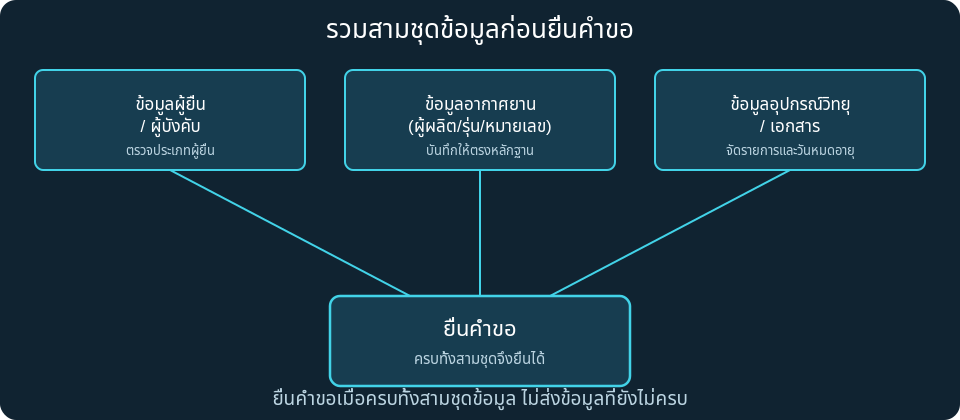
Start with the applicant/remote pilot information, the aircraft information and the radio equipment information or documents that the service requires. Keeping separate folders helps reduce submitting information under the wrong item. Model names and equipment serial numbers should match the evidence used, and personal data should not be published in public workbooks.
| Data set | How to prepare |
|---|---|
| Person/organisation | Check the applicant type and the list of evidence from the selected service |
| Aircraft | Record the manufacturer, model, serial number and the information specified by the current form |
| Supporting documents | List the originals, expiry dates if any, and pending-review status |
A verifiable workflow
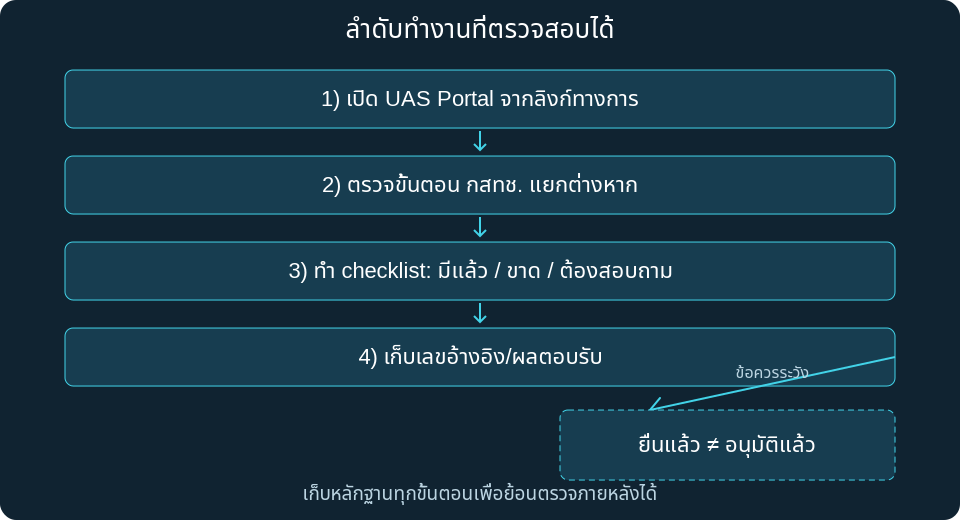
- Open the UAS Portal from the official link, choose the service that matches the case and read the current list of requirements
- Check the NBTC procedure separately, including the conditions related to the transaction in progress
- Make a checklist of whether each item is available, missing or still needs to be asked about; do not enter guessed information
- Keep reference numbers/acknowledgements appropriately after the actual submission. Submitting an application is not the same as approval.
The items this chapter lists are preparation categories, not a complete list of mandatory documents for every case, and they do not set approval times or fees on behalf of the agencies.
Exercise before using the real system
Using fictitious data, build a table of item name, source checked, date checked, person responsible and status. The exercise does not require creating an account or submitting a real application. The success criterion is that a teammate can follow what has been confirmed, what is still missing and where to go back and check.
Open the mission preparation exercise and download the worksheet →
References and scope
Sources checked 7 September B.E. 2569 (2026); compiled alongside knowledge kindly provided by DTI
Connecting knowledge with missions and data
Before following screenshots in older documents, check the channels and conditions in the official system again. Keep user accounts, registration documents and permission results separate. Store reference numbers only in the system designated by the organisation. Read the reference: CAAT, UAS Portal
Check your understanding: Using fictitious names and numbers, list the evidence to prepare and the gaps that need to be asked about with the agency. Do not upload real documents for testing.
Read next: chapters that use this knowledge in simulated work · Sources reviewed 26 September B.E. 2569 (2026)