Originals, hashes and traceable reports
Separate originals, working copies, transformation history and published versions, and verify with SHA-256
Learning outcomes and prerequisites
Students will check a manifest, separate original files from working files, record changes, and write a report that others can trace back. Read Time and coordinates and Observations first
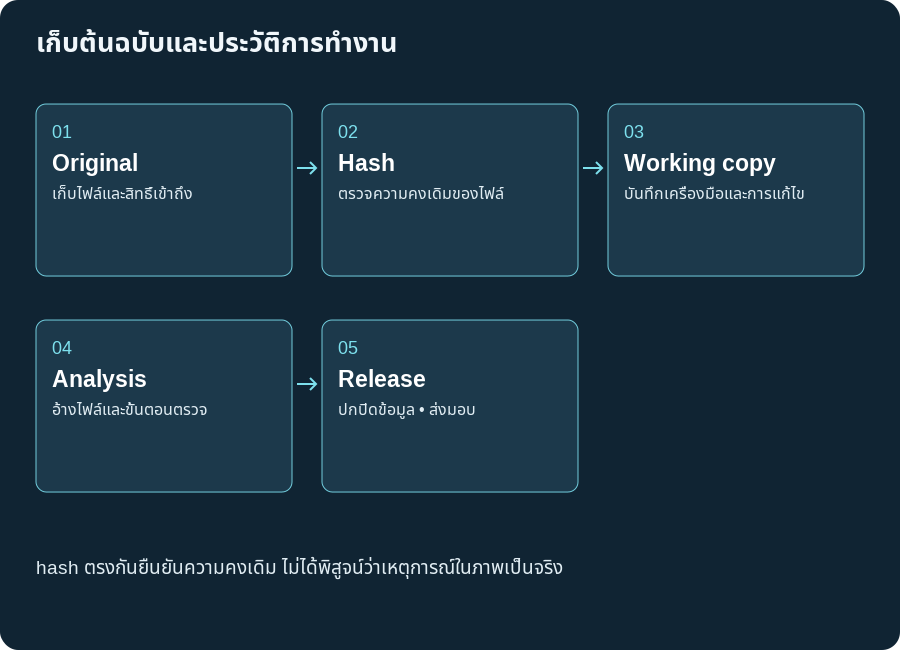
Open the full-size diagram to zoom in on details
A hash tells you about the file, not whether the event was real
A SHA-256 value is used to check whether a file's bytes match the recorded value. When the file content changes, the check may reveal a mismatch, but the hash does not by itself confirm the location, time, photographer or authenticity of the image. If someone replaces both the file and the manifest, the check may still pass, so the source and a trusted copy of the manifest must also be protected. For principles of preserving and verifying digital data, see Berkeley Protocol
Divide storage into unmodified originals, working copies and hand-over versions. Cropping, adding arrows, adjusting colour or redacting information should record the source file, the method, who did it, when, and the result. Do not replace an original with an edited image under the same name so that its history is lost.
A report must allow the reasoning to be followed
| Section | What to include |
|---|---|
| Question and scope | What the recipient needs to know, and how far the data can answer it |
| Data used | File IDs, sources, times and limitations |
| Observations | Area IDs that can be reopened and rechecked |
| Interpretation | Reasoning, assumptions and alternatives |
| Uncertainty | What is still missing and its effect on the answer |
| Hand-over | Report version, author/reviewer and restrictions on use |
When preparing a published version, review content that is not needed for the question, such as personal data or sensitive information about those involved. Record the reason for each redaction and keep the original under appropriate access control. This lesson does not define a legal basis or retention period in place of the requirements of real work.
Windows and Linux exercise: verify, then modify a copy
Download imagery workbook , extract the ZIP, then open a terminal in the folder imagery-workbook . The script uses only the Python 3 standard library; no packages need to be installed and no data is sent over the network.
- Read the README and open the manifest, which checks only
scene-a.svg,metadata.json,observations.csv - On Windows run
py -3 verify.pyorpython verify.py; on Linux runpython3 verify.py. Record the Python version and the result. - Copy the whole folder as a practice copy, then change one character in
scene-a.svgof the copy - Run the script in the copy again, record the FAIL result, and do not edit the manifest to hide the result
- Go back to the original, make a copy of
observations.csvfor filling in, then completeprovenance.csv,report.md,redaction-log.csv, stating that this is a hypothetical scenario
Answer key and assessment criteria
Before the edit, three files should PASS with exit code 0. After editing the scenario, only the scenario should FAIL, with exit code 1. If you edit the original table, the table will also FAIL, which is why you make a copy before filling it in. The manifest does not cover the report that is meant to be edited, nor every file in the ZIP.
Award 0–2 points per aspect: preserving the original, hash results, file history, separating observations from conclusions, and report limitations. Do not write that because the hash PASSes, the image shows a real event.
References and testing scope
- OHCHR / UC Berkeley, Berkeley Protocol on Digital Open Source Investigations — Source, checked 26 September 2026
- The pack contains only hypothetical data and text scripts, with no personal data or binaries of external tools. The pack's verification result is not a certification of legal evidence.
- Combine the skills in the case-study lab
Practise sending observations by version and rights with M04
M04 Condition Inspection links asset/target/location/view/time to observations, QA, image pairs and the outstanding items of six target parts. However, the teaching kit has only eight metadata entries: no raw images/thermograms, coordinates or ground results. File names/hashes of images that do not exist are therefore not created, and AI images are not used to confirm entries. A complete pairing in the teaching register does not certify safety or a diagnosis.
Use Worksheet O to make a private package for authorized persons and a public copy that has been reviewed for necessity/rights, with a redaction log. Keep the before and after versions, replies to comments, owners of outstanding items and follow-up checks. Worksheet D only proposes requirements, a test plan and rollback; actual is not_run in every case, and no validator or field results are delivered.
Practise sending points and outstanding items by version with M07
M07 Search Support separates the register of search boundaries from the register of suspected points, and separates the times of collection, receipt, review, time zone and confirmation. Naming a recipient is not equivalent to the status sent, received, acknowledged or ground_verified, each of which needs its own evidence. The teaching kit has no original images or ground results, so file names, hashes, coordinates or results of finding people are not invented.
Use Worksheet O to make a data set for authorized persons and a public version that has a data version, a rights review, data reduction and a record of the concealment, together with owners of outstanding items. Worksheet D proposes requirements R01–R08 and a test plan D01–D18 with actual still not_run. Keep the input data, schema, rules, config and the output before and after, with replies to every comment. When a result is wrong, hold, restore the version that was previously reviewed and supports the data, or keep the hold, notify recipients about the old result, and re-check after restoring. Do not use AI images or fictitious flags in place of real evidence.