Event queue from an ISR
Practise a bounded-size FIFO and the drop-newest policy through the reading and the existing, already verified practice set, with the steps and limitations.
Before you start
Objective: Practise a bounded-size FIFO and the drop-newest policy Prerequisite: Have completed Timer Interrupt and be able to read a counter Estimated practice time: 60 minutes. This is a time proposed by the author and has not been measured with real learners.
Comprehension check: Distinguish overflow at enqueue from dropped rows that could not be sent over Serial. Use the results of the existing set to support learning. A successful compile or simulation does not yet confirm the board or real flight.
View the full learning pathway · Review sensors and communication
STM32 set: ISR data queue to the main loop
What it is used for: Continues from Timer Interrupt and the latest tick to practise storing received events in FIFO order, handling a full queue, and reading data age. It suits those who can read C/C++, serial, unsigned timestamps and a PRIMASK snapshot. The goal is to choose a queue policy that fits the task before extending to sensor reception or drone firmware design.
Reference: NUCLEO-F446RE / MB1136, STM32duino 3.0.0, TIM2 requesting an update at 100 Hz . Compiles for the ARM target successfully; program size 21,760 bytes / RAM 1,736 bytes , with no warnings, together with FIFO/log tests and re-verified from the ZIP on Windows/Ubuntu. There is no upload and no real-board ISR/timing result yet. This is not an RTOS/DMA/flight controller port.
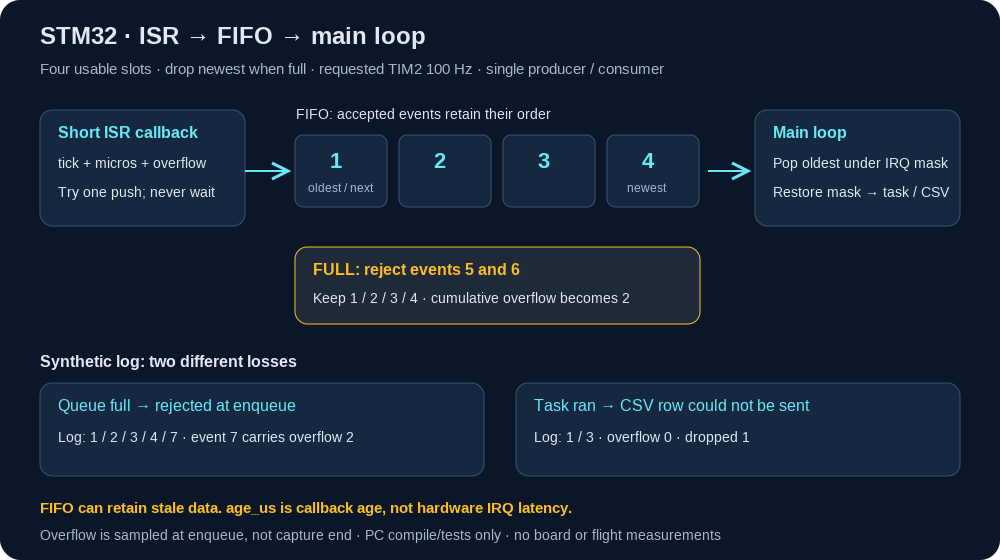
Queue diagram and synthetic examples; not measured results from a real board. Open the full-size ISR queue diagram
Steps for practising the queue on a PC
- Download STM32 Event Queue set (ZIP) extract it afresh, read the README, keep the name
stm32_queue/sketch, and check the queue's compile results and options against the queue's SHA manifest - Read
event_queue.h: it can use all 4 slots . When the queue is full it will reject the new item and keep the existing ones (drop-newest); it does not overwrite old items and does not wait inside the ISR. There is only one producer, the TIM2 callback, and only one consumer, main. - Read the callback: it records the tick/timestamp/overflow at the time of enqueue and then pushes once; if the queue is full it increments overflow. Main saves PRIMASK, briefly disables IRQs around popping one event, then restores the previous mask before doing LED/CSV/serial work. This is a queue that relies on interrupt masking; it is not lock-free and not a multi-thread queue.
- Run
python test_analyze.py,python analyze_queue.py synthetic/overflow.csvand C++11test_queue.cppaccording to the README, compare with the answer key for the four queue cases and then fill in the blank queue worksheet . The host tests check FIFO/full/refill/wrap/payload; they do not simulate MCU concurrency. - Verify/Compile with IDE 2/CLI, core 3.0.0, Nucleo-64 / F446RE, generic Serial, USB None, Smallest (-Os), Newlib Nano, as in the receipt. This round of checks includes no step connecting a motor/ESC and no upload.
Reading data age and a full queue
| CSV value | Meaning |
|---|---|
| tick | Callback number of the event accepted into the queue, as a uint32 |
| age_us | Age from the callback timestamp to when main starts the LED task after the pop, in µs |
| work_us | LED task time, excluding pop, CSV formatting and serial transmission |
| overflow | Cumulative count of enqueues that were rejected before this event entered the queue |
| dropped | Cumulative count of rows that main could not send before this row; this is not a queue overflow |
overflow.csv stores ticks 1/2/3/4 in order, rejects 5/6 while the queue is full, and then accepts 7 once a slot is free. Event 7 therefore has overflow 2, while the original events 1–4 keep the snapshot 0. The maximum age is 40,000 µs and work is 2,500 µs, so one row exceeds the 2 ms teaching budget. dropped.csv has tick 1 → 3 with dropped 1: task 2 was done but its row could not be sent. Both are invented data for teaching purposes
Between the visible rows, delta_tick = delta_overflow + delta_dropped + 1 . The checker rejects gaps that the counters cannot explain, including ticks that go backwards or repeat, and values that are not integers or are out of range. It supports tick wrap, but split the file after a reset/counter wrap and limit age/work to less than 2^31 µs (about 35.8 minutes).
overflow is a snapshot taken at enqueue, not the latest value at the time the row is sent so a rejection after the last reported event may not be visible. A counter of 0 does not prove that everything has been captured since boot, or that no data was lost after the last row. age_us is also not hardware IRQ latency/deadline, and callback ticks cannot detect timer updates that were merged while IRQs were masked.
It is recommended to choose the policy to suit the task: a logger may need to preserve history, but a controller may need to use the latest value and limit the age of data. A four-slot FIFO does not guarantee a maximum age of 40 ms, because main may stall for longer than that. Do not enlarge the queue to mask overload, and do not use old data to control an actuator without checking freshness. CSV/serial work lies outside work_us but still delays the next pop. The LED toggles every 50 tasks that main receives, so a 500 ms blink is not guaranteed when there is a backlog.
When a board is available, check the PCB/LD2/USART2 according to the README before capturing at 115200 baud, and record the version/options/duration/SHA in the worksheet. To measure occupancy or IRQ latency, a protocol and separate measurement points must be defined. TIM2 must not be reused by another library. The hardware step remains on hold as before.
References: official HardwareTimer, implementation pin 3.0.0 and ST UM1724 MB1136
Continue learning and review
Review Timer Interrupt and sending the tick · Continue with data age and the Freshness Gate · Back to the advanced overview
Practise tracing the queue and reading the causes of lost data, step by step
Objective: Choose a queue policy that fits the task and explain the counter/age from evidence Prerequisite: Have completed Timer Interrupt and unsigned timestamps Proposed time: 45–60 minutes; not yet measured with real learners. You can use paper or a CSV reader; no board or additional installation is needed.
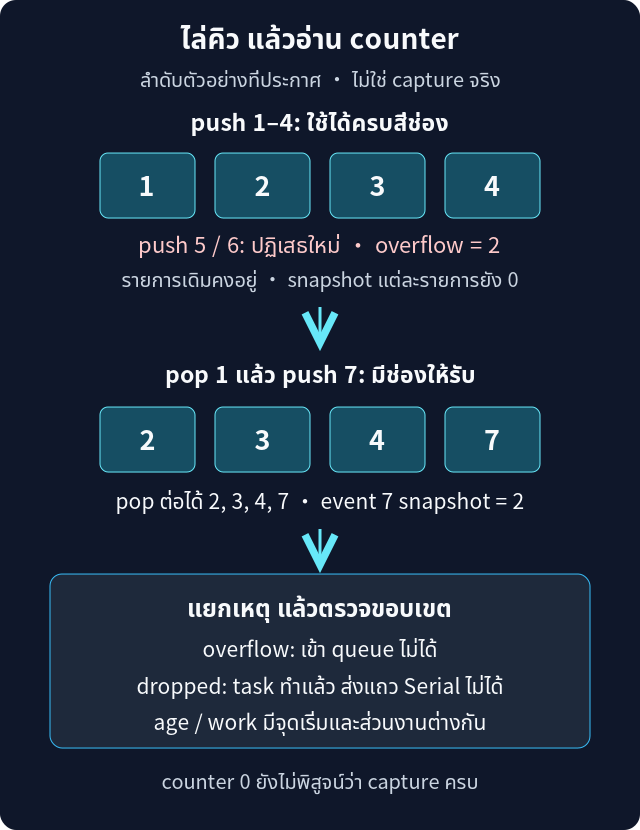
Use together with the realistic image and the existing queue diagram. The 12-step sequence example below is declared in order to explain; it is not an enqueue trace captured from a board, and a single sequence cannot be inferred from the age in the CSV.
Download the queue practice method, the 8-question worksheet, the blank 12-step queue table, the declared sequence, the original 13-row data and the original summary Do these before opening the rationale answers and the queue table answers The provenance/SHA-256 can be checked from manifest
1. Trace the FIFO without looking at the answers · Q1–Q3
Start with an empty queue of 4 slots. Do push 1..6 → pop one item → push 7 → pop 4 more times. After every step, write the queue from oldest to newest, together with the counter and snapshot of the popped event. Try to answer why push 5/6 does not change the old items, and why events 1–4 still keep overflow 0 even though they are sent after the counter has increased.
Hint: the payload stores the counter at enqueue time; keep it separate from the system's latest counter. Choose whether to preserve history or use the latest value according to the task, then compare with the Timer Interrupt lesson which uses a different handoff policy.
2. Explain gaps and tick wrap-around · Q4–Q5
Use overflow tick 4→7 and dropped tick 1→3 to compute the three kinds of delta, then check the equation that explains the gap. Then use the wrap 4294967295→0→1 and try computing with mod 2^32. data_rowin the combined file means the data row excluding the header; it is not the line number of the raw file, which has blank lines.
3. Read units and the scope of the work · Q6–Q7
Convert age 40000 µs to ms. Find the row where work exceeds the 2000 µs teaching budget, then identify the point from which age starts and which tasks work covers. Hint: requesting TIM2 at 100 Hz is a configured value, not a measured frequency result. Do not use age in place of IRQ latency, or work in place of the whole loop time.
4. Summarise what the counter does not yet confirm · Q8
When normal shows counter 0, write down what can be confirmed and what evidence is still needed before claiming that the capture is complete or that there is no loss. The position of the snapshot, file boundaries, resets, and timer updates that were merged while IRQs were masked still matter. Once you can explain this, continue to Data age and the Freshness Gate
Self-check: The proposed scoring is 2 points per question (1 for the answer + 1 for the reason/unit/limitation), 16 in total. It is for choosing what to review; there is no criterion certifying flight-readiness or the results of real learners. This round checked the data/explanations on a PC and did not run compile/firmware/SITL or new board experiments.
Choose the next practice set or review
Back to the index of the 10 MCU practice sets to choose a problem according to your goal and the prerequisites you should know, or take the 12-question comprehension assessment to find the topics that should be reviewed.
After checking the answers, record the answers you corrected, the reasons, and what the evidence still does not confirm, then choose the next set that helps answer that question. The worksheet score and the assessment are separate; use them for self-directed selection of review.