Data age and the freshness gate
Separate fresh from stale and read the 20,000 us data-age limit through the reading and the previously verified practice set, with steps and limitations.
Before starting the practice
Objective: separate fresh from stale and read the 20,000 us data-age limit Prerequisites: understand a FIFO queue and time differences from a single clock Estimated practice time: 60 minutes, a time proposed by the author and not yet measured with real learners
Check understanding: explain fresh at the limit, stale beyond the limit, and what the gate does not certify. Use the results of the earlier set to support learning; a passing compile or simulation does not yet confirm the board or real flight
See the whole learning pathway · Review sensors and communication
STM32 set: filter out old data before using it
What it is used to practise: a continuation of the queue from ISR to main loop . It practises checking data age after a pop and deciding whether to continue working or skip old data. It suits those who understand C/C++, FIFO, timestamps and PRIMASK. The goal is to separate preserving data order from the data being still fresh enough for the task before designing a sensor-reception system or control loop
This set uses NUCLEO-F446RE / MB1136, STM32duino 3.0.0, TIM2 requesting 100 Hz and the earlier four-slot/drop-newest queue. The ARM compile passes with a 21,796-byte program / 1,736-byte RAM and no warnings. The gate/FIFO/log tests and the ZIP check were repeated on Windows/Ubuntu. There are no real-board or flight results yet . The example uses an LED, with no actuator failsafe
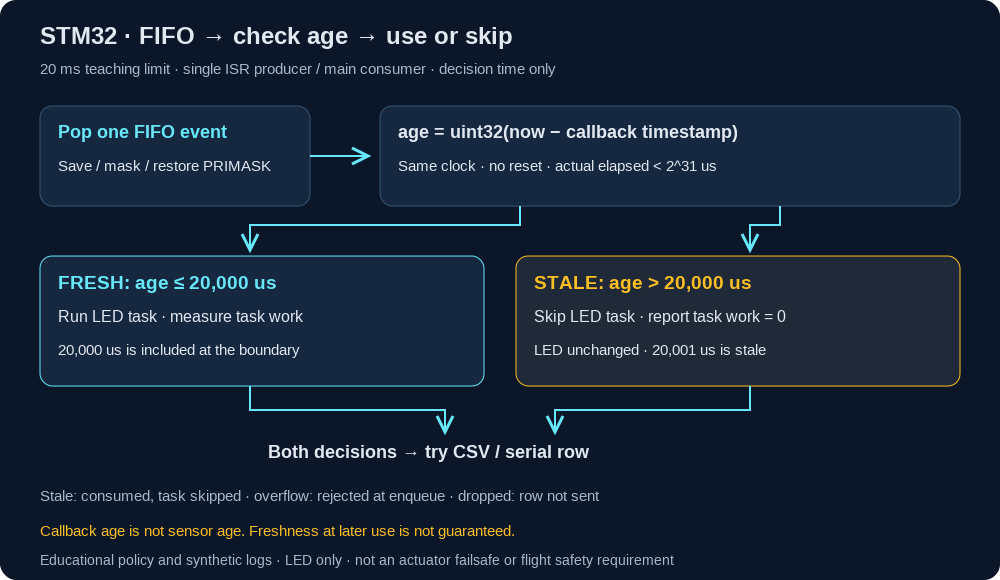
Diagram of the policy and the synthetic figures. 20 ms is a practice criterion, not a drone requirement. Open the full-size data-age diagram
Steps for practising data age on a PC
- Download the STM32 Data Freshness set (ZIP) and extract it afresh, keeping the names of the
stm32_freshness/sketch/header. Read the README together with the freshness compile result and options and the freshness SHA manifest - Read
freshness.h:uint32_t(now-stamp) <= 20000as fresh including values equal to the limit from a single clock with no reset. The real duration must be below 2^31 us (about 35.8 minutes). Unsigned subtraction survives one wrap within this contract; do not use it to infer multiple wraps - Read main: pop one event and restore the previous PRIMASK, then check the age at the time of the decision. If fresh, run the LED task; if stale, skip the task but still try to send a CSV row for every popped event so the reason is visible. A stale decision does not increase overflow/dropped. The ISR still pushes once, with no LED/serial/delay
- Run the C++11
test_queue.cppaccording to the README to check cutoff/cutoff+1, timestamp wrap, backlog and FIFO; thenpython test_analyze.pyandpython analyze_freshness.py synthetic/normal.csvrepeat the overflow/wrap/dropped cases - Fill in the blank data-age worksheet before comparing with the four freshness cases answer key . Every CSV is synthetic data. The host tests do not simulate IRQ concurrency, and the work values are not NUCLEO measurements
- If the earlier reference SDK is available, Verify/Compile core 3.0.0 and the F446RE per the receipt, and check the options/SHA before comparing. There is no step connecting a motor/ESC and no upload result in this round
Reading the fresh and stale results
| CSV column | How to interpret it |
|---|---|
tick |
Callback order. A stale row that was sent still counts as an event seen; it is not a tick gap |
age_us |
The callback timestamp up to the time of the check after the pop; it is not the sensor acquisition age or the hardware IRQ latency |
state |
fresh age <=20,000 us; stale age >20,000 us |
work_us |
LED task time, for fresh only; stale=0 means the task was skipped, not that the loop took zero time. Keep gate/pop/CSV/serial separate |
overflow |
The number of items rejected at the enqueue of an accepted event; it is not the final capture value |
dropped |
The number of rows main could not send before the current row. They may be fresh or stale, so the stale count of a missing row cannot be known |
The normal case has fresh 2/stale 1, where 20,000 is still fresh and 20,001 is stale; overflow has fresh 3/stale 2, rejected at enqueue 2, and work over the 2,000 us practice budget for one row; wrap has tick 4294967295->0->1 while the timestamp wrap is checked separately in C++; dropped has fresh 1/stale 1 seen, and the row at tick 2 could not be sent, one row
The analyzer checks the header in order. The six uint32 columns, five numeric columns and state must match; age and stale work must be zero; limits are 10 MB/100,000 rows; it rejects age/work >=2^31, repeated/regressing ticks and counters that reset/regress/wrap between the rows seen. It must have delta_tick = delta_overflow + delta_dropped + 1 as uint32 with delta_tick in (0,2^31). The fresh/stale counts summarise only the rows seen, while no_reported_queue_or_log_losses does not confirm that capture was complete or that there is no stale, because stale is a decision, not a queue/log loss
Recommendations: choose the cutoff from the requirement and the measured time; separate the timestamp at callback receipt from the one at sensor acquisition; recheck near the point of use if there is work in between, because being fresh at the time of the check does not guarantee it is still fresh when used later . A four-slot FIFO does not guarantee a maximum age of 40 ms; hardware updates may be merged while IRQs are masked; and an overflow after the last event may not appear in the log. The LED toggling every 50 fresh tasks does not guarantee every 500 ms; when stale it keeps the previous LED value, which is not a safe state for an actuator
Use HardwareTimer API and CMSIS PRIMASK with the earlier pinned SDK. There are no results for ISR/timing/serial/LED on a real board, no sensor/RTOS/DMA/flight-stack port, and no flight-safety validation
Continue learning and review
Review: the data queue from an ISR · Continue: diagnosing an STM32 log · Back to the advanced overview
Reading data with a web tool
Open the CSV reader and log graph tool to practise with synthetic examples or the six-column CSV of the Freshness Gate set. It processes locally and supports up to 1 MB/10,000 rows, a narrower limit than the earlier Python analyzer. Statistics are computed from every row, while the graph shows at most 1,000 points and may not show all the peaks
Practising the decision when data is old, step by step
Objective: read the time limit, separate old data from lost data, and explain at which point the data is fresh Prerequisites: understand a FIFO and unsigned timestamps Suggested time: 45-60 minutes, not yet measured with real learners. Paper or a CSV reader can be used; no board or extra installation is needed
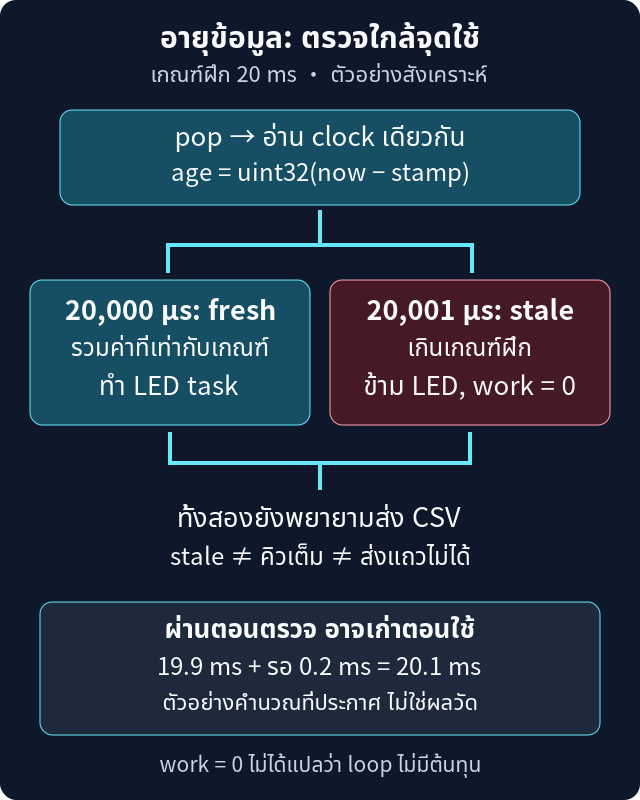
Use together with the earlier virtual images and diagram. The 13-row log is the earlier synthetic data, while the clock examples and the recheck are newly declared for calculation; they are not timestamps captured from a board
Download how to practise data age, the 8-question worksheet, the blank clock calculation table, the declared examples, the earlier 13-row data and the earlier summary . Do these before opening the reasoning answers and the clock answers . Check the source/SHA-256 from manifest
1. Check values at the time limit - Q1-Q2
Start with the normal ages 0, 20,000 and 20,001 us, classify fresh/stale and convert units; then compute six clock examples, both before and across the unsigned wrap. Use one clock with no reset and with real durations below 2^31 us, and state this contract in the worksheet. Clock figures that are seen alone do not confirm that there is no reset or multiple wraps
Recommendation: the earlier CSV has a tick wrap but no raw timestamp, so do not use that CSV to check timestamp wrap. The computed examples are separately declared data in the declaration
2. Separate age from lost data - Q3-Q6
Count fresh/stale in each case, citing data_row , which counts data rows excluding the header. Separate stale that skips the LED from an overflow that cannot enter the queue and a dropped row that cannot be sent. Then compute the delta of overflow tick 4->7 and dropped tick 1->3 using the equations of the earlier schema
Recommendation: the work=0 of a stale row still has the cost of pop/gate/CSV/Serial, and a fresh row may still have work over budget. The state of a row that could not be sent does not exist in the data, so answer that it is unknown, with the reason
3. Recheck near the point of use - Q7
Use the declared example: stamp=100000 us, checked at 119900 us and then used at 120100 us. Compute the age at both points together with the wait in between. Explain what passing at the check can tell you. This example has no measured LED work and no new firmware run result
4. Define what must be known before building on - Q8
Choose the timestamp point to relate to sensor acquisition, and define the cutoff from the requirement and the measured timing evidence, together with the behaviour when data is old or missing. The example LED keeps its previous value when stale, so it is not an actuator failsafe or a certification of flight readiness. Once you can explain it, continue with diagnosing an STM32 log and the CSV reader tool
Self-check: the proposed criterion is 2 points per question (answer 1 + reason/unit/limitation 1), 16 in total, used to choose what to review and not a real learner's result. This round checked data and explanations; it did not run a compile/firmware/SITL or a new board experiment
Choose the next practice set or review
Return to the index of the 10 MCU practice sets to choose a scenario according to your goal and the background you should know, or take the 12-question understanding assessment to find the topics to review
After checking the answers, record the answers you corrected, the reasons, and what the evidence still does not confirm, then choose the next set that helps answer that question. The worksheet score and the assessment are separate parts, used for choosing your own review