Assessment and practice set for microcontrollers
Review with a 12-question self-assessment and choose from 20 MCU practice sets, with lessons, worksheets, answers, a download catalog, a file-use guide, and a guide for checking conclusions against evidence.
Choose the activity you want
-
Open the catalog of 20 practice sets: separates 10 evidence-reading sets from 10 calculation and planning sets, with exercises, answers, and the foundations you should know
-
Use the downloaded files: separates worksheets from source data, and opens the CSV with Thai text and columns displayed correctly
-
Start the three-level self-assessment: 4 questions per level, 12 in total; checks the reasoning and records before–after results in the browser; JavaScript must be enabled
-
Check conclusions before continuing: examples at three levels and a report-checking form, helping to separate what the data confirm from what must still be collected
Before reading an exercise or a log, open MCU terms and units used to compare the meaning and the clock of that set
The scores of the two activities are separate. You can choose a practice set without taking the self-assessment first.
Objectives and how to use
Use it to find topics to review before starting the practice sets. There are three levels, 4 questions per level, 12 in total. You can start at the level that interests you without finishing every lesson. The suggested time is about 10–15 minutes per level, and it has not yet been measured with actual learners.
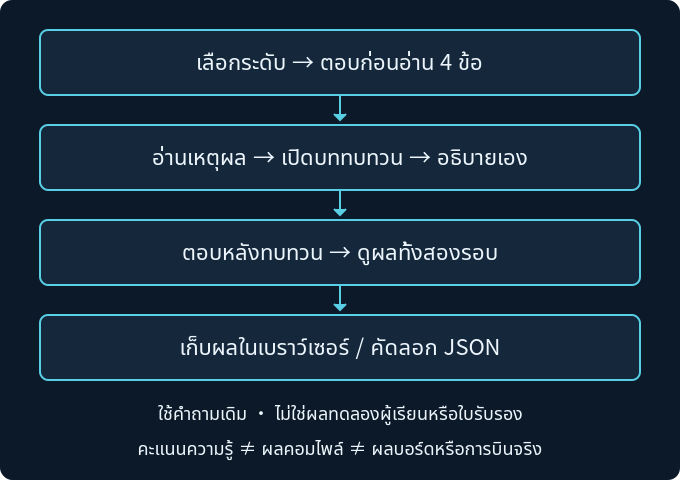
- Choose the level and before reading the lesson , then answer with your current understanding and press check to see the reasoning.
- Open the review link for any item that is still confusing, then explain the answer in your own words and state what the test result still cannot confirm.
- Choose after reviewing the lesson and do it again, then compare the results of both rounds. There is no passing threshold that certifies flying ability or board readiness.
- Copy or download the JSON to keep privately. The browser stores the latest result of each level/round; it does not keep the history of every attempt and does not sync between devices. If storage is unavailable, the page will say so and you can still do the exercises on this page.
Before and after use the same questions . Learners may remember the answers, so the difference in scores is review data for oneself only; it cannot be used to draw conclusions about course achievement or experimental results with learners.
Practice and check supporting evidence
Multiple-choice items score 1 point per question. You should also check the written explanation: an answer with units/data contract 1 point, limitations 1 point, and a method for collecting additional evidence 1 point per scenario. These are proposed practice criteria and have not yet been tried with a group of learners.
- Foundations: use the Arduino/ESP32 set to explain reading a button and an LED and to separate compile/host test results from results on a real board
- Applied: use sensors and communication to state units, axes, the clock, and the origin of synthetic data before drawing conclusions
- Advanced: open the log-reading tool to compare stale with loss and cumulative totals with deltas, and review the seven advanced lessons
Self-assessment results are separate from the completed mark that users record themselves. Continue using My learning list as before.
Choose a practice set by goal
A total of 20 sets grouped by the work you want to practice and the level of prerequisites. Choose one problem and read only the foundations you need. Every set is ready to use following its guide, but results on real boards and from real learners must still be collected.
- 10 evidence-reading sets: answer the worksheet from examples and logs following the earlier guide, 8 questions per set , suggested time 45–60 minutes, not yet measured with learners
- 10 calculation and planning sets: do problems on paper/PC with hypothetical numbers, with 5, 7, or 8 questions depending on the set, plus a blank planning form; no time has been set
Foundations · reading buttons and time
Know boolean, if, C/C++, and the unit ms before starting
- Buttons and debounce: separate raw/candidate/stable/event and the reporting period
Button guide · Button worksheet · Button answers
Applied · reading sensors and messages
You should be able to read Serial and timestamps before checking axes and units
- IMU and messages: check axes, units, time, and message order
IMU guide · IMU worksheet · IMU answers
Advanced · choose timing, logs, or control systems
Start with the foundations that match the problem: timing work uses C/C++ and unsigned timestamps; Diagnostics uses queues/Freshness and a six-column CSV; PID uses IMU units/time; SITL uses PID/STOP_SIM and the origin of the logs. Each set's guide explains the foundations in detail.
-
Polling Timing: separate late start, missed cycles, over-budget work, and log drops
Polling guide · Polling worksheet · Polling answers -
Timer Interrupt: read snapshots and latest-value handoff
Interrupt guide · Interrupt worksheet · Interrupt answers -
ISR queues and counters: choose a queue policy and explain cumulative totals
Queue guide · Queue worksheet · Queue answers -
Freshness Gate: separate stale data, lost data, and the points where age is checked
Freshness guide · Freshness worksheet · Freshness answers -
Log Diagnostics: use delta to separate stale data, a full queue, and rows that could not be sent
Log diagnosis guide · Log diagnosis worksheet · Log diagnosis answers -
Log origin and scope: separate exact bytes, annotation data, and what is still unknown
Log origin guide · Log origin worksheet · Log origin answers -
PID and STOP_SIM: read the deadline, saturated commands, and the cause of state changes
PID guide · PID worksheet · PID answers -
Reading SITL firmware events: separate the LAND command from failsafe, and the observed time
SITL guide · SITL worksheet · SITL answers
Calculation and planning · choose the exercise that matches the problem
Data used: hypothetical numbers per the exercise definition and the source-records.json of each set. What to keep afterward: answers with formulas, units, assumptions, and a copy of the planning form filled in with knowns/unknowns. No board is needed; these are not flight tuning values or real measurements.
-
ADC/PWM · Foundations · 5 questions: separate the ADC code, voltage, frequency, duty, and pulse time
Foundations: units V, Hz, second, and ratio
ADC/PWM guide · ADC/PWM exercise · ADC/PWM planning form · ADC/PWM answers -
UART frames · Applied · 7 questions: check frame boundaries, byte order, signedness, and XOR
Foundations: hexadecimal, bytes, and Serial
UART frame guide · UART frame exercise · UART frame planning form · UART frame answers -
Sampling rate · Applied · 7 questions: separate sample/ODR/read/use rate and explain aliasing
Foundations: Hz, second, and graphs over time
Sampling rate guide · Sampling rate exercise · Sampling rate planning form · Sampling rate answers -
IMU calibration · Applied · 7 questions: separate bias, gain, variation, and compensation status
Foundations: IMU units and axes, linear equations
IMU calibration guide · IMU calibration exercise · IMU calibration planning form · IMU calibration answers -
Complementary Filter · Applied · 8 questions: compute prediction/estimate with dt and alpha
Foundations: units deg/s, degree, second, and calibration
Complementary Filter guide · Complementary Filter exercise · Complementary Filter planning form · Complementary Filter answers -
Boundary-crossing angle ±180° · Applied · 8 questions: separate the direct difference, the short difference, and the rotation direction that is still unknown
Foundations: degree and floor; read Complementary Filter first
Boundary-crossing angle ±180° guide · Boundary-crossing angle ±180° exercise · Boundary-crossing angle ±180° planning form · Boundary-crossing angle ±180° answers -
Continuous angle and rotation rate · Applied · 8 questions: use the short difference and the actual dt, and state the intervals where the path cannot be chosen
Foundations: boundary-crossing angle, timestamps, and time units
Continuous angle and rotation rate guide · Continuous angle and rotation rate exercise · Continuous angle and rotation rate planning form · Continuous angle and rotation rate answers -
Angle filtering and time · Applied · 8 questions: separate the average, the reference time, the time when ready for use, and the delay
Foundations: continuous angle and the sampling interval
Angle filtering and time guide · Angle filtering and time exercise · Angle filtering and time planning form · Angle filtering and time answers -
Accumulating angle from a gyro · Applied · 8 questions: use the actual dt, compare two methods, and separate the initial angle from the offset
Foundations: angle over time, calibration, and the unit deg/s
Accumulating angle from a gyro guide · Accumulating angle from a gyro exercise · Accumulating angle from a gyro planning form · Accumulating angle from a gyro answers -
Memory budget · Advanced · 5 questions: separate Flash/RAM and the planned build from the runtime result
Foundations: bytes/KiB and the target/SDK of the set being read
Memory budget guide · Memory budget exercise · Memory budget planning form · Memory budget answers
How to do it and choose what to review next
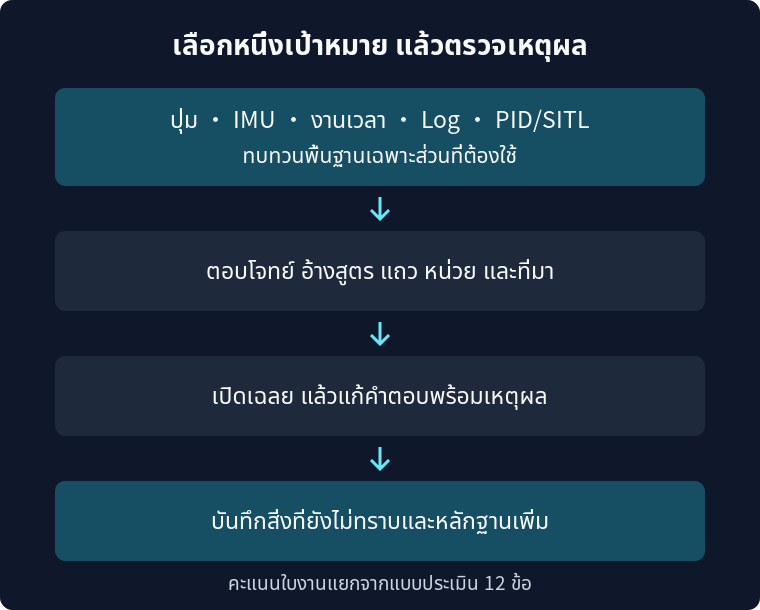
- Choose one goal, open the lesson and guide for that set, and check whether it uses calculation data, synthetic data, or stored simulation results.
- Evidence-reading sets use a CSV worksheet; calculation sets use a Markdown exercise and a copy of the planning form. Answer, and cite the formula, row, clock unit, and origin, before opening the answers.
- Check the answers with reasoning, then record what needs to be corrected, what still cannot be concluded, and the evidence that must be collected additionally.
- Choose the next lesson from the question you still cannot answer, for example: angle units → calibration/Fusion; boundary crossing → Wrap/Unwrap; delay → angle filtering; accumulating angle → Integration; late start → Polling; full queue → queue/Diagnostics; data age → Freshness; where a file came from → log origin; LAND event → SITL.
Download the practice-set catalog CSV, the practice-set selection record form, catalog usage advice and catalog file hashes for use outside the web page. The record form is a blank file for private keeping.
Advice: if your foundations are not yet sufficient, go back and read the topics listed; if you want an overview of your understanding, use the 12-question multiple-choice self-assessment . The self-assessment score, the worksheets, and the completed mark are separate. You can choose sets according to the work without completing every set; they are not combined into a passing score or a certificate. Results on real boards and from real learners must still be collected following the board trial guide
Use the practice-set files on a computer
Objective: open a practice set, answer the worksheet, and cite the original data without editing the source. Foundations: be able to download files and create folders, use an existing text reader or spreadsheet program, or jot the answers on paper. No board is needed yet.
Which files to read and which to fill in
File names may differ by set, so look at that set's guide first. The roles are as follows:
| File found | How to use it |
|---|---|
README.md |
Read the goal, steps, foundations, and scope of the set. It can be opened with a text reader or a Markdown reader. |
worksheet.csv / record form .md |
Make a copy and fill in the answers in the blank cells, keeping the original question numbers and exercises. |
answers.md / trace-answers.csv |
Open to check after answering. It is the answers or calculated results for the exercise, not a blank worksheet. |
source-records.json / data CSV / log |
Read the evidence that the lesson cites. Keep the original downloaded files. Do not assume that every set is real measured data. |
manifest.json |
Read the file list, sizes, and SHA-256 within the stated scope. Opening the JSON does not check the hash automatically. |
Start with one button worksheet
- Open the button and debounce lesson and then read the button guide . Keep the URL and the download date in your private notes.
- Download the 8-question button worksheet and keep it in the folder
original, then make a copy inworking. Use a name such asbasic-worksheet-round01.csv. Separating folders is a suggestion, not a requirement of any program. - Open the copy and check that Thai text is readable and that the header splits into 8 columns from
question_idtoreview_topic. The data rows must include B1–B8 in full. Do not count raw text lines instead of table rows. - Fill in
answer,source_call_or_exampleandreason_unit_and_scopebefore opening the button answers , then fill inself_check_pointsandreview_topicaccording to the reasoning you can verify. Keep the originalquestion_id,questionandmax_self_check_pointsunchanged. - Save the copy, close it and open it again, check the Thai text, columns, and answers, then use the conclusion-checking guide . The score in this worksheet is separate from the 12-question self-assessment on the web.
When a CSV opens but cannot be read correctly
- Garbled Thai: import as UTF-8 instead of double-clicking the file. In Excel use Data → Get Data → From File → From Text/CSV, or the text import menu according to your version, and check the preview before loading, following Microsoft: open a UTF-8 CSV
- All data in one cell: choose the comma (
,) delimiter in the CSV import window for this set. Do not use a replace-all command on commas, because a comma may be inside text enclosed in quotation marks. Check the column headers against the original before use. - Codes or times turn into dates/exponents: import the code columns and source values as Text first, keep the raw values, and compute in separate columns. Read Microsoft: import and export CSV . Menu names and the selection of column types differ by program/version.
- No spreadsheet program yet: read the file with a UTF-8 text program and jot down the question numbers, answers, and sources on paper. You do not need to buy or install any program to start practicing.
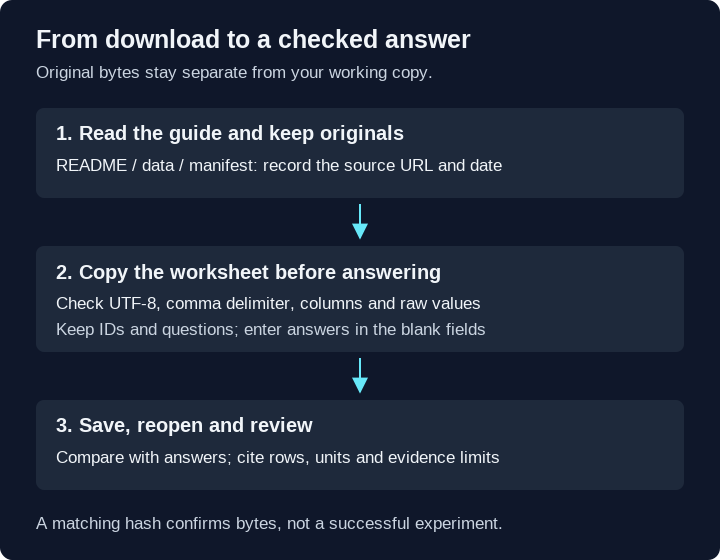
Advice: keep your answers private. The website does not accept worksheet files back and does not total scores automatically. Saving from a spreadsheet may change bytes, so check the hash against the file in original before editing, and give the filled-in copy a new name. A matching hash confirms only the bytes according to the manifest; it does not certify that the data are complete or that an experiment passed.
Download the text-version guide to using files, the checklist for files before answering and after saving, the sources of the file-use guide and the manifest of the file-use guide and then go back to choose a practice set by goal
Write conclusions that match the evidence
Objective: turn the answers from a practice set into conclusions that can be traced back. Foundations: read one set from the catalog and know the units used. Suggested time: 15–20 minutes per answer, not yet measured with learners. Paper or a CSV/Markdown reader can be used.
The following sample wording was composed by the authors from the existing data; it is not a learner's answer or a new experimental result. Data rows are counted from 1 after the header. Review MCU terms, units, and time when you are unsure of the meaning of a field.
Foundations · an event is not a measurement of a real button
Conclusion beyond the data: “A real button has no bounce after 30 ms”
Written so it can be checked: in the earlier button state table sequence press_release rows 5–6 at 139/140 ms have elapsed = 29/30 ms and event = 0/1; the edge >= 30 makes stable change at the call at 140 ms. The table is a computed result from the declared read sequence; the signal between calls and the bounce of a real button are not known. Review the button and debounce set before planning a real measurement.
Applied · the received sequence is not an RF loss count
Conclusion beyond the data: “Radio packet 65535 was lost, because 65534 was received and then it skipped to 0”
Written so it can be checked: in the earlier synthetic messages rows 2–3 have seq = 65534 → 0 under the 16-bit protocol / single session , so delta = 2 and accepted-stream gap = 1; but row 5 still has seq = 65535, which was classified as out_of_order. This result tells the order that passed the rules; it does not confirm an actual radio loss, which requires sender/receiver records and the session/clock. Review the IMU and messages set
Advanced · a missing log row is not work that was not done
Conclusion beyond the data: “One cycle of work was not done, and all work was on time because work = 100 µs”
Written so it can be checked: in the case of dropped in the earlier synthetic polling rows rows 1–2 have start = 10,000 → 30,000 µs, a difference of 20,000 µs or two periods set at 10,000 µs; dropped = 0 → 1 increases by one, while skipped in the visible rows is 0. By contract there is one log row that could not be sent. An increase in dropped does not equal work not done. The values of the missing row are not in the file, so the two visible rows are not used to certify the whole cycle. Review the Polling Timing set
How to check a report before continuing
- Choose one answer and cite the file, row, and data type before writing the conclusion.
- State the clock/session unit, the formula, and the limits used, then compute only from the data available.
- Separate conclusion → what is still unknown → additional evidence . Change wording that claims beyond the limits of the data.
- Use the six-item checklist to give the status complete / needs filling in / not relevant with reasons, then choose a review lesson from the points that need filling in.
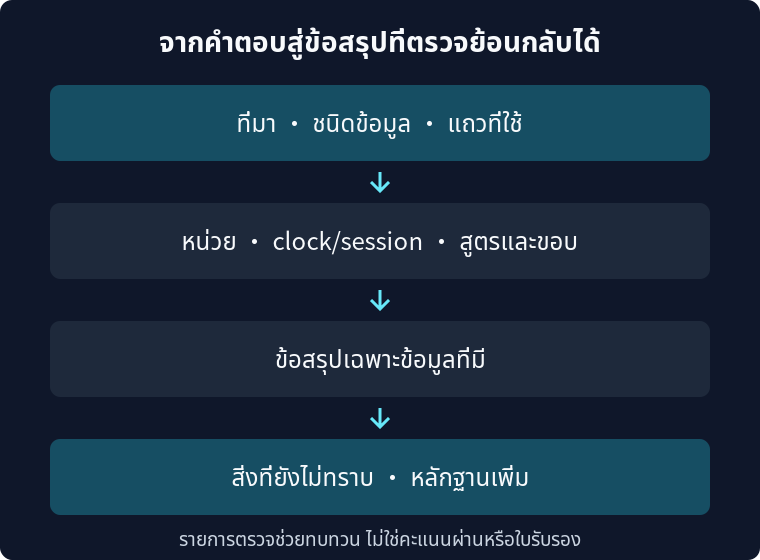
Download the conclusion-checking guide, sample three-level reports, the 6-item report checklist, a blank report form and the sources of the examples and the source hashes . Check the files of this set from the report manifest
Advice: keep your report private. These criteria are a proposed review guide; they do not add to the score in the 12-question self-assessment or the practice sets and are not used to certify flight readiness. A matching hash does not confirm that the capture is complete or who actually sent the data. Choose the next practice set from your goal according to the doubts that remain.
Scope of recording
Only the level, round, answers, and checked status are stored in this website's storage area. Scores are computed from the current answers. Clearing the self-assessment results does not clear the existing learning list. No learner names are stored, no answers or scores are sent to a server, and no CSV from the log-reading tool is stored.
Back to the microcontroller overview
Check your understanding at three levels
Choose a level and answer 4 questions before reading or after reviewing. The answers include reasoning and the lessons to read next. Answers and results are stored in this browser; there is no account and no results are sent to a server.
Before and after use the same set of questions, so this is for tracking one's own review. These results are not a measurement of effectiveness with real learners, a certificate, or evidence that a board works.