Diagnosing STM32 logs
Analyses stale data, queue rejections and unsent rows through the reading lesson and the previously checked practice kit, with steps and limitations
Before you start
Objective: analyse stale data, queue rejections and rows that were not sent Prerequisites: able to read the six-field CSV from the Freshness Gate lesson Estimated practice time: 45 minutes, a time proposed by the authors and not yet measured with real learners
Check your understanding: complete the worksheet of seven cases and cite the rows that support each conclusion. Use the earlier results to support your study. A successful compile or simulation does not confirm the board or real flight
View the whole learning path · Review sensors and communication
Practice kit: diagnosing STM32 logs
What it is for: practise reading the evidence from the Data Freshness kit before changing the queue or the timing threshold, separating stale (an event was received but the task was skipped), overflow (an event was rejected when the queue was full) and dropped (main could not send the row), and recognise that data that was not recorded cannot be concluded about
It suits learners who have completed FIFO and the six-field CSV, and works with Python 3 on Windows/Linux without connecting a board. The analyzer is byte-for-byte the same as version 1.15.8; this kit adds practice cases and explanations, with no new firmware or compile results. All seven cases are synthetic data for learning
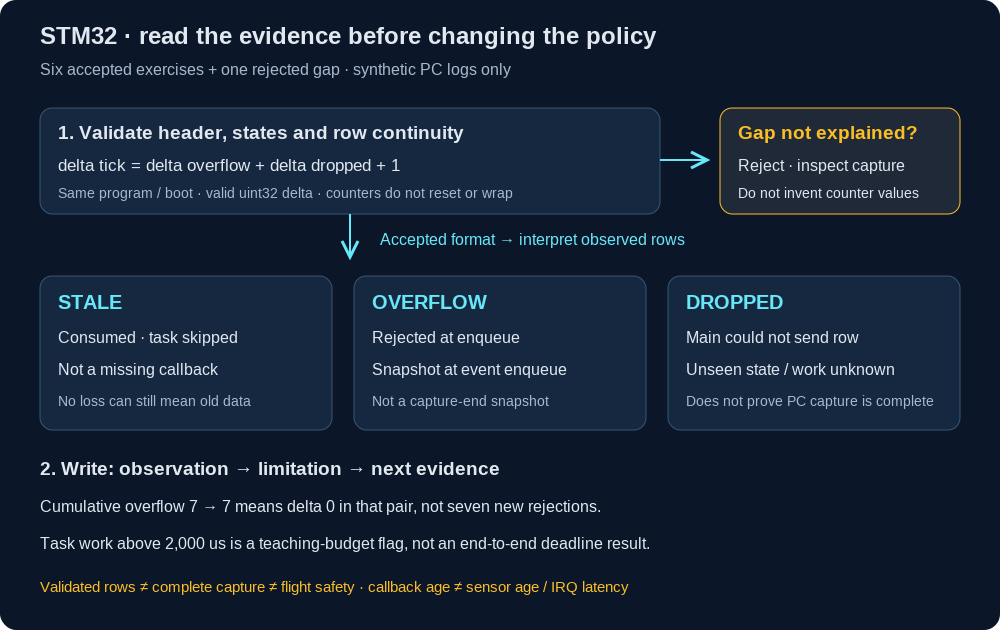
Diagnosis diagram in the same theme as the knowledge base: start from the CSV contract, then separate the problem types. The image does not show real board experiment results · Open the full-size diagram
Download: ZIP of the log-diagnosis practice kit · CSV worksheet · Answer key with reasoning (Markdown) · Answer values (JSON) · Manifest and file hashes
Steps for practising on a computer
- Extract the ZIP into a new folder, read
README.md, then openworksheet.csv. Start filling in answers from the CSV before looking at the answer key - Run
python analyze_freshness.py synthetic/stale-only.csvin the extracted folder; on Linux change it topython3; on Windows with the Python Launcher you can usepy -3. No extra packages need to be installed - Change files in the order given in the table, and calculate the delta of
tick,overflow,droppedbetween the two rows. Do not use the cumulative total in place of the delta - Compare the JSON with
answers.jsonand read the reasoning/limitations inanswers.md. The caseunexplained-gap.csvmust return exit code 2 withInvalid log. Do not alter a counter by guessing to make it pass - Run
python test_cases.pyto check the six consistent cases and the one rejected case, then write the summary 'what is seen → what cannot yet be said → evidence to collect' for each case
Choosing the practice cases and what to observe
File in synthetic/ |
Practice point | Short answer from the data seen |
|---|---|---|
stale-only.csv |
Stale data with no reported loss | fresh 1 / stale 2; an age of 20,000 us is still fresh |
queue-loss.csv |
Callbacks rejected at enqueue | delta tick 3 = overflow 2 + dropped 0 + current row 1 |
serial-loss.csv |
Rows that main could not send | delta tick 2 = overflow 0 + dropped 1 + current row 1 |
combined-loss.csv |
Queue and output-channel problems in the same interval | delta tick 4 = overflow 2 + dropped 1 + current row 1 |
task-budget.csv |
A task that is still fresh but exceeds the budget | the task takes 2,001 us, exceeding 2,000 us in one row; this is not a loop-deadline result |
partial-window.csv |
Separating cumulative totals from increases within the interval | overflow 7 / dropped 3 remain unchanged in both rows, so no increase was reported between this pair |
unexplained-gap.csv |
Checking data that cannot explain a gap | delta tick 2 but the sum 0 + 0 + 1 = 1; it must be rejected |
The equation applies under the contract of the original program: delta_tick = delta_overflow + delta_dropped + 1 where the uint32 delta tick is in the range (0, 2^31), the clock/boot is the same, and the counters do not reset or wrap. overflow is captured when that event is enqueued, while dropped is the total of rows that main could not send before the current row. Passing the analyzer therefore means consistency with the part of the contract that can be checked; it does not certify that the capture is complete
Tips and marking criteria
If stale increases, check the interval in which the queue was not read and the work in main; if overflow increases, check the arrival rate against the service rate; if dropped increases, separate row generation, the Serial output channel and the PC-side recording using additional evidence. Change one factor at a time and keep the original files. Do not enlarge the queue or the cutoff merely to make the report pass
Give 3 points per case: delta/rejection correct 1, a conclusion limited to what is seen 1, and stating the limits and the next evidence 1, for 21 points in total. This is a practice criterion for instructors, and there are no results from real learners yet
Limits that must be written in the report: no_reported_queue_or_log_losses=true this does not mean there is no stale data or that the capture is complete; a row that could not be sent does not reveal that row's state/work; an overflow after the last enqueue may not appear. This kit has no queue occupancy, boot ID or capture-end snapshot. The callback age is not the sensor age or IRQ latency, and a value that is fresh at the checkpoint may be old when used later. The budget/freshness are practice criteria, and no flight-safety conclusion follows from this CSV
When you have the hardware, define the capture boundary/boot identity and the timestamp point that relates to the requirement before measuring occupancy or IRQ latency. See the mask/restore mechanism of CMSIS PRIMASK in the source kit; this practice kit does not change the ISR or interrupt handling
Continue learning and review
Review data age and the Freshness Gate · Continue with the origin and scope of the log · Back to the advanced overview
Reading data with the web tool
Open the CSV reader and log graph tool to practise with a synthetic example or the six-field CSV of the Freshness Gate kit. It processes locally and supports at most 1 MB/10,000 rows, a narrower scope than the original Python analyzer. The statistics are calculated from all rows, while the graph shows at most 1,000 points and may not show every peak
Practise diagnosing from row pairs and writing a report
Objective: use the delta to separate stale data, a full queue and unsent rows, then write a conclusion that can be traced back Prerequisites: completed FIFO/Freshness Gate and able to read the six-field CSV Suggested time: 45–60 minutes, not yet measured with real learners. Use paper or a CSV reader; no board or extra installation is needed
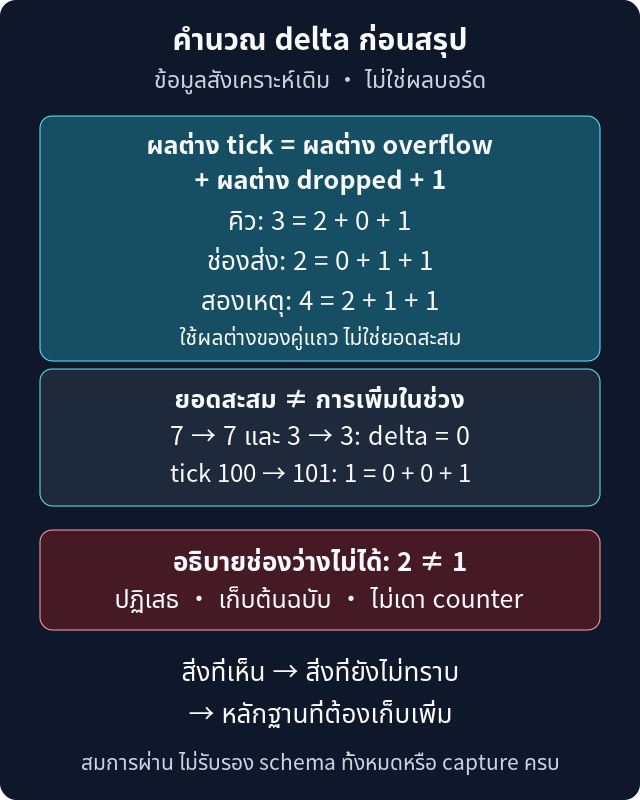
The original realistic image and diagram are kept. It uses the same seven synthetic cases and is not a board result or a new analyzer run
Download how to practise diagnosis, the 8-question worksheet, the blank pair-row table, the original 15 rows of data and the blank report form and complete them before opening the reasoning answer key, pair-row answer key and the original JSON answers Check the source/SHA-256 from manifest
1. Separate the cases and calculate the row pairs · Q1–Q4
Fill in all eight pairs from the seven cases, separating the scenarios before finding the difference. Do not calculate across file boundaries. Use the uint32 tick and counters that do not reset or wrap. Cite data_row , which counts data rows excluding the header and is not a raw line number, then check the original schema's equation together with the state/work and the numeric boundaries.
Hint: stale means a task was skipped because the data was old, overflow means an enqueue was rejected, and dropped means a row could not be sent. For the state of an event/row not in the log, answer that it is unknown and give the reason; do not fill in the total by guessing
2. Read the work portion and the data window · Q5–Q6
Find the fresh row whose work exceeds the practice budget of 2,000 µs, convert the units, and identify the portion of work that work does not cover. Then read the partial window in which the overflow 7/dropped 3 totals stay unchanged, separating the final total from the delta between the pair. Hint: the flag for no reported loss uses cumulative totals, so you must explain the window and the snapshot position as well
3. Keep logs that violate the contract for inspection · Q7
The unexplained-gap case has delta_tick 2 but the counters explain 1. State that it must be rejected, with the equation. Keep the original/hash and check the schema, the program and the capture boundary. Do not fill in the counters by guessing or declare which part of the device is faulty. Do not merge the rejected case into the certified statistics of the cases that passed
4. Write a report that cites evidence · Q8
Choose one case and fill in the three-part report form: what is seen → what is not yet known → evidence to collect. State the file/row/pair/unit/time boundary and the assumptions before proposing a change to the queue or cutoff. When you can explain it, continue to the origin and scope of the log
If you use the web CSV reader , load the original six-column CSV from the ZIP. The combined new file has extra metadata, so it does not match the upload schema, and a case that violates the contract must be rejected by the checker
Self-check: this guide kit proposes 2 per question (1 answer + 1 reason/unit/limitation), 16 in total, separate from the 7 cases × 3 criteria of the original kit, for choosing what to review and not real learner results. This round checked the numbers and sources; no analyzer/compile/firmware/SITL was run and no new board experiment was done
Choose the next practice kit or review
Back to the table of contents of the 10 MCU practice kits to choose a problem according to your goal and the prerequisites you should know, or take the 12-question comprehension assessment to find topics to review
After checking the answer key, record the answers you corrected, the reasons, and what the evidence still does not confirm, then choose the next kit that helps answer that question. The worksheet score and the assessment are separate; use them to choose your own review
Try reading a log on the web
Choose a synthetic example, or open the six-field CSV of the Freshness Gate kit, to view the data age and run time. The file is processed in the browser, is not uploaded to a server, and is not saved in your progress
It supports CSV with unquoted numbers, UTF-8/BOM and CRLF/LF, up to 1,000,000 bytes/10,000 rows, and does not support blank rows in the middle of the file. It uses this kit's age limit of 20,000 µs and work budget of 2,000 µs. The values shown are not a flight-safety certification