Configuration and control
UAT 302 UAS Installation and System Integration
Lesson
By the end of this module you will be able to
- Turn safety requirements into rules that check flight controller parameters
- Check the parameter file with a program before every flight
- Create SHA-256 fingerprints of configuration items to record a baseline and detect changes
- Produce configuration documentation linked to test evidence
Why this matters
A drone with every wire correct can still be dangerous if its flight controller parameters are wrong, for example a failsafe disabled during bench testing and never re-enabled, or a return-to-launch height lower than the trees around the field. UAT 206 and UAT 494 covered comparing two parameter files and controlling changes. This module adds checking parameters against requirements and identifying the configuration by fingerprint. The drone knowledge base’s unit on version and configuration control stresses that the configuration is what makes test results interpretable, and its unit on linking systems to evidence recommends pairing measurable requirements with check methods and evidence.
From requirements to parameter rules
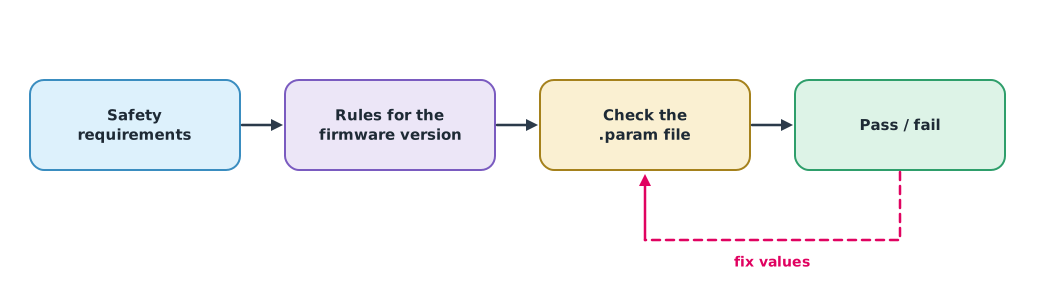
The team’s safety requirements become rules that a program can check. Parameter names and units must match the documentation for the firmware version in use. This example uses the ArduPilot Copter 4.6.3 parameter list:
BATT_LOW_VOLTandBATT_CRT_VOLT: low and critical battery voltages in volts (0 = off), withBATT_FS_LOW_ACTandBATT_FS_CRT_ACTsetting the action when reached (0 warn only, 1 land, 2 RTL)FS_THR_ENABLE: failsafe on loss of the RC signal (0 = off), andFS_GCS_ENABLE: failsafe when the GCS link is lost for more than 5 secondsFENCE_ENABLEandFENCE_ALT_MAX: the virtual fence and its altitude ceiling in metresRTL_ALT: the return-to-launch height, in centimetres in Copter 4.6.3, while the next development version changes it toRTL_ALT_Min metres. This is why check rules must be tied to the firmware version
Example 1 Checking the parameter file against requirements
The team’s requirements: for a 6S battery, the low level at 3.5 V per cell and the critical level at 3.3 V per cell, and both levels must command more than a warning; RC and GCS failsafes must be on; the fence must be on with a ceiling of no more than 90 m; and the RTL height must be at least 5 m above the tallest trees around the field, which are 25 m.
params = {   # read from the flight controller's .param file (hypothetical values)
    "BATT_LOW_VOLT": 21.0, "BATT_CRT_VOLT": 19.8, "BATT_FS_LOW_ACT": 2, "BATT_FS_CRT_ACT": 1,
    "FS_THR_ENABLE": 1, "FS_GCS_ENABLE": 0, "FENCE_ENABLE": 1, "FENCE_ALT_MAX": 100,
    "RTL_ALT": 2500,
}
CELLS, TREE_M = 6, 25
rules = [   # requirement, check function
    ("low voltage >= 3.5 V/cell", lambda p: p["BATT_LOW_VOLT"] >= 3.5 * CELLS),
    ("critical voltage >= 3.3 V/cell", lambda p: p["BATT_CRT_VOLT"] >= 3.3 * CELLS),
    ("battery actions not 'warn only'", lambda p: p["BATT_FS_LOW_ACT"] > 0 and p["BATT_FS_CRT_ACT"] > 0),
    ("RC failsafe enabled", lambda p: p["FS_THR_ENABLE"] != 0),
    ("GCS failsafe enabled", lambda p: p["FS_GCS_ENABLE"] != 0),
    ("fence on, ceiling <= 90 m", lambda p: p["FENCE_ENABLE"] == 1 and p["FENCE_ALT_MAX"] <= 90),
    ("RTL altitude >= trees + 5 m (RTL_ALT in cm)", lambda p: p["RTL_ALT"] / 100 >= TREE_M + 5),
]
failed = 0
for text, check in rules:
    ok = check(params)
    failed += not ok
    print(f"{'PASS' if ok else 'FAIL'}  {text}")
print(f"{failed} rule(s) failed -> {'do not fly' if failed else 'cleared for pre-flight checks'}")
PASS low voltage >= 3.5 V/cell
PASS critical voltage >= 3.3 V/cell
PASS battery actions not 'warn only'
PASS RC failsafe enabled
FAIL GCS failsafe enabled
FAIL fence on, ceiling <= 90 m
FAIL RTL altitude >= trees + 5 m (RTL_ALT in cm)
3 rule(s) failed -> do not flyThe check finds the GCS failsafe off, the fence ceiling above the limit, and an RTL height of 2500 cm, or 25 m, exactly at treetop height. Anyone reading 2500 as metres would think it very safe. Unit mistakes like this are why a program should do the checking instead of the eye.
Configuration fingerprints
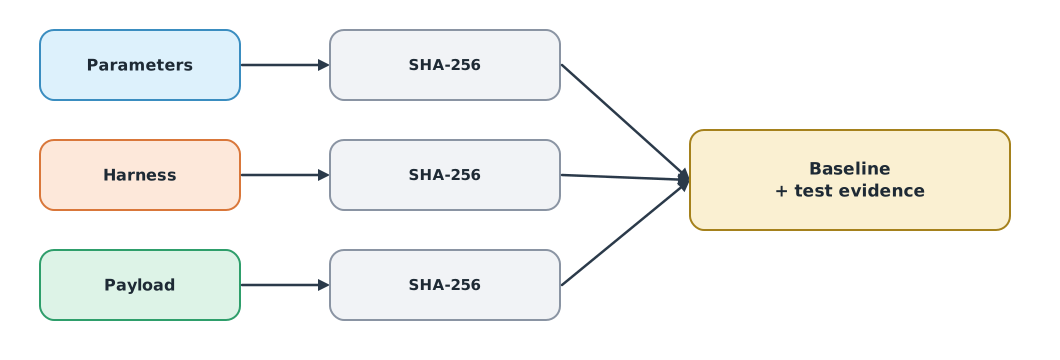
Writing “used the latest parameters” cannot be verified. ISO 10007 calls for clearly identified configuration items. A simple, exact method is to compute the SHA-256 hash (FIPS 180-4) of each file. If even one character changes, the whole hash changes. Record the hashes in the baseline and compare them before every flight.
Example 2 Recording a baseline and detecting changes
import hashlib

def fingerprint(text):
    return hashlib.sha256(text.encode("utf-8")).hexdigest()[:16]   # show the first 16 characters for readability

baseline = {
    "params": "BATT_LOW_VOLT,21.0\nFS_GCS_ENABLE,1\nRTL_ALT,3000\n",
    "harness": "W02 BEC A -> companion 5V 22 AWG\n",
    "payload": "thermal camera, 4 soft dampers\n",
}
today = dict(baseline, params="BATT_LOW_VOLT,21.0\nFS_GCS_ENABLE,1\nRTL_ALT,300\n")
record = {k: fingerprint(v) for k, v in baseline.items()}
for item, text in today.items():
    now = fingerprint(text)
    status = "unchanged" if now == record[item] else "CHANGED since baseline"
    print(f"{item:<8} {now}  {status}")
params 4d64c9c54070644e CHANGED since baseline
harness 58b531d879b843c2 unchanged
payload f7aa99efe1967fc3 unchangedMistyping RTL_ALT with one zero missing changes the parameter file’s hash at once, even though someone scanning a list hundreds of lines long would not see it. The team must find the cause, fix it, and record a new baseline through a change request as in UAT 494.
Module lab
Lab: hand over the drone with its configuration
- Download the parameter file from the training flight controller with Mission Planner or QGroundControl
- Write the team’s safety requirements and turn them into rules like Example 1, checking names and units against the documentation for the firmware version used
- Fix values that fail, and test each failsafe in SITL or on the ground with the propellers removed
- Fingerprint the parameters, wire list and payload register with Example 2 and record them as the baseline
- Hand over a dossier: interface register, wire list, rule-check results, baseline and test evidence
Common mistakes
Watch out
- Disabling a failsafe for bench testing and forgetting to re-enable it
- Confusing parameter units, such as centimetres and metres
- Using check rules for one firmware version on another
- Saying “the latest values” instead of identifying them by fingerprint
- Changing values in the field without recording a new baseline
Summary
- Safety requirements become parameter check rules tied to the names and units of a firmware version
- Check the parameter file with a program before every flight
- SHA-256 (FIPS 180-4) gives a fingerprint that changes as soon as the content changes
- The handover dossier links the configuration to test evidence
Check your understanding
- For a 4S battery warning at 3.5 V per cell, what should
BATT_LOW_VOLTbe? - In Copter 4.6.3, what height in metres is
RTL_ALT = 1500? - What is the problem with
BATT_FS_LOW_ACT = 0? - Why is a hash good for detecting changes in a long file?
- What should you do when a hash differs from the baseline?
Answers
- V
- 15 m
- It only warns and does not make the aircraft do anything when the battery is low
- It changes when even one character changes, so one value is compared instead of reading the whole file
- Find the cause, fix it, and record a new baseline through a change request
Key formulas
| Minimum pack voltage |
Key references
- ArduPilot Dev Team. Parameter list (Copter stable V4.6.3). ArduPilot Copter documentation. link
- ArduPilot Dev Team. Battery failsafe. ArduPilot Copter documentation. link
- ArduPilot Dev Team. Radio failsafe. ArduPilot Copter documentation. link
- ArduPilot Dev Team. GCS failsafe. ArduPilot Copter documentation. link
- ArduPilot Dev Team. RTL mode. ArduPilot Copter documentation. link
- National Institute of Standards and Technology. (2015). Secure hash standard (SHS) (FIPS 180-4). link
- International Organization for Standardization. (2017). Quality management — Guidelines for configuration management (ISO 10007:2017). link
Further reading
Study the assigned knowledge units in advance, review media and take the module quiz
Version and configuration control
Linking the drone system to verification evidence
In class / field
Lab or field practice from worksheets with a safety checklist
Learning evidence: Checked worksheets and quiz results