Three-role exercises: pilot and shared tasks
Choose a pilot task by role, then practise the shared synthetic-data case to produce a brief, a mission plan and a test plan for an adaptation.
Goals and prerequisite knowledge
The beginner (B) will create a brief that explains the task and its limitations. The planner (O) will organise the data work, people, resources, backup plan and acceptance check. The developer (D) will create the requirements, the interface and a plan for testing a change to the data-filtering rule. The P5 pilot set uses different tasks for each role, while the hypothetical case below has all three groups use the same dataset so that reasoning can be compared across work products.
Read the mission overview and how to choose a C01–C10 set first. For B, review the question and the deliverable; for O, review briefs and roles ; for D, review requirement-to-test . Use only a text reader or a spreadsheet; there is no need to install a simulator, have an aircraft, or connect to an external service.
Use the category's KSEC framework and the role-specific learning outcomes below. Assess with work products and observable behaviour. Learning readiness means reading the CSV/request and working under the stated conditions; field readiness still requires separate checks of people, equipment set, area, airspace, navigation and permissions. There is no flying in this activity.
If you cannot yet read times and tables fluently, do the examples in time and position before S. If you cannot separate observations from unknowns, review recording observations before K/E, and do the permissions case from data handover ; for C, start from read-back and teamwork and then practise keeping versions and outstanding items as in the examples in the lesson. Do not judge whose personality is of what type before doing the activity.
Preparing the pilot reading and the three-role work products
P5: the document set has been prepared and checked for consistency: actual pilot participants B=0 / O=0 / D=0, and learner results NOT_RUN 21 cards linked to 84 KSEC codes, the pre-v0 packets for the three roles, the rubric hash values for all 6 cases, and 4 public CSV templates passed the project's checker. The user does not yet have any participants and has not yet assigned a facilitator/reviewer, so it must go through the checklist before starting a real round when people are ready. See the overall status and outstanding work . This preparation does not yet close P5 and is not a certification of learners or of the field.
This pilot reading set uses the existing three lessons to observe route-finding, reading, producing the work product, and revising after receiving challenges. Choose the card by role below, while the shared synthetic task in the next section can still be used to practise all three roles with the same data. This starter-set pilot does not cover all 11 missions or every adaptation case.
Arranging the reading set before starting the v0 work product
The facilitator chooses one card per session and has the participant try finding the lesson on the website first, then sends the role packet. This table shows the references the participant may open on their own and the checking files whose timing the facilitator should control; the website already makes all documents accessible, so you must record it if the participant sees the answer guide or receives help before submitting v0, and not call that work unassisted.
An image created with AI to explain how the document set is arranged; not an image of P5 participants or evidence of training. Open the full-size image
Scroll the table horizontally to see all columns. When the table has keyboard focus, use the left or right arrow keys.
| Card | Lesson and data sources that may be opened | Review files and timing used | Observations to record |
|---|---|---|---|
| B · M01-B | survey lesson, worksheet B, data description, CSV checkpoint | rubric M01 and the examples in the lesson for reviewing the answers | Separate what was read independently from the answer guide that may be seen in the lesson |
| O · M06-O | assessment lesson, worksheet O, dataset rules, CSV observations | rubric M06 and the expected rows in the lesson for reviewing the reasoning | Record whether the row-filtering guide or hints were seen before v0 |
| D · C01-D | camera set lesson, requirements, interfaces, test plan and lab | The expected values that are specifications are used before the run; after the run, compare the author's host results and record the participant's own actual/replay/rollback | Knowing the expected values is not the actual results; if not yet run, keep actual as NOT_RUN |
Pilot task set before opening the answer guide
After observing route-finding from the website, the facilitator sends one file per role for the participant to do v0: M01-B Survey, M06-O Assessment or C01-D Camera set change. Each file has the task, the starting data and a field for writing reasons, without printing the author's row-filtering results or calculation results beside the questions. The facilitator keeps copies of the v0/rubric files and the version used, and only then opens the review criteria and sample results in the feedback session.
This packet reduces the chance of seeing the answers from the files sent but does not block public lessons or other documents on the website. If a participant opens the full lesson, rubric examples or host results before v0, record what was seen and when it was seen, truthfully, and do not interpret the work as unassisted. In C01-D, reading the expected values before the run is part of test design; the actual results must come from the participant's own run. The activity flow chart below and the facilitator's guide are used to control the timing and the evidence collection; they are not evidence that learners exist.
The KSEC of each card still uses the K/S/E/C codes and the existing rubric in the next table. There are no learner results from the author's checking of files. If a participant opens the rubric or the answer key before v0, record the file, time and assistance in assistance_note and interpret the evidence as it actually occurred.
Scroll the table horizontally to see all columns. When the table has keyboard focus, use the left or right arrow keys.
| Role and task card | Task tried and existing criteria | Outcome IDs recorded |
|---|---|---|
| B: M01-B Survey and mapping | Make a brief comparing A/B, read n_H7/n_Z6, and HOLD for both sets; use rubric M01 | APP-M01-B-K01, APP-M01-B-S01, APP-M01-B-E01, APP-M01-B-C01 |
| O: M06-O Situation assessment | Plan; the people/resources requested and confirmed; metadata for two audiences; and sending/receiving/acknowledgement; use rubric M06 | APP-M06-O-K01, APP-M06-O-S01, APP-M06-O-E01, APP-M06-O-C01 |
| D: C01-D Inspection camera set | Check the contract, make the expected/actual and one's own replay/rollback; use requirements/rubric C01 | APP-C01-D-K01, APP-C01-D-S01, APP-C01-D-E01, APP-C01-D-C01 |
Additional case-study cards S1–S3 and S5–S7
The following cards are optional extras for trying out understanding of missions that link several lessons. They do not replace the three pilot cards M01-B/M06-O/C01-D and do not add participants or learner results to P5. Use the downloadable task cards which specify the task_id, dataset, work product and rubric for each case; the route and KSEC code table shows the tracing of all 18 routes. Choose only one row per activity. Record task_id/task_version, the outcome ID and the rubric actually used in the original file; do not combine the results of different tasks into a single score.
Scroll the table horizontally to see all columns. When the table has keyboard focus, use the left or right arrow keys.
The data and images are created for teaching, expected is an answer guide, and local_author_run is a check on the author's own machine. Learners must do v0, receive real challenges, revise to v1 and run their own work when the criteria require it; if not yet run, keep actual as NOT_RUN. The discipline-specific reviewer is still not_assigned, P3 pending_field_review and the field results are NOT_RUN. The existing record forms can be used without changing the schema; the outcome codes in the mapping come to 260 rows, and CLO/PLO are still pending_design
Sequence of activities and before–after evidence
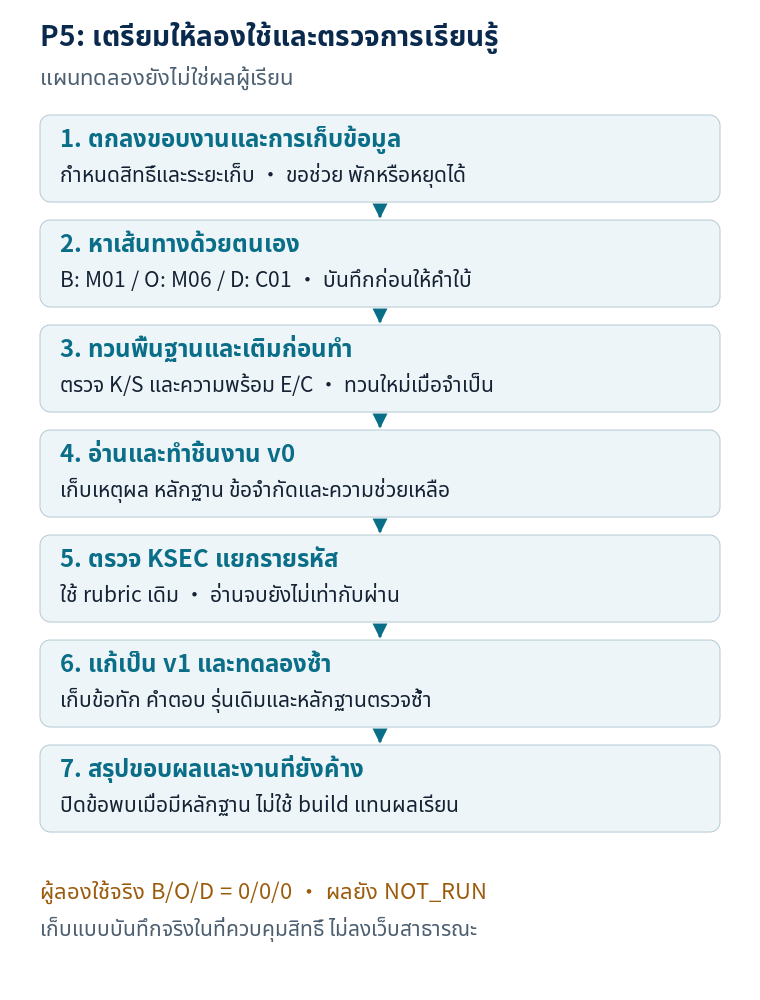
Checking the website and the author's host results are kept separate from learner evidence. If D has not yet run their own, actual stays NOT_RUN and the skills evidence is not yet sufficient. Open the full-size pilot-reading steps diagram
- Agree the scope of work, access and the data-collection period. Participants may ask for help, take a break or stop voluntarily.
- Start from the overview, find and choose the role according to the task card, and record the places where they could not find it before giving hints.
- Check the K/S foundations and the E/C readiness to work together according to the lesson; do follow-up work and review again when needed.
- Read and make the v0 work product with reasons, evidence and limitations. Record the effort made before any help; if the answer guide was seen beforehand or a hint was received, record what was seen and when.
- Use the existing rubric to check by outcome ID; do not pass someone for finishing the reading or for the number of fields filled in.
- Keep the challenges and the replies, revise to v1 and retest, linking the original ID/version; close the problem only when there is genuine retest evidence.
- Summarise only what was actually observed and the outstanding work. Fixing the web page or a successful build is not yet a learner pilot result.
Download the guide, the task cards, the packet for the chosen role and the record forms, then read the dictionary before making copies:
- readme.md: scope, version and CSV dictionary
- facilitator-guide.md: facilitator's guide
- reader-task-cards.md: B/O/D task cards and the existing criteria
- pilot-m01-b-v0.md: beginner task before v0
- pilot-m06-o-v0.md: planner task before v0
- pilot-c01-d-v0.md: developer task before v0
- session-record.csv: activity status, baseline and assistance
- outcome-record.csv: results by code, evidence and work product version
- issue-retest-record.csv: problems, fixes and retest evidence
- source-review-record.csv: references, versions, the date actually checked and follow-up work
The CSVs are UTF-8 with a header row only and zero data rows . Results by code use NOT_RUN / meets / needs_revision / insufficient_evidence / not_observed as defined in the readme. Keep real work outside the public repository, in an access-controlled area. Use codes instead of names, but the link back to individuals still has to be managed. By default, do not ask for names, e-mail, ID numbers or sensitive data.
The facilitator, reviewer and owner of the reference sources have not yet been assigned. The full P5 awaits a real pilot of all of B/O/D, a re-check of key issues, and an owner to maintain the reference sources. Check the sources manually when rules, tool versions or evidence limits change or a link breaks, then record what was actually opened and read. There is no automatic source checking and no confirmation that every source is current as of the date this set was prepared. CPX-Sim remains on hold.
Hypothetical case: choosing points for the ground team to inspect further
All data in this activity is synthetic . The practice area “Sample Field A”, measuring 320 × 200 m, is an invented area. The local x axis points to the right and y upward, with the point (0,0) at the lower-left corner. There are no world coordinates or transformation parameters. It is not a real place and cannot be used to plan an actual flight route.
The hypothetical coordinator requests: “As of 2026-10-11T10:00:00+07:00 , please summarise the points with observations for the ground team to choose to inspect further, together with the points that still cannot be used for decisions.” The deliverable is a one-page report, a table of points proposed for consideration, and a list of items to be confirmed. It does not certify that a vehicle can pass, the safety of the area, or any cause inferred from colours in an image.
Conditions set by the exercise for practice: A row can be used as a proposed point when the data age is from 0 to 60 minutes, the x/y coordinates are complete and within the frame inclusive of the boundary, the position uncertainty is no more than 5 m, the status is verified and it is not occluded. This condition is invented for the exercise; it is not a QA standard value or a safety value for a real mission.
verified means that the hypothetical record states that a reviewer has compared it with a hypothetical source record; it is not a field confirmation. The column source_note is a message-record code in this set; there are no real photographs or original image files from which to infer anything more.
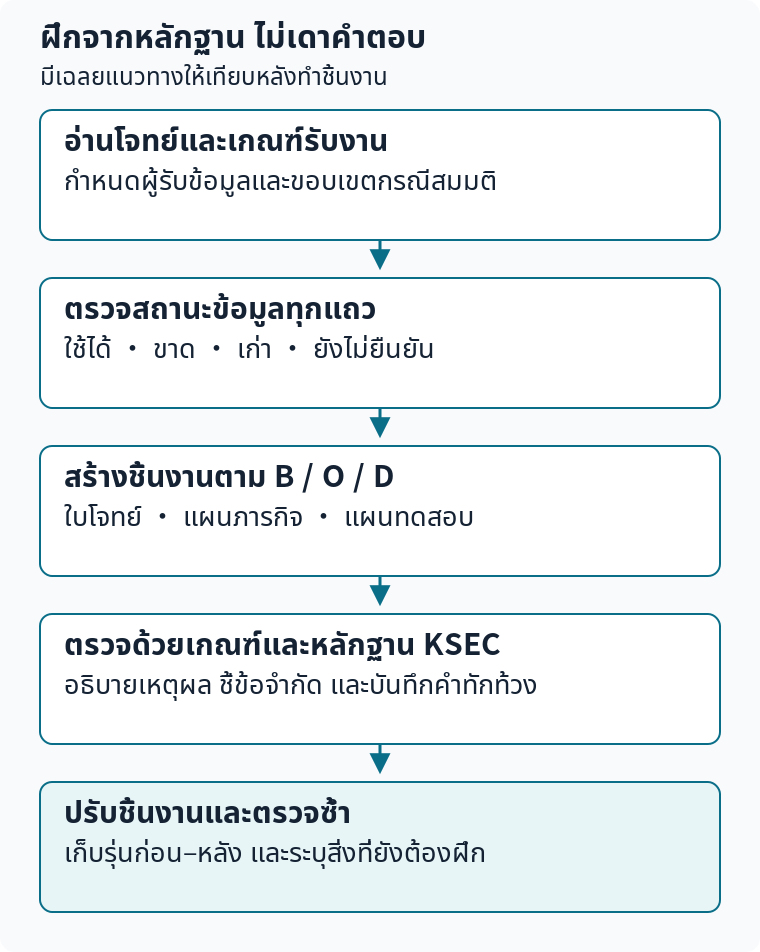
Diagram explanation: revising a work product must preserve the original and the list of unknowns. The reviewer checks the reasoning and the scope of the conclusion together with the filtering result. Open the full-size exercise-cycle diagram
Open the file and check the rows together
Download the explanation of the practice set and starter-observations.csv Make a copy before filling it in. Keep the original time with its offset, and read the table as UTF-8. If the spreadsheet converts times automatically, also keep the original time column as text.
Scroll the table horizontally to see all columns. When the table has keyboard focus, use the left or right arrow keys.
| ID / point | Time (+07:00) | x,y m / uncertainty | Observation from the hypothetical record |
|---|---|---|---|
| obs-01 / P-A | 09:35 | 40,30 / 3 m | Standing water seen; the reviewer recorded verified, not occluded; depth not yet known |
| obs-02 / P-B | 09:40 | 120,40 / 5 m | Grey obstruction seen on the footpath; verified, not occluded; type and whether it can be moved not yet known |
| obs-03 / P-C | 07:30 | 210,70 / 4 m | Dark area seen; verified, not occluded; current condition unknown |
| obs-04 / P-D | 09:45 | 285,115 / 4 m | Pale area seen; still unverified, not occluded; source of confirmation unknown |
| obs-05 / P-E | 09:50 | x missing,90 / 3 m | Surface of a different colour seen; verified, not occluded; complete coordinates not yet known |
| obs-06 / P-F | No time | 75,145 / 3 m | Surface marks differing from the surroundings seen; verified, not occluded; age of data unknown |
| obs-07 / P-G | 09:55 | 180,160 / 6 m | Only partly visible; verified, occluded; a viewpoint and position need to be added |
| obs-08 / P-H | 10:05 | 250,170 / 3 m | Object seen on the ground; verified, not occluded; the time is after the decision time, so the clock/record must be checked |
Joint checking steps before separating the roles:
- Review the request, the recipient, the decision time and the conditions. Do not use the time on the computer in place of the exercise's time.
- Compute age = decision time − collection time using the same offset, which gives 25, 20, 150, 15, 10, unknown, 5 and −5 minutes respectively.
- Check x/y, uncertainty, verification and occlusion. A blank means unknown, not 0.
- Make a two-part table: points proposed for the recipient's consideration, and the outstanding items with reasons/next work. Keep every code even if it does not pass.
- Write a conclusion supported by the data, for example “P-A and P-B pass the exercise's data rules and have observations that should be inspected further”, stating that safety has not been checked and the cause has not been confirmed.
Expected filtering result and shared answer guide
Scroll the table horizontally to see all columns. When the table has keyboard focus, use the left or right arrow keys.
| Point | Result under the exercise rules | Next step that can be explained |
|---|---|---|
| P-A, P-B | Proposed for the recipient to consider choosing for inspection | Send the observation, time, position and what is still unknown. The recipient prioritises and plans the ground route using their own information. |
| P-C | Data is 150 minutes old | Request new data or have the team confirm the current condition; do not edit the original timestamp |
| P-D | Source not yet confirmed | Check the source record and the confirmer before using it as a proposed point |
| P-E | x coordinate missing | Request complete coordinates/reference system; do not fill in x=0 or guess from the description |
| P-F | Collection time missing | Request the original time and offset; do not use the time the file was opened instead |
| P-G | Occluded and uncertainty 6 m | Must add a viewpoint and position so that it can answer the question, or propose another inspection method with a stated reason |
| P-H | Age −5 minutes; time is in the future | Check the clock and the meaning of the field; keep as outstanding until there is correcting evidence |
P-A and P-B are not ranked by danger from this table. Not being in the proposed list does not mean that a point is safe or unimportant. The recipient may choose to inspect the outstanding points to fill in data, but must see the limitations that mean they still cannot be used to decide from this dataset.
B Beginner: make a one-page brief
What to submit: mission-brief.md completed, together with the filtering result and the reasons for at least one other option. The goal is for another reader to be able to review the task and its limitations; no flight design is needed.
Scroll the table horizontally to see all columns. When the table has keyboard focus, use the left or right arrow keys.
| ID / Dimension | Prerequisites before starting | Goal to be demonstrated | Activity and evidence |
|---|---|---|---|
| APP-B-K01 / K | Knows that a question and a deliverable differ | Explain the recipient, scope, time and the data needed | Write the question/deliverable section of the brief for someone else to review |
| APP-B-S01 / S | Can read times and tables | Filter points with reasons and options for adding data | A table of two proposed points, six outstanding items, and the completed brief |
| APP-B-E01 / E | Knows the meaning of unknowns/permissions | Preserve the limitations and handle the case of personal data | Write that the area is not certified, and how to reduce/check data rights before sending if it were real work |
| APP-B-C01 / C | Keeps the original and allows the work to be reviewed | Accept challenges by recording the revision and the stopping conditions | Brief before/after with reasons, the person responsible for outstanding items, and objections |
- Write the question, the recipient, the local area and the decision time according to the exercise
- Write the deliverable in three parts: a short report, the proposed points, and the outstanding items with next work
- Choose the working method “check the data provided first”, explaining that there is already data to filter two points, so there is no need yet to choose to buy equipment or to fly anew
- Propose options for adding data, such as a ground inspection or collecting additional images at specific points only, stating that using a real drone would still require checks of the set, people, area and permissions
- Include what the data cannot answer, such as water depth, the type of obstruction, the current condition of P-C, and the actual place
- Check rubric B then compare with the completed example brief
Short sample answer: “Propose P-A and P-B for the coordinator to choose to inspect further as of 10:00 under the exercise's data rules; attach outstanding items P-C–P-H together with the data-work owner; ask the recipient to confirm whether they will inspect the proposed points or fill the outstanding items first; no certification of the condition of the area from this set of observations.”
Fail: “Fly a multirotor to view all points, so the area is safe” because it invents a flight and goes beyond the data given, even if every heading is filled in. Pass: identifies two points and six outstanding items with reasons, keeps within the hypothetical frame, and separates the options for adding data from what has already been done.
O Operator/planner: make a work plan and handover
What to submit: mission-plan.md completed, with resources, a backup plan, acceptance criteria and a list of outstanding items. The sample plan in this round is data work on a computer; there is no real flight.
Scroll the table horizontally to see all columns. When the table has keyboard focus, use the left or right arrow keys.
| ID / Dimension | Prerequisites before starting | Goal to be demonstrated | Activity and evidence |
|---|---|---|---|
| APP-O-K01 / K | Knows the data rules and the team roles | Explain QA and separate work that can start from a field not yet inspected | A work agreement and a field-readiness list with truthful statuses |
| APP-O-S01 / S | Can make a work/resource table | Organise a plan, people, backup and handover criteria that can be followed | A plan with work periods, complete filtering results and acceptance criteria |
| APP-O-E01 / E | Knows data rights and the limits of the results | Limit data/conclusions and send partial results truthfully | A permissions plan, a case of masking individuals, and an outstanding-items report that does not hide rows |
| APP-O-C01 / C | Knows read-back/handover of duties | Takes responsibility for cross-checking and stops when conditions fail | A record of who did/checked, the handover, who ordered the stop, and awaiting-check status |
- Set the request owner, the compiler/filterer of the data, the cross-checker and the recipient of the results. State the case where one person does several roles and who checks instead.
- Set the work periods per the example: 10:00 receive the request and data, 10:10 make the filtering table, 10:20 cross-check, 10:30 send version v1 to the recipient. This time target is invented for practice; there are no timed learner results.
- Make a resource register: a PC, a CSV reader, an original/copy folder, a report template, and a designated file-sending channel. No aircraft is needed in this round.
- Check every code under the shared rules, separating proposed points from outstanding items, with the person responsible for requesting more data.
- Set a backup plan: if the time/coordinates cannot be confirmed, send a partial report with the outstanding items; if the program corrupts times, use the original times and check by hand; if the recipient cannot open the file, send a UTF-8 CSV and a summary message that have been checked to match.
- Acceptance check: every code is in the results; P-A/P-B are in the proposed list; the other six have complete reasons; the local frame and decision time are clear; no flight or safety is claimed; the recipient can open it and review the limitations.
- If the recipient wants to add data with an aircraft, open a separate next plan and check people, set, condition/maintenance, area, airspace, navigation, requirements and the decision maker before starting. That step remains outstanding in this example.
Answer guide: The hypothetical planner “Kan” agrees the scope, “Min” filters the data, “Tan” does the independent check, and the “ground coordinator” receives the results. If the team has only one person, record that a check by another person is missing and send an awaiting-check status; do not write that the cross-check has been done when it has not.
Fail: the plan has a drone and times but no data checker, no alternative when P-E/P-F cannot be confirmed, or sends P-H as live data. Pass: the data work can start with the stated resources, keeps the outstanding items, has an owner for stopping/changing the plan, and has no assumed flight readiness to pass.
Handing over so the recipient understands the limitations
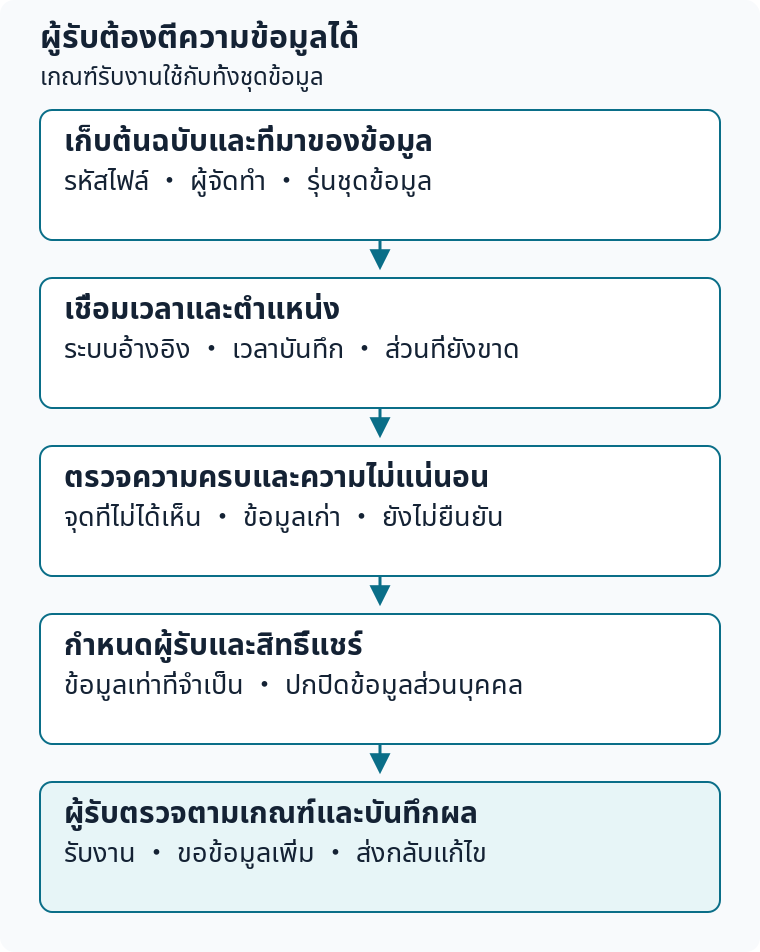
Diagram explanation: a successful file transmission does not yet confirm that the recipient uses the data correctly; also check that the file was opened and that the limitations were reviewed. Open the full-size handover-quality diagram
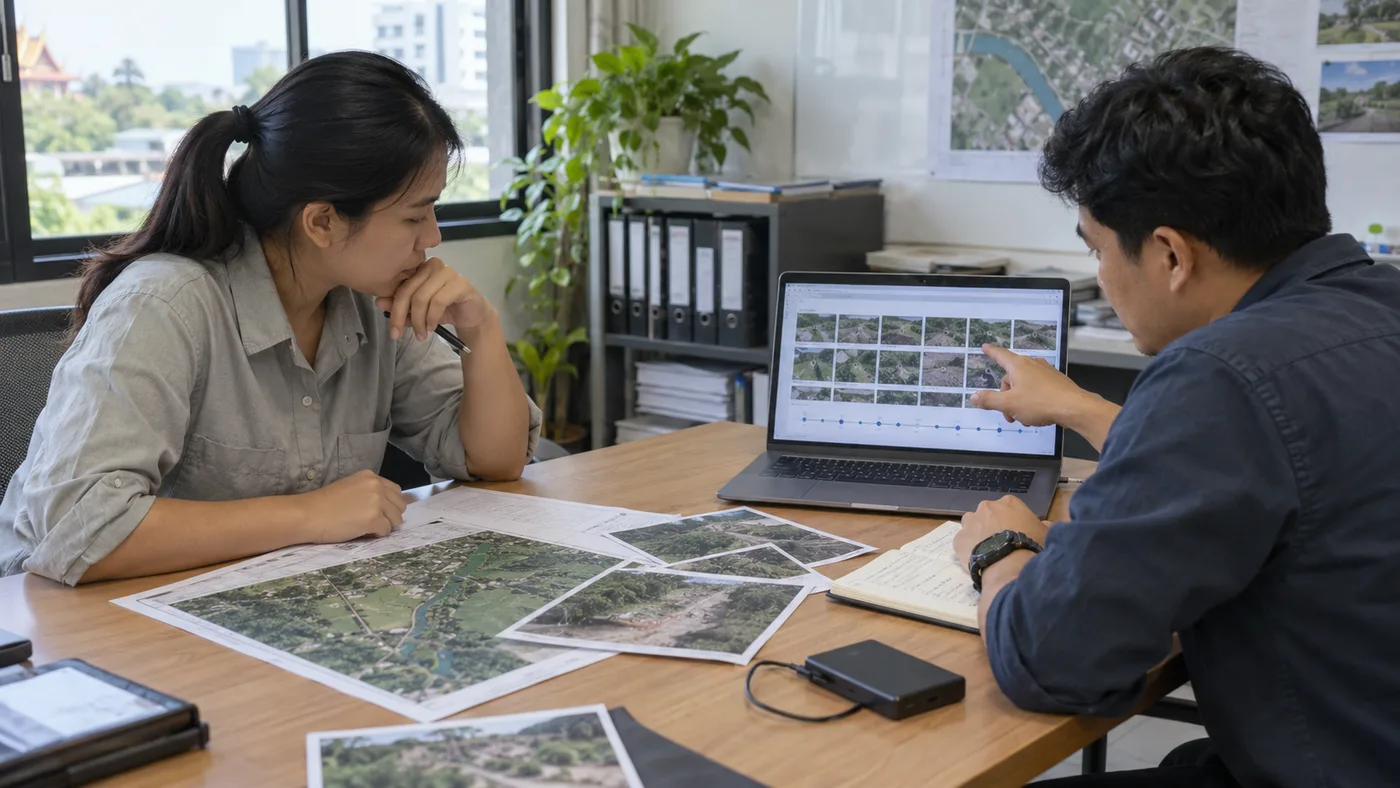
The sample report uses hypothetical point names and people's names; there is no real personal data. If extended to real data, define the access rights, masking, keeping of the original and onward transmission before use. Read evidence and reports and data handover to review.
D Developer/tuner: change the rule with a test plan and rollback
What to submit: adaptation-test-plan.md completed, with an expected-results table and an interface register. This work is designed and checked by reasoning on paper or in a spreadsheet; there is no aircraft control code and there are no run results yet for the system developed.
Scroll the table horizontally to see all columns. When the table has keyboard focus, use the left or right arrow keys.
| ID / Dimension | Prerequisites before starting | Goal to be demonstrated | Activity and evidence |
|---|---|---|---|
| APP-D-K01 / K | Can read schema, units, time and requirements | Explain the errors of v0 and the limits of trust in the interface | Requirements and an input/output/enum/missing register that explains errors |
| APP-D-S01 / S | Can design check cases and keep a baseline | Link the requirements to normal, error, boundary and restoration cases | A before/after table, a test plan and a rollback according to R01–R05 |
| APP-D-E01 / E | Can separate expected/actual results and data rights | Report without inventing results or turning data into commands | Expected/actual clearly separated, limitations, and conditions for permissions/exporting text |
| APP-D-C01 / C | Records versions and lets a reviewer review | Stop sending wrong results, keep evidence and check after restoring | The trigger owner records findings/version/reviewer and the method of review after rollback |
The hypothetical baseline v0 problem: The existing rule selects every row with complete x/y, which gives P-A, P-B, P-C, P-D, P-F, P-G and P-H, while P-E is excluded but with no other reason. This rule does not check time, uncertainty, verification or occlusion, so it does not meet the recipient's criteria.
In section 1a of plan D, state the aircraft manual, mass, CG and flight energy as N/A, with the reason that only a file rule on a PC is changed. If hardware is proposed in later work, N/A must be replaced with the model/manual that matches the set, before/after evidence and the items still to be checked; do not use invented limit values.
- Write the requirements: R01 keep the original and all codes; R02 filter by every condition of the shared rules; R03 send the outstanding items with all reasons; R04 do not fill in time/position/status by itself; R05 every row's result states the rule version and the decision time.
- Define the interface: input is UTF-8 CSV by column header, ISO 8601 time with offset, x/y and uncertainty in metres in the local frame; blank is missing;
verified/unverifiedandyes/noare enum values - Define the output: the code and original data, age or unknown,
candidate/hold, the list of reasons, the next work, rule_version and decision_time; no flight command field or safety-certification field. - Propose v1 that checks all the shared rules and changes only the data-filtering part. Keep v0 and the results before the change for comparison; do not edit the original to make it pass.
- Make the expected-results table for all eight rows: v1 has candidates P-A/P-B and holds the other six rows. P-G has both the occlusion and the uncertainty reasons; do not stop at the first reason and let the other reason go missing.
- Add boundary test cases: age 60 minutes passes, 60 minutes 1 second fails; age −1 second fails; x=0 and x=320 are within the frame when the other conditions pass; x=321 fails; uncertainty=5 passes, 5.1 fails; a timestamp without an offset, a mismatched frame, an odd enum or a duplicate code must produce a detectable error before any result is sent.
- Define stop/rollback for when a candidate is wrong, an outstanding item goes missing or the input is edited: keep the v1 results out of the handover, switch back to v0 / a manual checking procedure, and re-check the original set. But v0 does not pass the requirements, so it must carry an awaiting-check status; do not use the rollback as a reason to send v0 results without checking.
Answer guide: v1 fixes the faults of the v0 rule in terms of data quality as set by the exercise. The difference of 7 → 2 points does not prove that v1 reduces field risk or has a higher accuracy in detecting objects, because there is no field data or model result to measure.
Fail: “Tested and 100% accurate” with only an expected-results table, or a system that fills in missing values so that rows pass. Pass: requirements are traced to checkable cases; explains before/after and side effects; has error/boundary cases, ways to stop/restore, and states the results that have not been run.
Check the work product, fix problems and record the evidence
Open reader-rubrics.md and mark each item “pass / needs fixing / no evidence yet” with the reason and the row code. Important items that fail must be fixed before the work product is finished, even if the number of headings is complete; do not total them into a score that covers up wrong data. A learner working alone writes objections to their own work and then revises it into a new version.
Scroll the table horizontally to see all columns. When the table has keyboard focus, use the left or right arrow keys.
| Problems that may be found | Fix that can be checked |
|---|---|
| Thai-language CSV cannot be read | Open as UTF-8; check the column headers and the text against the original before filling in |
| The program changes the offset or time format | Keep the original value as text; add computed values in a copy and state the conversion method |
| Interpreting a blank as 0 | Give the status missing/hold and request evidence; do not fill in a number to make a formula work |
| Using P-H because it looks “newer” | Check for negative age and the clock; do not treat a wrong time as freshness |
| Using verified as a guarantee of truth | State that it is a status in a hypothetical record and that there is no field confirmation yet |
| Sending only two points and letting the outstanding items disappear | Attach P-C–P-H with complete reasons and next work |
| Writing that testing or flying has been done | Change it to expected results/plan, and record real results only when there is evidence |
The answer guides completed for all three work products are in worked-examples.md ; use them to compare the reasoning after the first attempt. It is not mandatory to choose the same wording; if the proposal differs, show how it answers the question and preserves the outstanding items.
Downloads and assessment status
- Explanation of the practice set and the licence
- Shared CSV data
- Summary sheet B · Plan O · Test plan D
- Criteria with pass/fail examples · Fully completed examples
- Record of KSEC results, evidence, fixes and repeat practice · Table for preparing the link between lessons and the curriculum
The text, conditions, rubric and data are newly created for learning. They have not yet been rehearsed with real learners, and there are no real equipment or field results. Readiness to do the worksheet is not readiness for real operations.
References and review date
- CAAT, Guidance for Development of an Operations Manual, Issue 01 Rev 00 (2022): used as a basis for roles, plans and records; not a substitute for current regulations
- NIST, Aerial Drone Test Methods and the 2024 publication abstract: used to separate the assessment of people from the capability of the set. The criteria of this exercise are not an NIST certification.
- Internal base lessons in the library: time/position, evidence, system testing and human factors
Reviewed 11 October 2026 (B.E. 2569) · The new exercise documents are licensed under CC BY 4.0 by PK-Research; the synthetic CSV data is licensed under CC0 1.0. External references retain the rights of their original owners.
Practise P4 with the set of choice and adaptation cases
Choose C01 Inspection camera set, C02 Search data set and C03 Synthetic payload set according to the results the recipient needs. Start from the requirements of roles B/O/D, do the K/S foundations, then keep v0/v1 under the same outcome IDs. The six files of each case link to the same calculation lab; no flight equipment is needed.
The author has host results for 17 cases and raw results that have been compared against expected, re-run, and checked with restore pairs. The author's results are in the host record; for the content status and outstanding work, see the overview page . Learners must do the work and keep evidence of their own work. Learner results start at NOT_RUN until real participants are available. P5 is only the preparation of the set; specialist not_assigned; P3 pending_field_review